Mean Average Precision
Install the metrics extra before using this API:
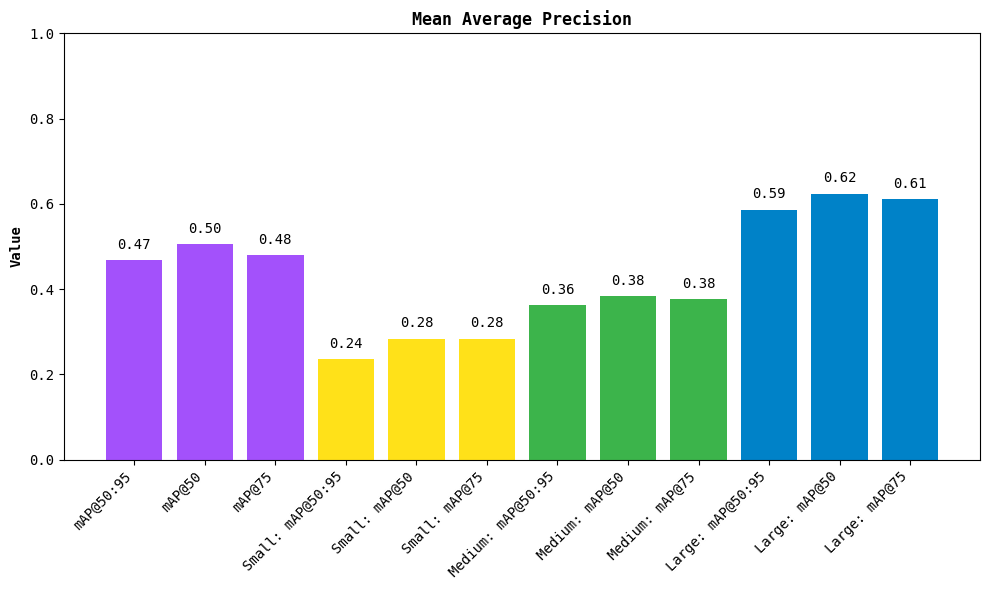
MeanAveragePrecision scores detection models on sv.Detections (boxes, masks or oriented boxes) matched by IoU. KeyPointMeanAveragePrecision scores pose estimation models on sv.KeyPoints matched by Object Keypoint Similarity (OKS); see Pose estimation. Both follow COCO evaluation and return results with the same map50_95, map50, map75, plot and to_pandas interface.
Evaluate targets from a PyTorch DataLoader
A DataLoader can return any annotation format defined by its dataset and collate function. Convert each image's annotations to a separate sv.Detections object, then pair it with that image's predictions. Ground truth needs xyxy boxes and integer class_id values; only predictions need confidence scores.
For Hugging Face DETR, Detections.from_transformers accepts post-processed predictions with boxes, labels, and scores. Training targets instead have boxes and class_labels. With annotation conversion enabled, their boxes use normalized (center_x, center_y, width, height) coordinates. Convert them with sv.xcycwh_to_xyxy and scale to the same image dimensions used to post-process predictions. sv.xywh_to_xyxy is for boxes whose first two coordinates describe the top-left corner, so it is not the right converter here.
Convert normalized targets
The following helper converts image-normalized boxes into pixel coordinates. image_size_hw is (height, width), while the scale applied to boxes is (width, height, width, height).
import numpy as np
import numpy.typing as npt
import supervision as sv


def normalized_targets_to_detections(
    boxes: npt.NDArray[np.float32],
    class_ids: npt.NDArray[np.int64],
    image_size_hw: tuple[int, int],
) -> sv.Detections:
    """Convert normalized center-based targets to pixel corner coordinates."""
    height, width = image_size_hw
    xyxy = sv.xcycwh_to_xyxy(boxes)
    xyxy *= np.array([width, height, width, height], dtype=xyxy.dtype)
    return sv.Detections(xyxy=xyxy, class_id=class_ids)


target = normalized_targets_to_detections(
    boxes=np.array([[0.5, 0.5, 0.25, 0.5]], dtype=np.float32),
    class_ids=np.array([0], dtype=np.int64),
    image_size_hw=(480, 640),
)
print(target.xyxy)
# [[240. 120. 400. 360.]]
An image without objects should still have one target entry: pass boxes with shape (0, 4) and class IDs with shape (0,). The helper preserves these shapes and does not modify the input arrays.
Run evaluation
This example assumes you already have a DETR model, its image_processor, and TEST_DATALOADER. Each batch contains pixel_values, pixel_mask, and a list of per-image labels dictionaries. classes lists class names in class-ID order, read here from the model's id2label mapping; both predictions and targets must use IDs from 0 to len(classes) - 1. Remap both sides first if your dataset uses sparse category IDs.
Coordinate assumptions: the targets below are normalized relative to each image before batch padding, and evaluation preprocessing only resizes images. Under these assumptions, orig_size restores original-image pixel coordinates, as in the Hugging Face evaluation example. Check your processor and collate function: processing multiple images together can update annotations to the padded canvas. Such targets need padding and resize transforms reversed before using orig_size; multiplying by orig_size alone does not undo padding. Likewise, crops or other geometric augmentations require their transforms to be accounted for. Keep validation preprocessing deterministic.
import torch
from supervision.metrics import MeanAveragePrecision

device = next(model.parameters()).device
classes = [
    model.config.id2label[class_id] for class_id in sorted(model.config.id2label)
]
model.eval()
predictions: list[sv.Detections] = []
targets: list[sv.Detections] = []

with torch.no_grad():
    for batch in TEST_DATALOADER:
        labels = batch["labels"]
        outputs = model(
            pixel_values=batch["pixel_values"].to(device),
            pixel_mask=batch["pixel_mask"].to(device),
        )
        target_sizes = torch.stack([label["orig_size"] for label in labels]).to(device)
        results = image_processor.post_process_object_detection(
            outputs,
            target_sizes=target_sizes,
            threshold=0.0,
        )

        for result, label in zip(results, labels, strict=True):
            height, width = label["orig_size"].detach().cpu().tolist()
            targets.append(
                normalized_targets_to_detections(
                    boxes=label["boxes"].detach().cpu().numpy().astype(np.float32),
                    class_ids=label["class_labels"]
                    .detach()
                    .cpu()
                    .numpy()
                    .astype(np.int64),
                    image_size_hw=(height, width),
                )
            )
            predictions.append(sv.Detections.from_transformers(result))

map_result = MeanAveragePrecision().update(predictions, targets).compute()
print(map_result.map50_95)

confusion_matrix = sv.ConfusionMatrix.from_detections(
    predictions=predictions,
    targets=targets,
    classes=classes,
    conf_threshold=0.5,
)
print(confusion_matrix.matrix)
Keep low-confidence predictions when computing mAP: filtering at 0.5 before evaluation discards part of the precision-recall curve. The confusion matrix uses its own confidence threshold. Iterate over the complete loader, preserving one prediction/target pair per image even when either side is empty.
Dense scenes
Detection AP uses COCO's default prediction limits (1, 10, 100). The highest limit caps the highest-confidence predictions per image and category, after any class mapping or class-agnostic merging. Ground truths are not capped. A perfect prediction of 1,000 objects of one class therefore reaches about 0.109 AP@100. The same objects spread evenly over ten categories can reach 1.0.
Use an explicit larger limit when evaluating dense scenes:
from supervision.metrics import MeanAveragePrecision

metric = MeanAveragePrecision(max_detection_thresholds=(1, 10, 1000))
result = metric.update(predictions, targets).compute()
print(result.max_detection_thresholds)  # (1, 10, 1000)
The sequence must contain exactly three strictly increasing positive integers. AP uses its largest value; the smaller values preserve the evaluator's COCO limit structure. The default remains unchanged. Higher limits also increase matching work and memory use, especially for masks.
Custom-limit AP is a different metric from standard COCO AP@100: report the cap when comparing results. Text summaries and custom-limit plot titles display it; results, including each object-size result, retain max_detection_thresholds. result.to_pandas().attrs["max_detection_thresholds"] retains the limits in memory without changing the score columns. CSV export does not retain DataFrame attributes, so store the configuration alongside exported scores.
Pose estimation
KeyPointMeanAveragePrecision scores pose estimation models the way COCO keypoint evaluation does: predictions are matched to targets by Object Keypoint Similarity (OKS) instead of IoU. Pass one sv.KeyPoints per image for predictions and targets. COCO visibility v=1 (occluded) and v=2 (visible) both map to KeyPoints.visible=True and v=0 to False, since pycocotools counts every keypoint with v>0. To reproduce COCO numbers, store each target's annotated area in targets.data["area"]; otherwise the area of the box spanning its visible keypoints is used. Targets with no visible keypoint are COCO ignore regions only when their boxes are given as targets.data["xyxy"] in (x_min, y_min, x_max, y_max); without boxes they are skipped, so a prediction on one counts as a false positive, and a class whose only targets are skipped scores -1. A prediction box in predictions.data["xyxy"] sets its object-size bucket, as the bbox of a COCO result entry does in pycocotools. Mark COCO crowd targets with targets.data["iscrowd"]; like pycocotools, they are ignore regions that any number of predictions may match. Predictions are ranked by detection_confidence, not keypoint confidence. Non-finite (NaN or infinite) coordinates are not rejected: a non-finite target keypoint counts as unlabelled, like visible=False, and a non-finite prediction keypoint adds nothing to OKS while its finite keypoints still count; pycocotools instead returns a NaN OKS when a labelled keypoint of the pair is NaN. A target area must be finite and non-negative; a zero area is accepted but leaves only exact-match keypoints counting. Clean such labels first.
import supervision as sv
from supervision.metrics import KeyPointMeanAveragePrecision

metric = KeyPointMeanAveragePrecision()  # COCO sigmas for 17-point skeletons
for predictions, targets in zip(PREDICTIONS, TARGETS):
    metric.update(predictions, targets)

result = metric.compute()
print(result.map50_95)
API reference
supervision.metrics.mean_average_precision.MeanAveragePrecision

Bases: Metric[MeanAveragePrecisionResult]
Mean Average Precision (mAP) is a metric used to evaluate object detection models. It is the average of the precision-recall curves at different IoU thresholds.
Examples:
>>> import numpy as np
>>> import supervision as sv
>>> from supervision.metrics import MeanAveragePrecision
>>> predictions = sv.Detections(
...     xyxy=np.array([[0, 0, 10, 10]]),
...     class_id=np.array([0]),
...     confidence=np.array([0.9])
... )
>>> targets = sv.Detections(
...     xyxy=np.array([[0, 0, 10, 10]]),
...     class_id=np.array([0])
... )
>>> map_metric = MeanAveragePrecision()
>>> map_result = map_metric.update(predictions, targets).compute()
>>> round(float(map_result.map50), 2)
1.0
>>> print(map_result)
Average Precision (AP) @[ IoU=0.50:0.95 | area=   all | maxDets=100 ] = 1.000
Average Precision (AP) @[ IoU=0.50      | area=   all | maxDets=100 ] = 1.000
Average Precision (AP) @[ IoU=0.75      | area=   all | maxDets=100 ] = 1.000
Average Precision (AP) @[ IoU=0.50:0.95 | area= small | maxDets=100 ] = 1.000
Average Precision (AP) @[ IoU=0.50:0.95 | area=medium | maxDets=100 ] = -1.000
Average Precision (AP) @[ IoU=0.50:0.95 | area= large | maxDets=100 ] = -1.000
Source code in src/supervision/metrics/mean_average_precision.py
1386 1387 1388 1389 1390 1391 1392 1393 1394 1395 1396 1397 1398 1399 1400 1401 1402 1403 1404 1405 1406 1407 1408 1409 1410 1411 1412 1413 1414 1415 1416 1417 1418 1419 1420 1421 1422 1423 1424 1425 1426 1427 1428 1429 1430 1431 1432 1433 1434 1435 1436 1437 1438 1439 1440 1441 1442 1443 1444 1445 1446 1447 1448 1449 1450 1451 1452 1453 1454 1455 1456 1457 1458 1459 1460 1461 1462 1463 1464 1465 1466 1467 1468 1469 1470 1471 1472 1473 1474 1475 1476 1477 1478 1479 1480 1481 1482 1483 1484 1485 1486 1487 1488 1489 1490 1491 1492 1493 1494 1495 1496 1497 1498 1499 1500 1501 1502 1503 1504 1505 1506 1507 1508 1509 1510 1511 1512 1513 1514 1515 1516 1517 1518 1519 1520 1521 1522 1523 1524 1525 1526 1527 1528 1529 1530 1531 1532 1533 1534 1535 1536 1537 1538 1539 1540 1541 1542 1543 1544 1545 1546 1547 1548 1549 1550 1551 1552 1553 1554 1555 1556 1557 1558 1559 1560 1561 1562 1563 1564 1565 1566 1567 1568 1569 1570 1571 1572 1573 1574 1575 1576 1577 1578 1579 1580 1581 1582 1583 1584 1585 1586 1587 1588 1589 1590 1591 1592 1593 1594 1595 1596 1597 1598 1599 1600 1601 1602 1603 1604 1605 1606 1607 1608 1609 1610 1611 1612 1613 1614 1615 1616 1617 1618 1619 1620 1621 1622 1623 1624 1625 1626 1627 1628 1629 1630 1631 1632 1633 1634 1635 1636 1637 1638 1639 1640 1641 1642 1643 1644 1645 1646 1647 1648 1649 1650 1651 1652 1653 1654 1655 1656 1657 1658 1659 1660 1661 1662 1663 1664 1665 1666 1667 1668 1669 1670 1671 1672 1673 1674 1675 1676 1677 1678 1679 1680 1681 1682 1683 1684 1685 1686 1687 1688 1689 1690 1691 1692 1693 1694 1695 1696 1697 1698 1699 1700 1701 1702 1703 1704 1705 1706 1707 1708 1709 1710 1711 1712 1713 1714 1715 1716 1717 1718 1719 1720 1721 1722 1723 1724 1725 1726 1727 1728 1729 1730 1731 1732 1733 1734 1735 1736 1737 1738 1739 1740 1741 1742 1743 1744 1745 1746 1747 1748 1749 1750 1751 1752 1753 1754 1755 1756 1757 1758 1759 1760 1761 1762 1763 1764 1765 1766 1767 1768 1769 1770 1771 1772 1773 1774 1775 1776 1777 1778 1779 1780 1781 1782 1783 1784 1785 1786 1787 1788 1789 1790 1791 1792 1793 1794 1795 1796 1797 1798 1799 1800 1801 1802 1803 1804 1805 1806 1807 1808 1809 1810 1811 1812 1813 1814 1815 1816 1817 1818 1819 | |
Methods:
__init__(metric_target: MetricTarget = MetricTarget.BOXES, class_agnostic: bool = False, class_mapping: dict[int, int] | None = None, image_indices: list[int] | None = None, *, max_detection_thresholds: Sequence[int] = (1, 10, 100)) -> None

Initialize the Mean Average Precision metric.
Parameters:
| Name | Type | Description | Default |
|---|---|---|---|
|
MetricTarget
|
The type of detection data to use. |
BOXES
|
|
bool
|
Whether to treat all data as a single class with ID |
False
|
|
dict[int, int] | None
|
A dictionary to map class IDs to new IDs. With
|
None
|
|
list[int] | None
|
The indices of the images to use. |
None
|
|
Sequence[int]
|
Exactly three strictly increasing positive
integer limits, defaulting to COCO's |
(1, 10, 100)
|
Raises:
| Type | Description |
|---|---|
ValueError
|
If |
Example
Source code in src/supervision/metrics/mean_average_precision.py
compute() -> MeanAveragePrecisionResult

Calculate Mean Average Precision based on predicted and ground-truth detections at different thresholds using the COCO evaluation metrics. Source: https://github.com/rafaelpadilla/review_object_detection_metrics
Returns:
| Type | Description |
|---|---|
MeanAveragePrecisionResult
|
The Mean Average Precision result. |
Source code in src/supervision/metrics/mean_average_precision.py
1713 1714 1715 1716 1717 1718 1719 1720 1721 1722 1723 1724 1725 1726 1727 1728 1729 1730 1731 1732 1733 1734 1735 1736 1737 1738 1739 1740 1741 1742 1743 1744 1745 1746 1747 1748 1749 1750 1751 1752 1753 1754 1755 1756 1757 1758 1759 1760 1761 1762 1763 1764 1765 1766 1767 1768 1769 1770 1771 1772 1773 1774 1775 1776 1777 1778 1779 1780 1781 1782 1783 1784 1785 1786 1787 1788 1789 1790 1791 1792 1793 1794 1795 1796 1797 1798 1799 1800 1801 1802 1803 1804 1805 1806 1807 1808 1809 1810 1811 1812 1813 1814 1815 1816 1817 1818 1819 | |
reset() -> None

update(predictions: Detections | list[Detections], targets: Detections | list[Detections]) -> MeanAveragePrecision

Add new predictions and targets to the metric, but do not compute the result.
Parameters:
| Name | Type | Description | Default |
|---|---|---|---|
|
Detections | list[Detections]
|
The predicted detections. |
required |
|
Detections | list[Detections]
|
The ground-truth detections. |
required |
Returns:
| Type | Description |
|---|---|
MeanAveragePrecision
|
The updated metric instance. |
Source code in src/supervision/metrics/mean_average_precision.py
supervision.metrics.mean_average_precision.MeanAveragePrecisionResult
dataclass

Bases: MetricResult
The result of the Mean Average Precision calculation.
Returns -1 sentinel scores when no detections or targets are present.
Attributes:
| Name | Type | Description |
|---|---|---|
metric_target |
MetricTarget
|
the type of data used for the metric - boxes, masks or oriented bounding boxes. |
is_class_agnostic |
bool
|
When computing class-agnostic results, the class ID of
every labeled detection is set to |
mAP_scores |
NDArray[float64]
|
the mAP scores at each IoU threshold.
Shape: |
ap_per_class |
NDArray[float64]
|
the average precision scores per
class and IoU threshold. Shape: |
iou_thresholds |
NDArray[float64]
|
the IoU thresholds used in the calculations. |
matched_classes |
NDArray[int32]
|
the class IDs of all matched classes.
Corresponds to the rows of |
small_objects |
MeanAveragePrecisionResult | None
|
the mAP results for small objects (area < 32²). |
medium_objects |
MeanAveragePrecisionResult | None
|
the mAP results for medium objects (32² ≤ area < 96²). |
large_objects |
MeanAveragePrecisionResult | None
|
the mAP results for large objects (area ≥ 96²). |
max_detection_thresholds |
tuple[int, ...]
|
The three evaluation limits. AP uses the last limit, per image and category after any class mapping. |
Source code in src/supervision/metrics/mean_average_precision.py
88 89 90 91 92 93 94 95 96 97 98 99 100 101 102 103 104 105 106 107 108 109 110 111 112 113 114 115 116 117 118 119 120 121 122 123 124 125 126 127 128 129 130 131 132 133 134 135 136 137 138 139 140 141 142 143 144 145 146 147 148 149 150 151 152 153 154 155 156 157 158 159 160 161 162 163 164 165 166 167 168 169 170 171 172 173 174 175 176 177 178 179 180 181 182 183 184 185 186 187 188 189 190 191 192 193 194 195 196 197 198 199 200 201 202 203 204 205 206 207 208 209 210 211 212 213 214 215 216 217 218 219 220 221 222 223 224 225 226 227 228 229 230 231 232 233 234 235 236 237 238 239 240 241 242 243 244 245 246 247 248 249 250 251 252 253 254 255 256 257 258 259 260 261 262 263 264 265 266 267 268 | |
Attributes
map50: float
property

The mAP score at IoU threshold of 0.5.
map50_95: float
property

The mAP score at IoU thresholds from 0.5 to 0.95.
map75: float
property

The mAP score at IoU threshold of 0.75.
Methods:
__str__() -> str

Formats the evaluation output metrics to match the structure used by pycocotools.
Example
>>> import numpy as np
>>> import supervision as sv
>>> from supervision.metrics import MeanAveragePrecision
>>> predictions = sv.Detections(
...     xyxy=np.array([[0, 0, 10, 10]]),
...     class_id=np.array([0]),
...     confidence=np.array([0.9])
... )
>>> targets = sv.Detections(
...     xyxy=np.array([[0, 0, 10, 10]]),
...     class_id=np.array([0])
... )
>>> map_metric = MeanAveragePrecision()
>>> map_result = map_metric.update(predictions, targets).compute()
>>> print(map_result)  # doctest: +ELLIPSIS
Average Precision (AP) @[ IoU=0.50:0.95 | area=   all | maxDets=100 ] = ...
Average Precision (AP) @[ IoU=0.50      | area=   all | maxDets=100 ] = ...
Average Precision (AP) @[ IoU=0.75      | area=   all | maxDets=100 ] = ...
Average Precision (AP) @[ IoU=0.50:0.95 | area= small | maxDets=100 ] = ...
Average Precision (AP) @[ IoU=0.50:0.95 | area=medium | maxDets=100 ] = ...
Average Precision (AP) @[ IoU=0.50:0.95 | area= large | maxDets=100 ] = ...
Source code in src/supervision/metrics/mean_average_precision.py
plot() -> None

Plot the mAP results.
Source code in src/supervision/metrics/mean_average_precision.py
to_pandas() -> pd.DataFrame

Convert the result to a pandas DataFrame.
Returns:
| Type | Description |
|---|---|
DataFrame
|
The result as a DataFrame. Its |
DataFrame
|
records the limits without changing the score columns. DataFrame |
DataFrame
|
attributes are not preserved by CSV export. |
Source code in src/supervision/metrics/mean_average_precision.py
supervision.dataset.formats.coco.get_coco_class_index_mapping(annotations_path: str) -> dict[int, int]

Generates a mapping from sequential class indices to original COCO class ids.
This function is essential when working with models that expect class ids to be zero-indexed and sequential (0 to 79), as opposed to the original COCO dataset where category ids are non-contiguous ranging from 1 to 90 but skipping some ids.
Use Cases
- Evaluating models trained with COCO-style annotations where class ids are sequential ranging from 0 to 79.
- Ensuring consistent class indexing across training, inference and evaluation, when using different tools or datasets with COCO format.
- Reproducing results from models that assume sequential class ids (0 to 79).
How it Works
- Reads the COCO annotation file in its original format (
annotations_path). - Extracts and sorts all class names by their original COCO id (1 to 90).
- Builds a mapping from COCO class ids (not sequential with skipped ids) to new class ids (sequential ranging from 0 to 79).
- Returns a dictionary mapping:
{new_class_id: original_COCO_class_id}.
Parameters:
| Name | Type | Description | Default |
|---|---|---|---|
|
str
|
Path to COCO JSON annotations file |
required |
Returns:
| Type | Description |
|---|---|
dict[int, int]
|
A mapping from new class id (sequential ranging from 0 to 79) |
dict[int, int]
|
to original COCO class id (1 to 90 with skipped ids). |
Examples:
>>> import json
>>> import os
>>> import tempfile
>>> from supervision.dataset.formats.coco import get_coco_class_index_mapping
>>> coco_data = {
...     "categories": [
...         {"id": 1, "name": "person"},
...         {"id": 3, "name": "car"},
...     ],
...     "images": [],
...     "annotations": [],
... }
>>> annotations_path = None
>>> try:
...     with tempfile.NamedTemporaryFile(
...         mode="w", suffix=".json", delete=False
...     ) as f:
...         annotations_path = f.name
...         json.dump(coco_data, f)
...     mapping = get_coco_class_index_mapping(annotations_path)
...     print(mapping)
... finally:
...     if annotations_path is not None:
...         os.remove(annotations_path)
{0: 1, 1: 3}
>>> os.path.exists(annotations_path)
False
Source code in src/supervision/dataset/formats/coco.py
supervision.metrics.keypoint_mean_average_precision.KeyPointMeanAveragePrecision

Bases: Metric[KeyPointMeanAveragePrecisionResult]
Keypoint Mean Average Precision based on Object Keypoint Similarity (OKS).
This is the COCO keypoint metric: predictions are matched to targets by OKS
instead of IoU, at 10 OKS thresholds from 0.5 to 0.95, with 101-point
recall interpolation and at most 20 predictions per image and class. The
Inputs are one :class:~supervision.key_points.core.KeyPoints per image for
predictions and targets. Matching and accumulation are shared with
:class:~supervision.metrics.mean_average_precision.MeanAveragePrecision.
The result matches pycocotools COCOeval(..., iouType="keypoints") when the
target areas match.
The following behavior details matter for pycocotools parity:
- Visibility. Target keypoints with
visibleset toFalseare unlabelled, like COCOv=0, and do not enter the OKS. COCOv=1(labelled but occluded) andv=2(labelled and visible) both map tovisible=True, becausepycocotoolscounts every keypoint withv>0.visible=Nonemeans every keypoint is labelled. Prediction visibility is not used. - Targets without visible keypoints (COCO
num_keypoints == 0). Whentargets.data["xyxy"]holds the target boxes as(N, 4)(x_min, y_min, x_max, y_max), such a target is kept as an ignore region, as inpycocotools: OKS is measured to its box expanded by its own width and height on each side, a prediction matched to it is ignored rather than counted, and it is never a miss, in every size bucket. Its area istargets.data["area"]or, if absent, the box area. Without boxes the target is skipped, so a prediction that lands on it counts as a false positive; if it was the class's only target, the class has no targets and scores-1. Boxes of targets with visible keypoints are not used. - Area. OKS is normalized by the target's object area. Pass it as
targets.data["area"](the same key :class:~supervision.metrics.mean_average_precision.MeanAveragePrecisionreads) to reproduce COCO, which uses the annotated segmentation area. Without it, the area of the box spanning the target's visible keypoints is used. That box is usually tighter than the person's outline, so each pair's OKS differs from COCO; mAP can move either way, since matches change too. A target with a single visible keypoint gets area0. The fallback keeps the metric usable on keypoint-only labels. - Scores. Predictions are ranked by
detection_confidence; keypointconfidenceis not used. Whendetection_confidenceisNone, every prediction of that image scores0, as in :class:~supervision.metrics.mean_average_precision.MeanAveragePrecision. - Object size. Targets fall into the medium and large buckets by that
same area. Predictions fall in by the area of their box in
predictions.data["xyxy"]when given, else of the box spanning all their keypoints, aspycocotoolsdoes with and without a resultbbox. Boxes never change the OKS of a prediction. - Crowd.
targets.data["iscrowd"]marks crowd targets, as in COCOiscrowd=1. A crowd target is an ignore region: it is never a miss, and any number of predictions may match it and are then ignored. OKS against it is computed like any other target, using its box when it has no visible keypoint. Without the key, every target is a regular instance. - Invalid values. Non-finite (NaN or infinite) coordinates are not
rejected. A non-finite target keypoint counts as unlabelled, like
visible=False, so a target with only non-finite keypoints is a target without visible keypoints. A non-finite prediction keypoint adds0to the OKS while its finite keypoints still count.pycocotoolsinstead returns a NaN OKS when a labelled keypoint of the pair is NaN. A target area must be finite and non-negative. With an area of0only keypoints at exactly zero distance add to the OKS, so such pairs score low or0. Clean such labels beforehand.
Examples:
>>> import numpy as np
>>> import supervision as sv
>>> from supervision.metrics import KeyPointMeanAveragePrecision
>>> targets = sv.KeyPoints(
...     xy=np.array([[[10, 10], [60, 10], [35, 80]]], dtype=np.float32),
...     class_id=np.array([0]),
...     data={"area": np.array([4000.0])},
... )
>>> predictions = sv.KeyPoints(
...     xy=np.array([[[11, 10], [60, 12], [35, 79]]], dtype=np.float32),
...     class_id=np.array([0]),
...     detection_confidence=np.array([0.9]),
... )
>>> metric = KeyPointMeanAveragePrecision(sigmas=[0.25, 0.25, 0.25])
>>> result = metric.update(predictions, targets).compute()
>>> round(result.map50, 2)
1.0
Source code in src/supervision/metrics/keypoint_mean_average_precision.py
309 310 311 312 313 314 315 316 317 318 319 320 321 322 323 324 325 326 327 328 329 330 331 332 333 334 335 336 337 338 339 340 341 342 343 344 345 346 347 348 349 350 351 352 353 354 355 356 357 358 359 360 361 362 363 364 365 366 367 368 369 370 371 372 373 374 375 376 377 378 379 380 381 382 383 384 385 386 387 388 389 390 391 392 393 394 395 396 397 398 399 400 401 402 403 404 405 406 407 408 409 410 411 412 413 414 415 416 417 418 419 420 421 422 423 424 425 426 427 428 429 430 431 432 433 434 435 436 437 438 439 440 441 442 443 444 445 446 447 448 449 450 451 452 453 454 455 456 457 458 459 460 461 462 463 464 465 466 467 468 469 470 471 472 473 474 475 476 477 478 479 480 481 482 483 484 485 486 487 488 489 490 491 492 493 494 495 496 497 498 499 500 501 502 503 504 505 506 507 508 509 510 511 512 513 514 515 516 517 518 519 520 521 522 523 524 525 526 527 528 529 530 531 532 533 534 535 536 537 538 539 540 541 542 543 544 545 546 547 548 549 550 551 552 553 554 555 556 557 558 559 560 561 562 563 564 565 566 567 568 569 570 571 572 573 574 575 576 577 578 579 580 581 582 583 584 585 586 587 588 589 590 591 592 593 594 595 596 597 598 599 600 601 602 603 604 605 606 607 608 609 610 611 612 613 614 615 616 617 618 619 620 621 622 623 624 625 626 627 628 629 630 631 632 633 634 635 636 637 638 639 640 641 642 643 644 645 646 647 648 649 650 651 652 653 654 655 656 657 658 659 660 661 662 663 664 665 666 667 668 669 670 671 672 673 674 675 676 677 678 679 680 681 682 683 684 685 686 687 688 689 690 691 692 693 694 695 696 697 698 699 700 701 702 703 704 705 706 707 708 709 710 711 712 713 714 715 716 717 718 719 720 721 722 723 724 725 726 727 728 729 730 731 732 733 734 | |
Methods:
__init__(sigmas: npt.ArrayLike | None = None, class_agnostic: bool = False) -> None

Initialize the keypoint Mean Average Precision metric.
Parameters:
| Name | Type | Description | Default |
|---|---|---|---|
|
ArrayLike | None
|
Per-keypoint OKS sigmas of shape |
None
|
|
bool
|
Whether to treat all data as a single class with ID
|
False
|
Raises:
| Type | Description |
|---|---|
ValueError
|
If |
Source code in src/supervision/metrics/keypoint_mean_average_precision.py
compute() -> KeyPointMeanAveragePrecisionResult

Compute keypoint mAP from the stored predictions and targets.
Returns:
| Type | Description |
|---|---|
KeyPointMeanAveragePrecisionResult
|
The keypoint Mean Average Precision result. |
Source code in src/supervision/metrics/keypoint_mean_average_precision.py
reset() -> None

Reset the metric to its initial state, clearing all stored data.
update(predictions: KeyPoints | list[KeyPoints], targets: KeyPoints | list[KeyPoints]) -> KeyPointMeanAveragePrecision

Add predictions and targets of one or more images to the metric.
Parameters:
| Name | Type | Description | Default |
|---|---|---|---|
|
KeyPoints | list[KeyPoints]
|
The predicted key points, one
:class: |
required |
|
KeyPoints | list[KeyPoints]
|
The ground-truth key points, one
:class: |
required |
Returns:
| Type | Description |
|---|---|
KeyPointMeanAveragePrecision
|
The updated metric instance. |
Raises:
| Type | Description |
|---|---|
ValueError
|
If the numbers of predictions and targets differ, a
skeleton has no keypoints, a skeleton's number of keypoints
differs from earlier ones or from the length of |
Source code in src/supervision/metrics/keypoint_mean_average_precision.py
supervision.metrics.keypoint_mean_average_precision.KeyPointMeanAveragePrecisionResult
dataclass

Bases: MetricResult
The result of the keypoint Mean Average Precision calculation.
Scores are -1 when there are no targets to evaluate. COCO keypoint
evaluation reports no small-object bucket, because small people are not
annotated with keypoints in COCO, so only medium and large results exist.
Attributes:
| Name | Type | Description |
|---|---|---|
is_class_agnostic |
bool
|
When computing class-agnostic results, every
skeleton gets class ID |
mAP_scores |
NDArray[float64]
|
the mAP scores at each OKS threshold.
Shape: |
ap_per_class |
NDArray[float64]
|
the average precision scores per class and OKS threshold.
Shape: |
oks_thresholds |
NDArray[float64]
|
the OKS thresholds used in the calculations. |
matched_classes |
NDArray[int32]
|
the class IDs of all target classes.
Corresponds to the rows of |
medium_objects |
KeyPointMeanAveragePrecisionResult | None
|
the mAP results for medium objects (32² ≤ area < 96²). |
large_objects |
KeyPointMeanAveragePrecisionResult | None
|
the mAP results for large objects (area ≥ 96²). |
Source code in src/supervision/metrics/keypoint_mean_average_precision.py
44 45 46 47 48 49 50 51 52 53 54 55 56 57 58 59 60 61 62 63 64 65 66 67 68 69 70 71 72 73 74 75 76 77 78 79 80 81 82 83 84 85 86 87 88 89 90 91 92 93 94 95 96 97 98 99 100 101 102 103 104 105 106 107 108 109 110 111 112 113 114 115 116 117 118 119 120 121 122 123 124 125 126 127 128 129 130 131 132 133 134 135 136 137 138 139 140 141 142 143 144 145 146 147 148 149 150 151 152 153 154 155 156 157 158 159 160 161 162 163 164 165 166 167 168 169 170 171 172 173 174 175 176 177 178 179 | |
Attributes
map50: float
property

The mAP score at OKS threshold of 0.5.
map50_95: float
property

The mAP score at OKS thresholds from 0.5 to 0.95.
map75: float
property

The mAP score at OKS threshold of 0.75.
Methods:
__str__() -> str

Format the scores like the pycocotools keypoint summary.
Example
>>> import numpy as np
>>> import supervision as sv
>>> from supervision.metrics import KeyPointMeanAveragePrecision
>>> xy = np.array([[[10, 10], [60, 10], [35, 80]]], dtype=np.float32)
>>> targets = sv.KeyPoints(xy=xy, class_id=np.array([0]))
>>> predictions = sv.KeyPoints(
...     xy=xy, class_id=np.array([0]), detection_confidence=np.array([0.9])
... )
>>> metric = KeyPointMeanAveragePrecision(sigmas=[0.5, 0.5, 0.5])
>>> print(metric.update(predictions, targets).compute())
Average Precision (AP) @[ OKS=0.50:0.95 | area=   all | ... ] = 1.000
Average Precision (AP) @[ OKS=0.50      | area=   all | ... ] = 1.000
Average Precision (AP) @[ OKS=0.75      | area=   all | ... ] = 1.000
Average Precision (AP) @[ OKS=0.50:0.95 | area=medium | ... ] = 1.000
Average Precision (AP) @[ OKS=0.50:0.95 | area= large | ... ] = -1.000
Source code in src/supervision/metrics/keypoint_mean_average_precision.py
plot() -> None

to_pandas() -> pd.DataFrame

Convert the result to a pandas DataFrame.
Returns:
| Type | Description |
|---|---|
DataFrame
|
The result as a DataFrame. |