Detect and Annotate
Sample Image
Don't have an image? Download the one used in this tutorial:
Supervision provides a seamless process for annotating predictions generated by various object detection and segmentation models. This guide shows how to perform inference with RF-DETR, Inference, Ultralytics, or Transformers. RF-DETR's predict method returns a Detections object directly; the other frameworks require a conversion step covered in the next section.
Run Detection
First, you'll need to obtain predictions from your object detection or segmentation model.
To run inference, initialize your chosen model and pass the source image to its predict or infer method. Supervision supports RF-DETR, Roboflow Inference, Ultralytics YOLO, and Hugging Face Transformers -- select the tab matching your framework. RF-DETR already returns a Detections instance; the other frameworks return a framework-specific object you will convert to Detections in the next step.
import torch
from PIL import Image
from transformers import DetrImageProcessor, DetrForObjectDetection

processor = DetrImageProcessor.from_pretrained("facebook/detr-resnet-50")
model = DetrForObjectDetection.from_pretrained("facebook/detr-resnet-50")

image = Image.open("dog.jpeg")
inputs = processor(images=image, return_tensors="pt")

with torch.no_grad():
    outputs = model(**inputs)

width, height = image.size
target_size = torch.tensor([[height, width]])
results = processor.post_process_object_detection(
    outputs=outputs, target_sizes=target_size
)[0]
Load Predictions into Supervision
Now that we have predictions from a model, we can load them into Supervision.
Each supported framework has a dedicated class method on sv.Detections that converts raw model output into a unified Supervision object -- except RF-DETR, whose predict method returns a Detections object directly. For the others, call from_inference, from_ultralytics, or from_transformers depending on the package you used for inference. This normalization step ensures all downstream annotators and filters work identically regardless of the source model.
RF-DETR's predict method returns a Detections object directly -- no conversion step needed.
We can do so using the sv.Detections.from_inference method, which accepts model results from both detection and segmentation models.
We can do so using the sv.Detections.from_ultralytics method, which accepts model results from both detection and segmentation models.
We can do so using the sv.Detections.from_transformers method, which accepts model results from both detection and segmentation models.
import torch
import supervision as sv
from PIL import Image
from transformers import DetrImageProcessor, DetrForObjectDetection
processor = DetrImageProcessor.from_pretrained("facebook/detr-resnet-50")
model = DetrForObjectDetection.from_pretrained("facebook/detr-resnet-50")
image = Image.open("dog.jpeg")
inputs = processor(images=image, return_tensors="pt")
with torch.no_grad():
outputs = model(**inputs)
width, height = image.size
target_size = torch.tensor([[height, width]])
results = processor.post_process_object_detection(
outputs=outputs, target_sizes=target_size)[0]
detections = sv.Detections.from_transformers(
transformers_results=results,
id2label=model.config.id2label)
You can load predictions from other computer vision frameworks and libraries using:
from_deepsparse(Deepsparse)from_detectron2(Detectron2)from_mmdetection(MMDetection)from_sam(Segment Anything Model)from_yolo_nas(YOLO-NAS)
Annotate Image with Detections
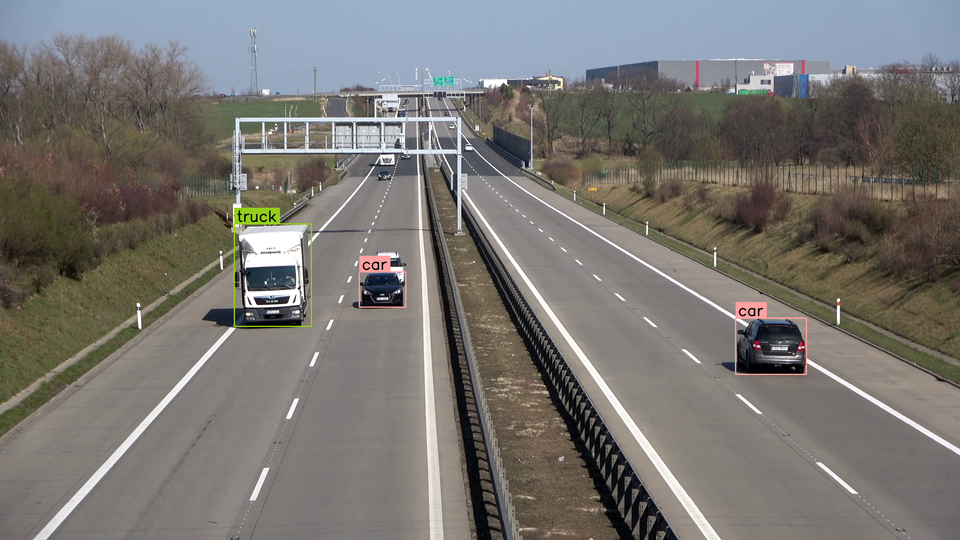
Finally, we can annotate the image with the predictions. Since we are working with an object detection model, we will use the sv.BoxAnnotator and sv.LabelAnnotator classes.
To draw bounding boxes and class labels on your image, create a BoxAnnotator and a LabelAnnotator, then call their annotate methods in sequence. Each annotator returns the modified image, so you can chain multiple annotators together. The result is a single NumPy array with all visual overlays rendered and ready for display or saving.
import cv2
import supervision as sv
from rfdetr import RFDETRMedium
model = RFDETRMedium()
image = cv2.imread("dog.jpeg")
detections = model.predict(image[:, :, ::-1])
box_annotator = sv.BoxAnnotator()
label_annotator = sv.LabelAnnotator()
annotated_image = box_annotator.annotate(
scene=image, detections=detections)
annotated_image = label_annotator.annotate(
scene=annotated_image, detections=detections)
import cv2
import supervision as sv
from inference import get_model

model = get_model(model_id="rfdetr-small")
image = cv2.imread("dog.jpeg")
results = model.infer(image)[0]
detections = sv.Detections.from_inference(results)
box_annotator = sv.BoxAnnotator()
label_annotator = sv.LabelAnnotator()
annotated_image = box_annotator.annotate(
scene=image, detections=detections)
annotated_image = label_annotator.annotate(
scene=annotated_image, detections=detections)
import cv2
import supervision as sv
from ultralytics import YOLO

model = YOLO("yolov8n.pt")
image = cv2.imread("dog.jpeg")
results = model(image)[0]
detections = sv.Detections.from_ultralytics(results)
box_annotator = sv.BoxAnnotator()
label_annotator = sv.LabelAnnotator()
annotated_image = box_annotator.annotate(
scene=image, detections=detections)
annotated_image = label_annotator.annotate(
scene=annotated_image, detections=detections)
import torch
import supervision as sv
from PIL import Image
from transformers import DetrImageProcessor, DetrForObjectDetection

processor = DetrImageProcessor.from_pretrained("facebook/detr-resnet-50")
model = DetrForObjectDetection.from_pretrained("facebook/detr-resnet-50")

image = Image.open("dog.jpeg")
inputs = processor(images=image, return_tensors="pt")

with torch.no_grad():
    outputs = model(**inputs)

width, height = image.size
target_size = torch.tensor([[height, width]])
results = processor.post_process_object_detection(
    outputs=outputs, target_sizes=target_size)[0]
detections = sv.Detections.from_transformers(
    transformers_results=results,
    id2label=model.config.id2label)
box_annotator = sv.BoxAnnotator()
label_annotator = sv.LabelAnnotator()
annotated_image = box_annotator.annotate(
scene=image, detections=detections)
annotated_image = label_annotator.annotate(
scene=annotated_image, detections=detections)
Display Custom Labels
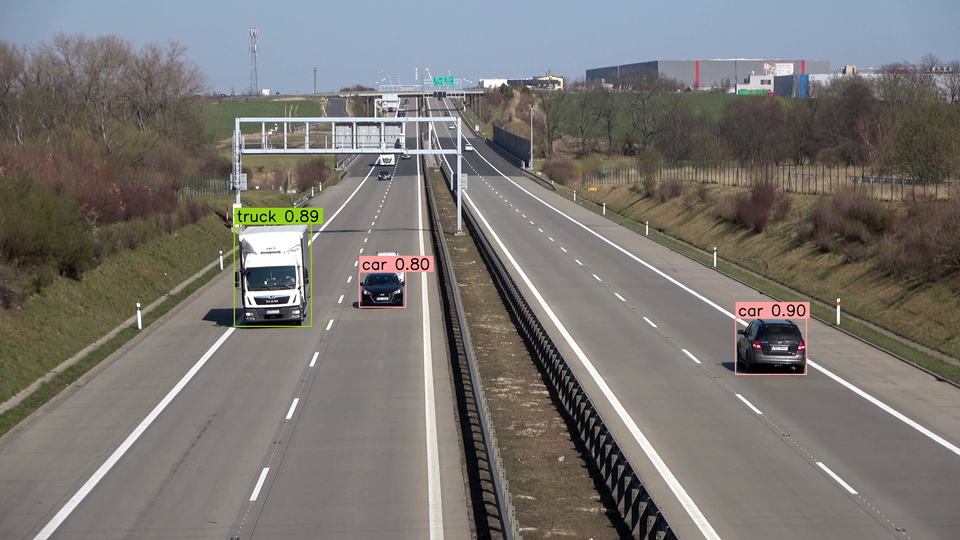
By default, sv.LabelAnnotator will label each detection with its class_name (if possible) or class_id. You can override this behavior by passing a list of custom labels to the annotate method.
import cv2
import supervision as sv
from rfdetr import RFDETRMedium

model = RFDETRMedium()
image = cv2.imread("dog.jpeg")
detections = model.predict(image[:, :, ::-1])

box_annotator = sv.BoxAnnotator()
label_annotator = sv.LabelAnnotator()

labels = [
    f"{class_name} {confidence:.2f}"
    for class_name, confidence
    in zip(detections['class_name'], detections.confidence)
]

annotated_image = box_annotator.annotate(
    scene=image, detections=detections)
annotated_image = label_annotator.annotate(
    scene=annotated_image, detections=detections, labels=labels)
import cv2
import supervision as sv
from inference import get_model

model = get_model(model_id="rfdetr-small")
image = cv2.imread("dog.jpeg")
results = model.infer(image)[0]
detections = sv.Detections.from_inference(results)

box_annotator = sv.BoxAnnotator()
label_annotator = sv.LabelAnnotator()

labels = [
    f"{class_name} {confidence:.2f}"
    for class_name, confidence
    in zip(detections['class_name'], detections.confidence)
]

annotated_image = box_annotator.annotate(
    scene=image, detections=detections)
annotated_image = label_annotator.annotate(
    scene=annotated_image, detections=detections, labels=labels)
import cv2
import supervision as sv
from ultralytics import YOLO

model = YOLO("yolov8n.pt")
image = cv2.imread("dog.jpeg")
results = model(image)[0]
detections = sv.Detections.from_ultralytics(results)

box_annotator = sv.BoxAnnotator()
label_annotator = sv.LabelAnnotator()

labels = [
    f"{class_name} {confidence:.2f}"
    for class_name, confidence
    in zip(detections['class_name'], detections.confidence)
]

annotated_image = box_annotator.annotate(
    scene=image, detections=detections)
annotated_image = label_annotator.annotate(
    scene=annotated_image, detections=detections, labels=labels)
import torch
import supervision as sv
from PIL import Image
from transformers import DetrImageProcessor, DetrForObjectDetection

processor = DetrImageProcessor.from_pretrained("facebook/detr-resnet-50")
model = DetrForObjectDetection.from_pretrained("facebook/detr-resnet-50")

image = Image.open("dog.jpeg")
inputs = processor(images=image, return_tensors="pt")

with torch.no_grad():
    outputs = model(**inputs)

width, height = image.size
target_size = torch.tensor([[height, width]])
results = processor.post_process_object_detection(
    outputs=outputs, target_sizes=target_size)[0]
detections = sv.Detections.from_transformers(
    transformers_results=results,
    id2label=model.config.id2label)

box_annotator = sv.BoxAnnotator()
label_annotator = sv.LabelAnnotator()

labels = [
    f"{class_name} {confidence:.2f}"
    for class_name, confidence
    in zip(detections['class_name'], detections.confidence)
]

annotated_image = box_annotator.annotate(
    scene=image, detections=detections)
annotated_image = label_annotator.annotate(
    scene=annotated_image, detections=detections, labels=labels)
Annotate Image with Segmentations
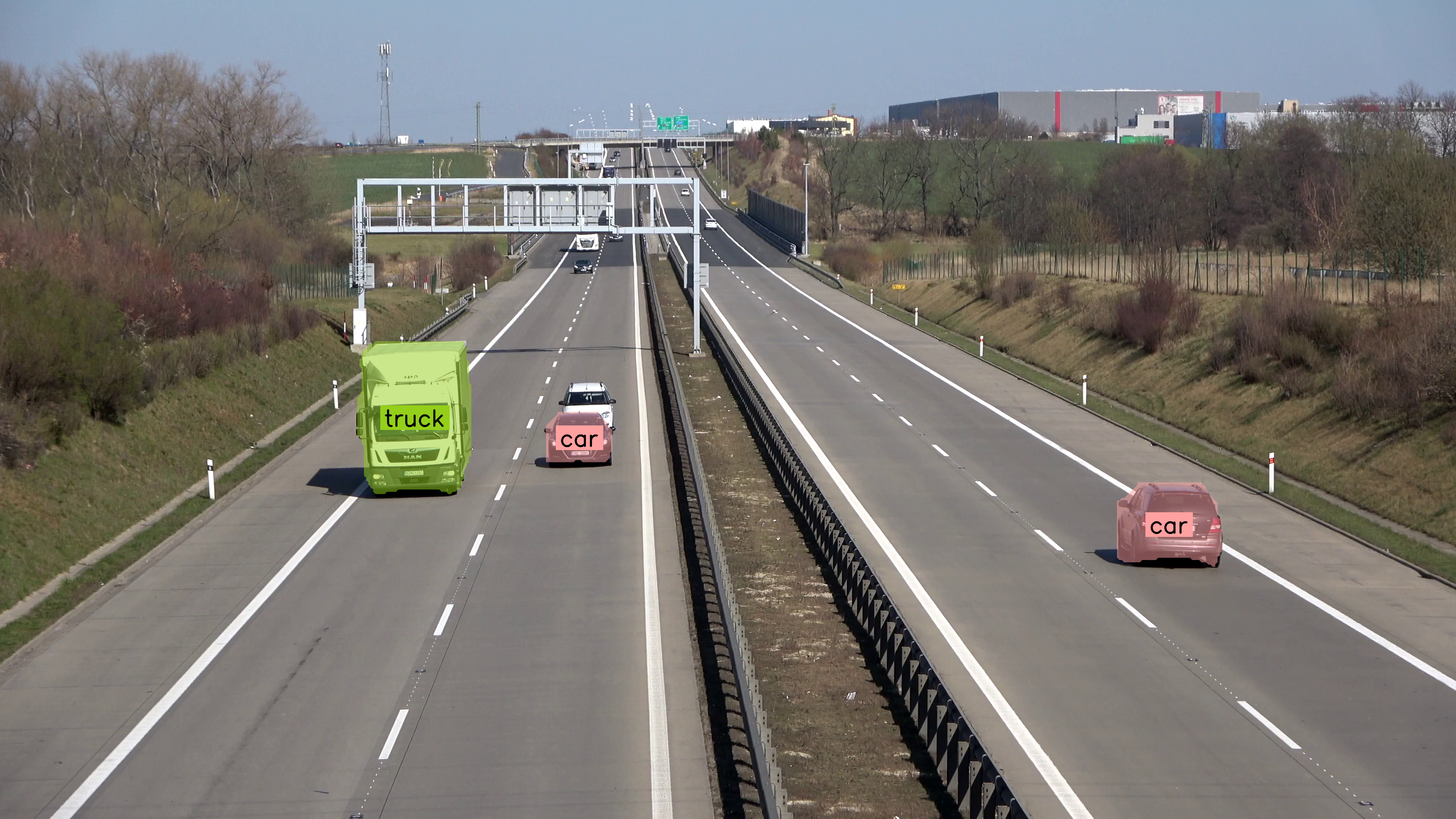
If you are running the segmentation model sv.MaskAnnotator is a drop-in replacement for sv.BoxAnnotator that will allow you to draw masks instead of boxes.
import cv2
import supervision as sv
from rfdetr.detr import RFDETRSegSmall

model = RFDETRSegSmall()
image = cv2.imread("dog.jpeg")
detections = model.predict(image[:, :, ::-1])

mask_annotator = sv.MaskAnnotator()
label_annotator = sv.LabelAnnotator(text_position=sv.Position.CENTER_OF_MASS)

annotated_image = mask_annotator.annotate(
    scene=image,
    detections=detections,
)
annotated_image = label_annotator.annotate(
    scene=annotated_image,
    detections=detections,
)
sv.plot_image(annotated_image)
import cv2
import supervision as sv
from inference import get_model

model = get_model(model_id="rfdetr-seg-small")
image = cv2.imread("dog.jpeg")
results = model.infer(image)[0]
detections = sv.Detections.from_inference(results)

mask_annotator = sv.MaskAnnotator()
label_annotator = sv.LabelAnnotator(text_position=sv.Position.CENTER_OF_MASS)

annotated_image = mask_annotator.annotate(
    scene=image,
    detections=detections,
)
annotated_image = label_annotator.annotate(
    scene=annotated_image,
    detections=detections,
)
sv.plot_image(annotated_image)
import cv2
import supervision as sv
from ultralytics import YOLO

model = YOLO("yolov8n-seg.pt")
image = cv2.imread("dog.jpeg")
results = model(image)[0]
detections = sv.Detections.from_ultralytics(results)

mask_annotator = sv.MaskAnnotator()
label_annotator = sv.LabelAnnotator(text_position=sv.Position.CENTER_OF_MASS)

annotated_image = mask_annotator.annotate(
    scene=image,
    detections=detections,
)
annotated_image = label_annotator.annotate(
    scene=annotated_image,
    detections=detections,
)
import torch
import supervision as sv
from PIL import Image
from transformers import DetrImageProcessor, DetrForSegmentation

processor = DetrImageProcessor.from_pretrained("facebook/detr-resnet-50-panoptic")
model = DetrForSegmentation.from_pretrained("facebook/detr-resnet-50-panoptic")

image = Image.open("dog.jpeg")
inputs = processor(images=image, return_tensors="pt")

with torch.no_grad():
    outputs = model(**inputs)

width, height = image.size
target_size = torch.tensor([[height, width]])
results = processor.post_process_segmentation(
    outputs=outputs, target_sizes=target_size
)[0]
detections = sv.Detections.from_transformers(
    transformers_results=results, id2label=model.config.id2label
)

mask_annotator = sv.MaskAnnotator()
label_annotator = sv.LabelAnnotator(text_position=sv.Position.CENTER_OF_MASS)

labels = [
    f"{class_name} {confidence:.2f}"
    for class_name, confidence in zip(
        detections["class_name"],
        detections.confidence,
    )
]

annotated_image = mask_annotator.annotate(scene=image, detections=detections)
annotated_image = label_annotator.annotate(
    scene=annotated_image, detections=detections, labels=labels
)
Frequently Asked Questions
How do I detect and annotate objects with supervision?
Pass any model's output to sv.Detections.from_<model>() to create a unified Detections object. Then pass it to sv.BoxAnnotator or sv.MaskAnnotator to draw predictions on an image.
Can I annotate both bounding boxes and masks at the same time?
Yes. Chain annotators: first draw boxes with BoxAnnotator, then overlay masks with MaskAnnotator on the same scene.
How do I label detections with class names?
Use sv.LabelAnnotator and pass custom text with the labels parameter. If a connector provides class names, they are stored in detections["class_name"] / detections.data["class_name"]; when labels is omitted, LabelAnnotator uses class names first, then class IDs, then detection indices.
Can I use supervision with Hugging Face models?
Yes. sv.Detections.from_transformers() accepts supported Hugging Face object detection and segmentation outputs. Vision-language model outputs are handled through sv.Detections.from_vlm(...), for example with sv.VLM.FLORENCE_2 or sv.VLM.PALIGEMMA.
Authors
- Piotr Skalski — Computer Vision Engineer, Roboflow
- Borda — Open Source Engineer, Roboflow