Visualize Depth Maps
A depth map holds a distance for every pixel of an image: stereo disparity in pixels, metric depth in metres, or a monocular model's relative depth, larger meaning nearer. sv.DepthMap holds it with what it measures, and sv.DepthAnnotator colours it over the image, near objects warm, leaving pixels without depth unpainted.
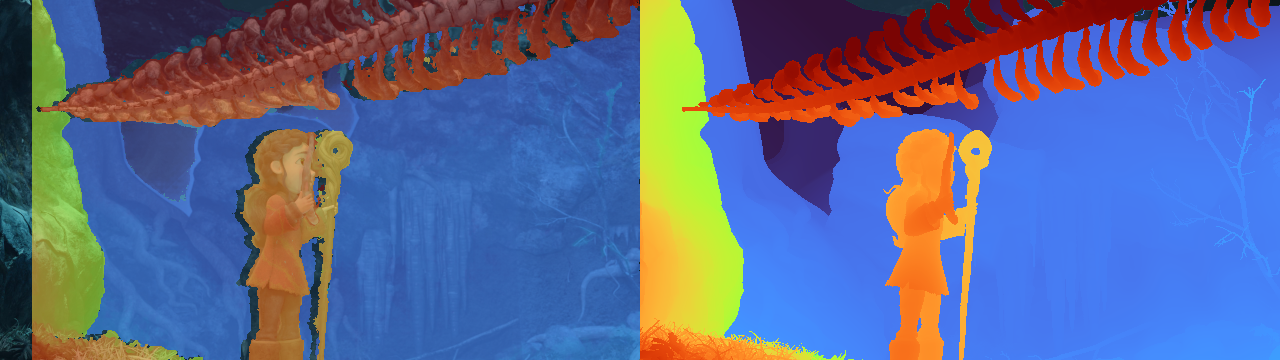
Load a Depth Map
Open the image, then load its depth map from a model or a file.
import supervision as sv
from PIL import Image

image = sv.pillow_to_cv2(Image.open("<SOURCE_IMAGE_PATH>"))
Depth models served by Roboflow Inference (Depth Anything, YOLO26 depth) return a map normalised per image, 1 for the nearest pixel and 0 for the farthest. It loads as relative_inverse: good for pictures, not for distances.
YOLO26 depth models predict metric depth in metres.
The pipeline does not say what its model predicts, so name the kind.
A stereo matcher's disparity, or any other float array, loads with the kind of value it holds.
import numpy as np

disparity = np.load("<DISPARITY_NPY_PATH>")  # float32 pixels, left view

depth_map = sv.DepthMap(
    disparity,
    kind="disparity_px",
    camera=sv.DepthCamera(fx_px=1050.0, baseline_m=0.12),
)
The camera is optional: with the rig's focal length and baseline, a stereo matcher's disparity gives metric depth too.
Dataset files load directly: sv.DepthMap.from_png16(path, scale=256, kind="disparity_px") for KITTI and sv.DepthMap.from_pfm(path) for Middlebury and SceneFlow.
NaN, infinities and values at or below 0 (below 0 for relative maps) are pixels without depth; depth_map.valid_mask marks the rest.
For "relative_inverse", larger values are nearer and 0 is the farthest valid value, so set pixels without depth to NaN. Invert a relative map that grows with distance, such as raw Depth Anything V3 output, before wrapping it (from_inference maps need no inverting); negating it instead would leave every pixel negative, and so without depth:
import numpy as np

relative_depth = np.load("<RELATIVE_DEPTH_NPY_PATH>")  # float32, grows with distance
relative_depth[relative_depth <= 0] = np.nan  # pixels without depth
depth_map = sv.DepthMap(1 / relative_depth, kind="relative_inverse")
Colour a Depth Map
depth_annotator = sv.DepthAnnotator(opacity=0.65)
annotated_image = depth_annotator.annotate(image.copy(), depth_map)
colormap="turbo"separates the most depth steps;"viridis"and"cividis"keep their order in grayscale and for colour-blind readers.scale="inverse"(default) colours a disparity or relative map as it is and a metric map as inverse depth, which gives near detail most of the colours;scale="metric"colours metres and needs a metric map or a stereo camera.display_range="auto"uses the map's 2nd to 98th percentile; a(low, high)tuple fixes the range in the map's own unit, whatever the scale, such as(1.0, 10.0)metres for a metric map (a disparity range is in pixels of that map, so it changes meaning if youresizethe map), andsv.DepthClipRangeholds one range across a video.
To show the depth alone, annotate a blank canvas instead of the image. To paint the pixels without depth in one colour:
height, width = annotated_image.shape[:2]
annotated_image[~depth_map.resize((width, height)).valid_mask] = sv.Color.BLACK.as_bgr()
Colour a Video with One Range
Colouring each frame with its own range makes a still wall change colour whenever something enters the frame. Compute one range for the whole clip in a first pass, then colour every frame with it:
import numpy as np
import supervision as sv


def estimate_depth(
    frame: np.ndarray,
) -> sv.DepthMap: ...  # return your depth model's map for this frame


source = "<SOURCE_VIDEO_PATH>"
clip_range = sv.DepthClipRange.from_depth_maps(
    estimate_depth(frame) for frame in sv.get_video_frames_generator(source)
)

depth_annotator = sv.DepthAnnotator(display_range=clip_range, opacity=0.65)

with sv.VideoSink("<TARGET_VIDEO_PATH>", sv.VideoInfo.from_video_path(source)) as sink:
    for frame in sv.get_video_frames_generator(source):
        depth_map = estimate_depth(frame)
        sink.write_frame(depth_annotator.annotate(frame, depth_map))
The first pass reads one map at a time, so memory stays bounded however long the clip is, at the cost of estimating depth twice per frame. For a short clip, keep the maps in a list, pass it to DepthClipRange.from_depth_maps and colour the frames from it to avoid the second inference pass. A locked range keeps the colour scale fixed: colours stay put only where the depth values are steady, as in ground truth or calibrated stereo, and a model's own frame-to-frame wobble becomes more visible.
Label Objects with Their Distance
measure_detections stores the median depth inside each mask, or each box without masks, in detections.data["depth_m"], ready for labels drawn with sv.LabelAnnotator. Here depth_map is the stereo map with a camera from Load a Depth Map. When the map has another size than the image, such as a monocular model's output, pass the image's size as resolution_wh: the map is stretched over the image as sv.DepthAnnotator draws it, and its values keep their unit.
import numpy as np
from inference import get_model

model = get_model(model_id="rfdetr-small")
detections = sv.Detections.from_inference(model.infer(image)[0])
height, width = image.shape[:2]
detections = depth_map.measure_detections(detections, resolution_wh=(width, height))

labels = [
    f"{name} {depth:.1f} m" if np.isfinite(depth) else f"{name} no depth"
    for name, depth in zip(detections.data["class_name"], detections.data["depth_m"])
]
annotated_image = sv.LabelAnnotator().annotate(annotated_image, detections, labels)
An object whose region holds no depth gets NaN, so the labels above check np.isfinite instead of printing nan m.
measure_detections names its column after what the map can give: "depth_m" for a depth_m map or a disparity map with a camera, and the map's own kind otherwise, "disparity_px" for a disparity map without a camera. A relative map has no metres, so it fills detections.data["relative_inverse"] instead: useful to sort objects from near to far within one image, not to compare images. A column of the same name already in detections.data is replaced.
For one pixel, depth_map.value_at(x, y) returns the value in the map's own unit, not in metres unless the map is depth_m: pixels for a disparity map, so call depth_map.to_depth().value_at(x, y) for metres, and None where there is no depth.
Attribution
Image: frame 96 of sequence 0021 of the Spring dataset (Mehl et al., CVPR 2023, doi:10.18419/darus-3376) and the Spring open movie by Blender Foundation, both CC BY 4.0; downscaled, with an OpenCV StereoSGBM disparity layer coloured by sv.DepthAnnotator.