Image Utils
supervision.utils.image.crop_image(image: ImageType, xyxy: npt.NDArray[np.number] | list[int] | tuple[int, int, int, int]) -> ImageType

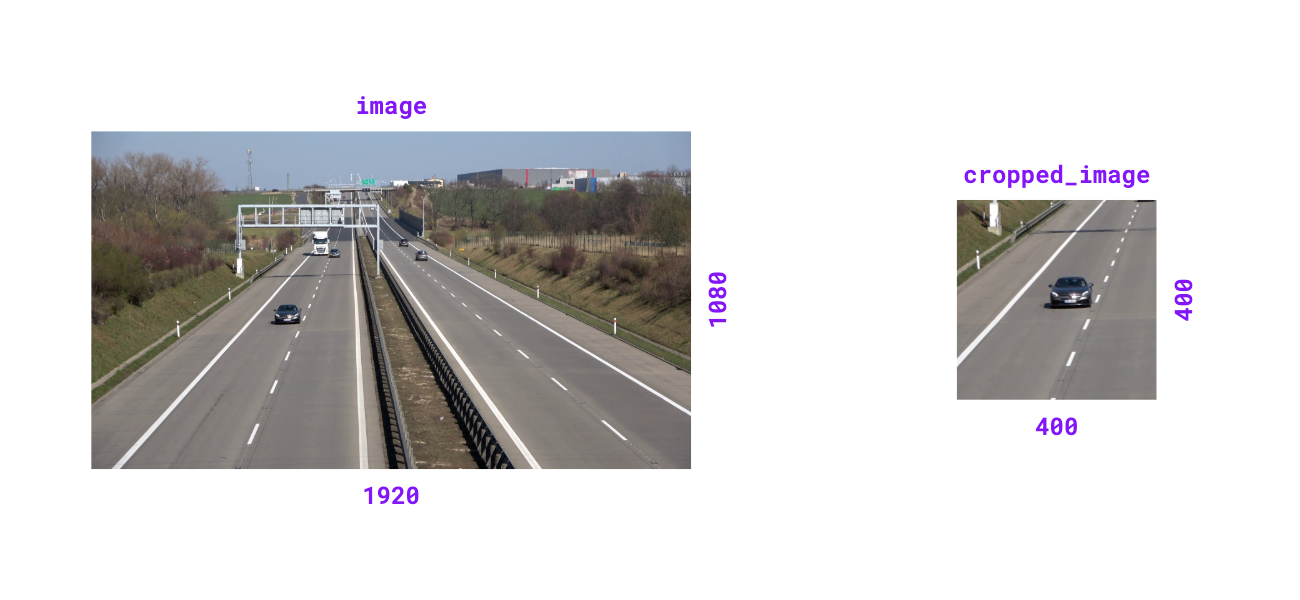
Crop image based on bounding box coordinates.
Parameters:
| Name | Type | Description | Default |
|---|---|---|---|
|
ImageType
|
The image to crop. |
required |
|
NDArray[number] | list[int] | tuple[int, int, int, int]
|
Bounding box coordinates in |
required |
Returns:
| Type | Description |
|---|---|
ImageType
|
Cropped image matching input type. |
Note
Coordinates are rounded to integers and clipped to the image bounds before slicing. This keeps NumPy and Pillow inputs aligned and avoids negative-index wrap-around on NumPy arrays.
Examples:
>>> import numpy as np
>>> import supervision as sv
>>> image = np.zeros((1080, 1920, 3), dtype=np.uint8)
>>> image.shape
(1080, 1920, 3)
>>> xyxy = (400, 400, 800, 800)
>>> cropped_image = sv.crop_image(image=image, xyxy=xyxy)
>>> cropped_image.shape
(400, 400, 3)
>>> image = np.zeros((1920, 1080), dtype=np.uint8)
>>> image.shape
(1920, 1080)
>>> xyxy = (400, 400, 800, 800)
>>> cropped_image = sv.crop_image(image=image, xyxy=xyxy)
>>> cropped_image.shape
(400, 400)
Source code in src/supervision/utils/image.py
supervision.utils.image.load_image_from_url(value: str, cv_imread_flags: int = cv2.IMREAD_COLOR, timeout: float = 30.0, use_cache: bool = True, cache_dir: str | Path | None = None, force_reload: bool = False) -> npt.NDArray[np.uint8]

Load an image from a URL as an OpenCV image.
Parameters:
| Name | Type | Description | Default |
|---|---|---|---|
|
str
|
HTTP(S) URL of the image. |
required |
|
int
|
OpenCV image read flag passed to |
IMREAD_COLOR
|
|
float
|
Request timeout in seconds. Defaults to |
30.0
|
|
bool
|
If |
True
|
|
str | Path | None
|
Directory where downloaded image bytes are cached. If |
None
|
|
bool
|
If |
False
|
Returns:
| Type | Description |
|---|---|
NDArray[uint8]
|
Image as a NumPy array in the format selected by |
Raises:
| Type | Description |
|---|---|
ValueError
|
If the URL is invalid or the downloaded bytes cannot be decoded. |
RequestException
|
If the request fails or returns an error status. |
Examples:
import supervision as sv

image = sv.load_image_from_url(
    "https://media.roboflow.com/quickstart/dog.jpeg"
)
image.shape
Source code in src/supervision/utils/image.py
supervision.utils.image.scale_image(image: ImageType, scale_factor: float) -> ImageType

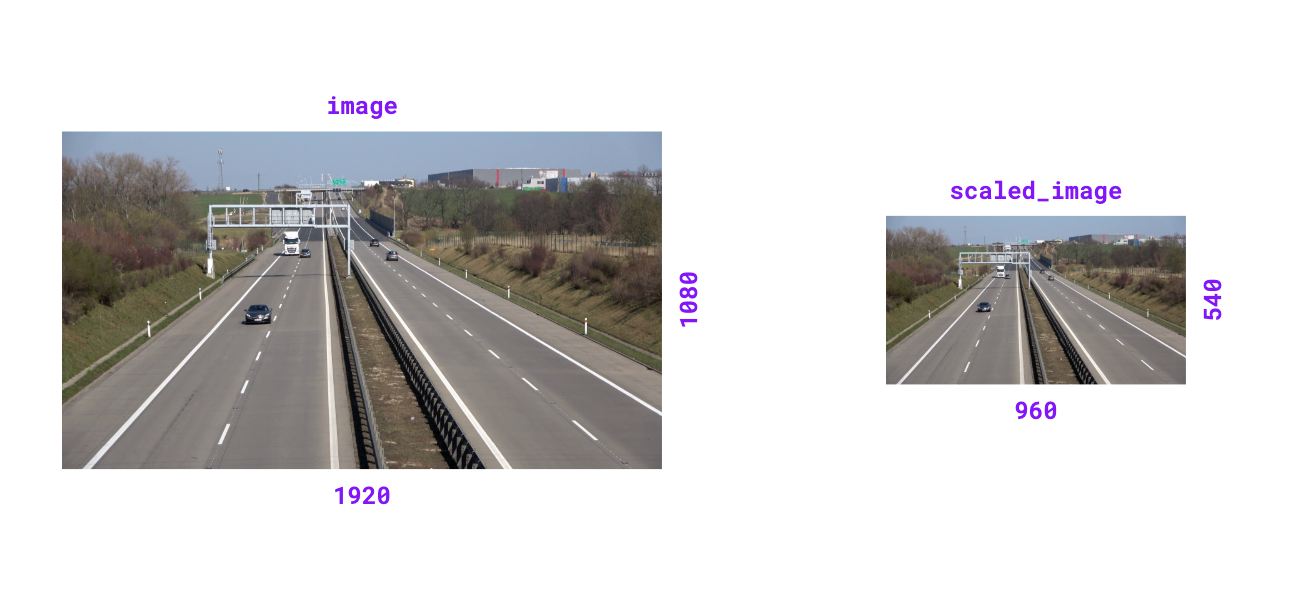
Scale image by given factor. Scale factor > 1.0 zooms in, < 1.0 zooms out.
Parameters:
| Name | Type | Description | Default |
|---|---|---|---|
|
ImageType
|
The image to scale. |
required |
|
float
|
Factor by which to scale the image. |
required |
Returns:
| Type | Description |
|---|---|
ImageType
|
Scaled image matching input type. |
Raises:
| Type | Description |
|---|---|
TypeError
|
If |
ValueError
|
If scale factor is non-positive. |
Note
Each axis keeps at least one pixel, so a factor small enough to round an axis of a small image down to zero returns a one-pixel-wide or one-pixel-tall image rather than raising.
Examples:
>>> import numpy as np
>>> import supervision as sv
>>> image = np.zeros((1080, 1920, 3), dtype=np.uint8)
>>> image.shape
(1080, 1920, 3)
>>> scaled_image = sv.scale_image(image=image, scale_factor=0.5)
>>> scaled_image.shape
(540, 960, 3)
>>> image = np.zeros((1920, 1080), dtype=np.uint8)
>>> image.shape
(1920, 1080)
>>> scaled_image = sv.scale_image(image=image, scale_factor=0.5)
>>> scaled_image.shape
(960, 540)
Source code in src/supervision/utils/image.py
supervision.utils.image.resize_image(image: ImageType, resolution_wh: tuple[int, int], keep_aspect_ratio: bool = False) -> ImageType

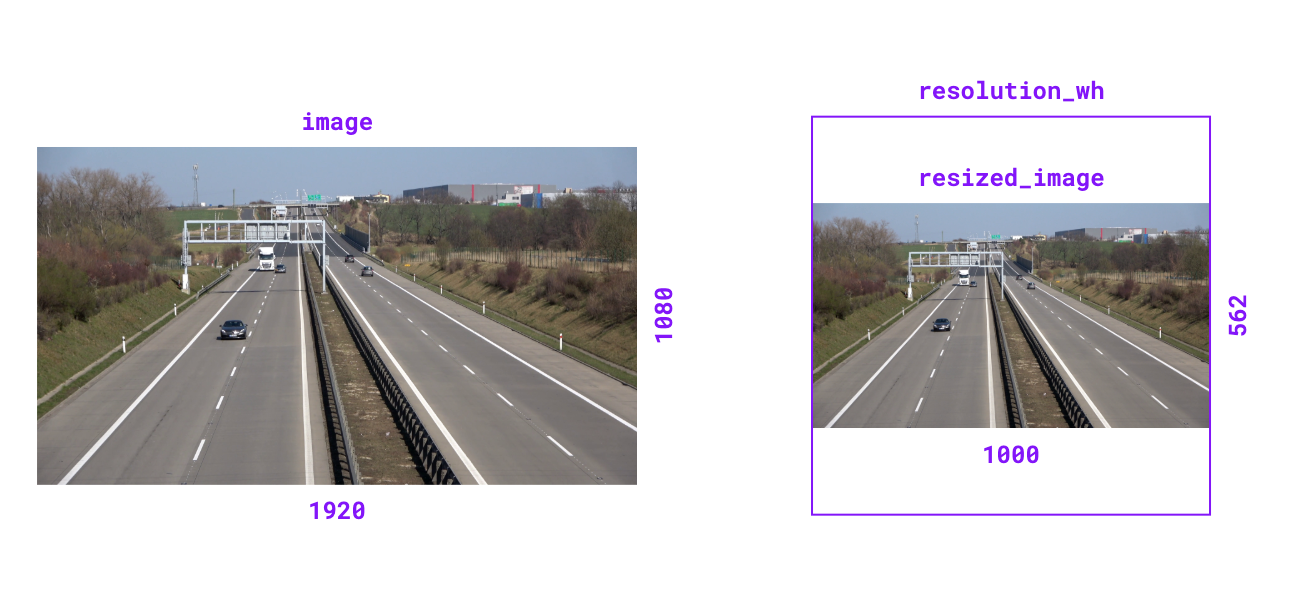
Resize image to specified resolution. Can optionally maintain aspect ratio.
Parameters:
| Name | Type | Description | Default |
|---|---|---|---|
|
ImageType
|
The image to resize. |
required |
|
tuple[int, int]
|
Target resolution as |
required |
|
bool
|
Flag to maintain original aspect ratio.
Defaults to |
False
|
Returns:
| Type | Description |
|---|---|
ImageType
|
Resized image matching input type. |
Raises:
| Type | Description |
|---|---|
TypeError
|
If |
Note
With keep_aspect_ratio=True the fitted axis keeps at least one pixel, so
an aspect ratio too extreme to fit the target box returns a one-pixel-wide
or one-pixel-tall image rather than raising.
Examples:
>>> import numpy as np
>>> import supervision as sv
>>> image = np.zeros((1080, 1920, 3), dtype=np.uint8)
>>> image.shape
(1080, 1920, 3)
>>> resized_image = sv.resize_image(
...     image=image, resolution_wh=(1000, 1000), keep_aspect_ratio=True
... )
>>> resized_image.shape
(562, 1000, 3)
>>> image = np.zeros((1920, 1080), dtype=np.uint8)
>>> image.shape
(1920, 1080)
>>> resized_image = sv.resize_image(
...     image=image, resolution_wh=(1000, 1000), keep_aspect_ratio=True
... )
>>> resized_image.shape
(1000, 562)
Source code in src/supervision/utils/image.py
supervision.utils.image.letterbox_image(image: ImageType, resolution_wh: tuple[int, int], color: tuple[int, int, int] | Color = Color.BLACK) -> ImageType

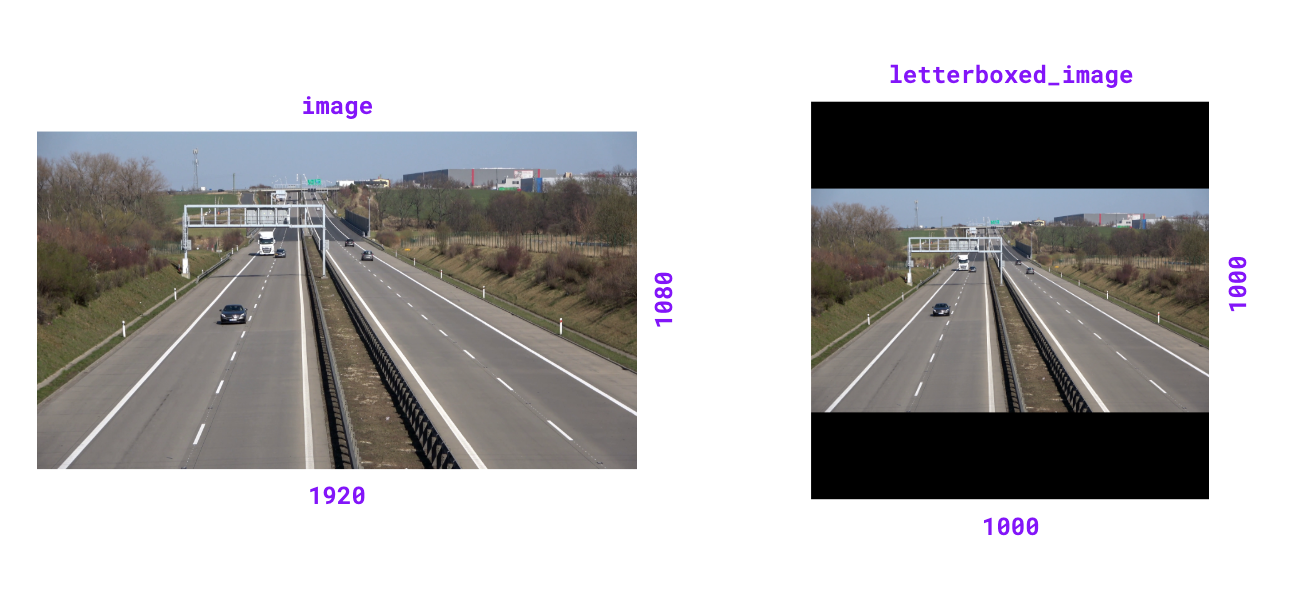
Resize image and pad with color to achieve desired resolution while maintaining aspect ratio.
Parameters:
| Name | Type | Description | Default |
|---|---|---|---|
|
ImageType
|
The image to resize and pad. Accepts BGR arrays of shape
|
required |
|
tuple[int, int]
|
Target resolution as |
required |
|
tuple[int, int, int] | Color
|
Padding color. If tuple, should be in BGR format.
Defaults to :attr: |
BLACK
|
Returns:
| Type | Description |
|---|---|
ImageType
|
Letterboxed image matching input type. |
Raises:
| Type | Description |
|---|---|
TypeError
|
If |
Note
For BGRA inputs, the alpha channel in the padding region is set to
0 (fully transparent). Grayscale inputs receive scalar padding
from color[0].
Examples:
>>> import numpy as np
>>> import supervision as sv
>>> image = np.zeros((1080, 1920, 3), dtype=np.uint8)
>>> image.shape
(1080, 1920, 3)
>>> letterboxed_image = sv.letterbox_image(
...     image=image, resolution_wh=(1000, 1000)
... )
>>> letterboxed_image.shape
(1000, 1000, 3)
>>> gray = np.zeros((4, 6), dtype=np.uint8)
>>> sv.letterbox_image(image=gray, resolution_wh=(10, 10)).shape
(10, 10)
Source code in src/supervision/utils/image.py
supervision.utils.image.tint_image(image: ImageType, color: Color = Color.BLACK, opacity: float = 0.5) -> ImageType

Tint image with solid color overlay at specified opacity.
Parameters:
| Name | Type | Description | Default |
|---|---|---|---|
|
ImageType
|
The image to tint. Accepts BGR arrays of shape |
required |
|
Color
|
Overlay tint color. Defaults to :attr: |
BLACK
|
|
float
|
Blend ratio between overlay and image (0.0-1.0).
Defaults to |
0.5
|
Returns:
| Type | Description |
|---|---|
ImageType
|
Tinted image matching input
type. The input image is left unchanged. A grayscale input comes back
as a BGR array (or an RGB |
Raises:
| Type | Description |
|---|---|
TypeError
|
If |
ValueError
|
If opacity is outside range [0.0, 1.0]. |
Examples:
>>> import numpy as np
>>> import supervision as sv
>>> image = np.zeros((100, 100, 3), dtype=np.uint8)
>>> tinted_image = sv.tint_image(
...     image=image, color=sv.Color.ROBOFLOW, opacity=0.5
... )
>>> tinted_image.shape
(100, 100, 3)
>>> int(image.max())
0
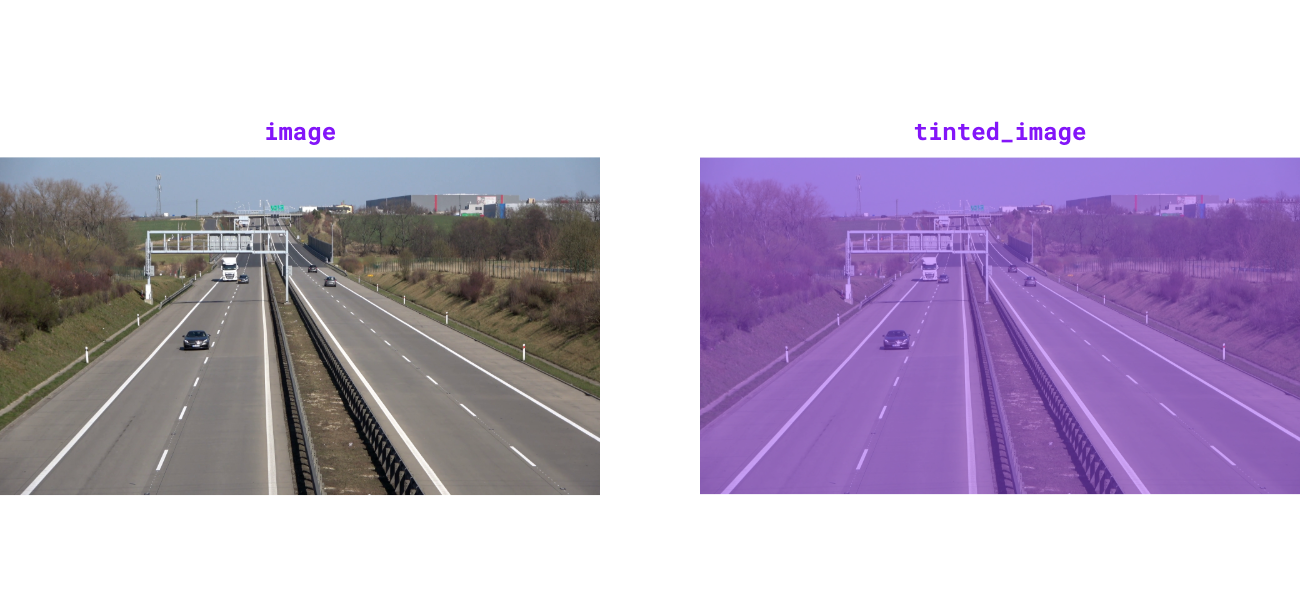
Source code in src/supervision/utils/image.py
supervision.utils.image.grayscale_image(image: ImageType) -> ImageType

Convert image to 3-channel grayscale. Luminance channel is broadcast to all three channels for compatibility with color-based drawing helpers.
Parameters:
| Name | Type | Description | Default |
|---|---|---|---|
|
ImageType
|
The image to convert to grayscale. Accepts BGR arrays of shape
|
required |
Returns:
| Type | Description |
|---|---|
ImageType
|
3-channel grayscale image matching input type. |
Examples:
>>> import numpy as np
>>> import supervision as sv
>>> image = np.ones((100, 100, 3), dtype=np.uint8) * 128
>>> grayscale_image = sv.grayscale_image(image=image)
>>> grayscale_image.shape
(100, 100, 3)
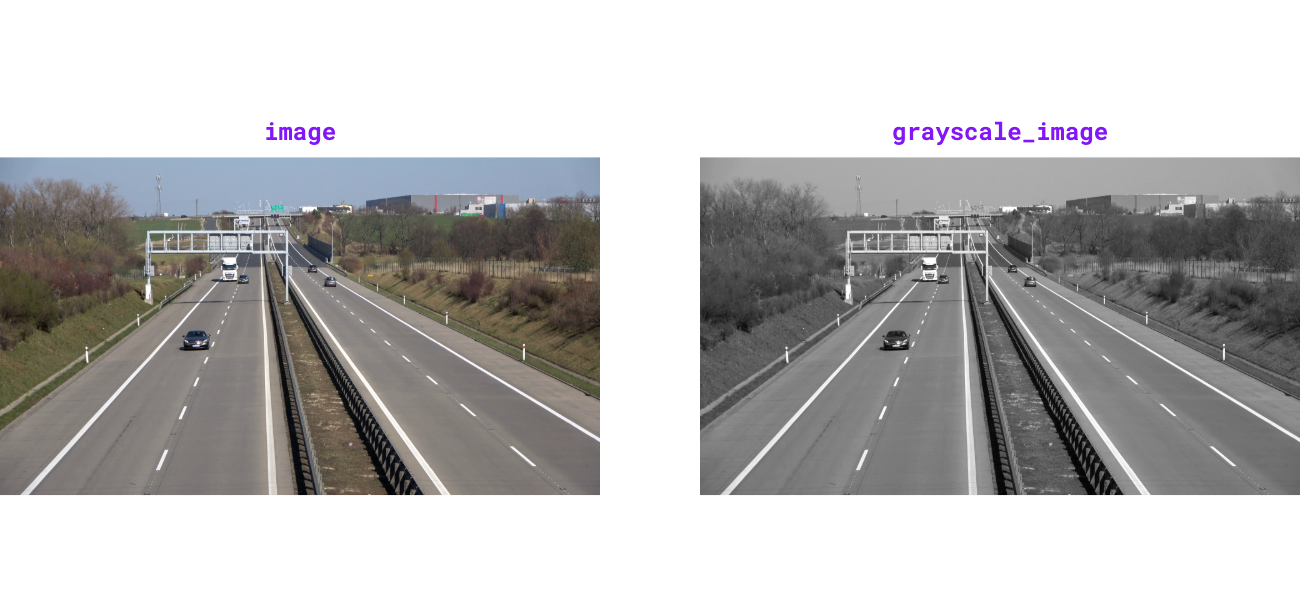
Source code in src/supervision/utils/image.py
supervision.utils.image.get_image_resolution_wh(image: ImageType) -> tuple[int, int]

Get image width and height as a tuple (width, height) for various image
formats.
Supports both numpy.ndarray images (with shape (H, W, ...)) and
PIL.Image.Image inputs.
Parameters:
| Name | Type | Description | Default |
|---|---|---|---|
|
ImageType
|
Input image. |
required |
Returns:
| Type | Description |
|---|---|
tuple[int, int]
|
Image resolution as |
Raises:
| Type | Description |
|---|---|
ValueError
|
If a |
TypeError
|
If |
Examples:
>>> import numpy as np
>>> import supervision as sv
>>> image = np.zeros((1080, 1920, 3), dtype=np.uint8)
>>> sv.get_image_resolution_wh(image)
(1920, 1080)
Source code in src/supervision/utils/image.py
supervision.utils.image.ImageSink

Save sequential images into a directory through a context manager.
:class:~supervision.utils.image.ImageSink creates the target directory on
entry and writes each image using
:meth:~supervision.utils.image.ImageSink.save_image, incrementing the image
name pattern after every save.
Source code in src/supervision/utils/image.py
612 613 614 615 616 617 618 619 620 621 622 623 624 625 626 627 628 629 630 631 632 633 634 635 636 637 638 639 640 641 642 643 644 645 646 647 648 649 650 651 652 653 654 655 656 657 658 659 660 661 662 663 664 665 666 667 668 669 670 671 672 673 674 675 676 677 678 679 680 681 682 683 684 685 686 687 688 689 690 691 692 693 694 695 696 697 698 | |
Methods:
__init__(target_dir_path: str, overwrite: bool = False, image_name_pattern: str = 'image_{:05d}.png') -> None

Initialize context manager for saving images to directory.
Parameters:
| Name | Type | Description | Default |
|---|---|---|---|
|
str
|
Target directory path where images will be saved. |
required |
|
bool
|
Whether to overwrite existing directory.
Defaults to |
False
|
|
str
|
File name pattern for saved images.
Defaults to |
'image_{:05d}.png'
|
Examples:
>>> import numpy as np
>>> import supervision as sv
>>> import tempfile
>>> import os
>>> with tempfile.TemporaryDirectory() as tmpdir:
...     image = np.zeros((100, 100, 3), dtype=np.uint8)
...     with sv.ImageSink(target_dir_path=tmpdir, overwrite=True) as sink:
...         sink.save_image(image=image)
...         sink.save_image(image=image)
...     files = sorted(os.listdir(tmpdir))
...     len(files)
2
Source code in src/supervision/utils/image.py
save_image(image: npt.NDArray[np.uint8], image_name: str | None = None) -> None

Save image to target directory with optional custom filename.
Parameters:
| Name | Type | Description | Default |
|---|---|---|---|
|
NDArray[uint8]
|
Image to save with shape |
required |
|
str | None
|
Custom filename for saved image. If
|
None
|
Raises:
| Type | Description |
|---|---|
OSError
|
If |