Skip to content

Image Utils

supervision.utils.image.crop_image(image: ImageType, xyxy: npt.NDArray[int] | list[int] | tuple[int, int, int, int]) -> ImageType

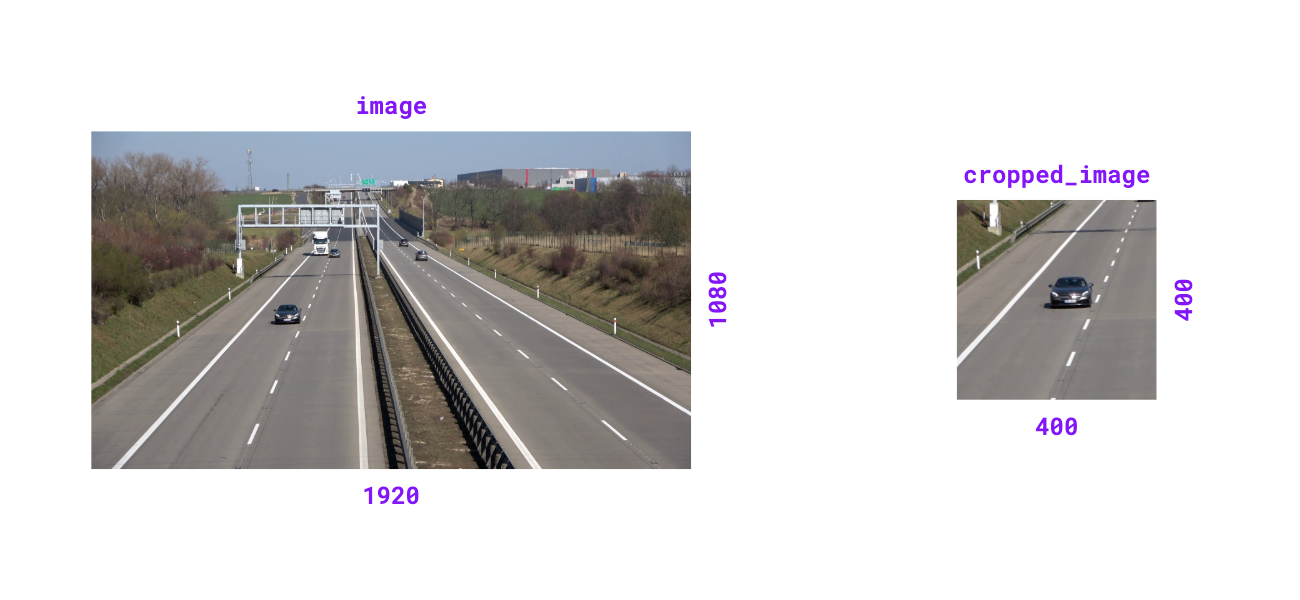
Crop image based on bounding box coordinates.

Parameters:

Name Type Description Default

image

ImageType

The image to crop.

required

xyxy

NDArray[int] | list[int] | tuple[int, int, int, int]

Bounding box coordinates in (x_min, y_min, x_max, y_max) format.

required

Returns:

Type Description
ImageType

Cropped image matching input type.

Examples:

>>> import numpy as np
>>> import supervision as sv
>>> image = np.zeros((1080, 1920, 3), dtype=np.uint8)
>>> image.shape
(1080, 1920, 3)
>>> xyxy = (400, 400, 800, 800)
>>> cropped_image = sv.crop_image(image=image, xyxy=xyxy)
>>> cropped_image.shape
(400, 400, 3)
>>> image = np.zeros((1920, 1080), dtype=np.uint8)
>>> image.shape
(1920, 1080)
>>> xyxy = (400, 400, 800, 800)
>>> cropped_image = sv.crop_image(image=image, xyxy=xyxy)
>>> cropped_image.shape
(400, 400)
crop-image

Source code in src/supervision/utils/image.py
@ensure_cv2_image_for_standalone_function
def crop_image(
    image: ImageType,
    xyxy: npt.NDArray[int] | list[int] | tuple[int, int, int, int],
) -> ImageType:
    """
    Crop image based on bounding box coordinates.

    Args:
        image: The image to crop.
        xyxy:
            Bounding box coordinates in `(x_min, y_min, x_max, y_max)` format.

    Returns:
        Cropped image matching input
            type.

    Examples:
        ```pycon
        >>> import numpy as np
        >>> import supervision as sv
        >>> image = np.zeros((1080, 1920, 3), dtype=np.uint8)
        >>> image.shape
        (1080, 1920, 3)
        >>> xyxy = (400, 400, 800, 800)
        >>> cropped_image = sv.crop_image(image=image, xyxy=xyxy)
        >>> cropped_image.shape
        (400, 400, 3)

        ```

        ```pycon
        >>> image = np.zeros((1920, 1080), dtype=np.uint8)
        >>> image.shape
        (1920, 1080)
        >>> xyxy = (400, 400, 800, 800)
        >>> cropped_image = sv.crop_image(image=image, xyxy=xyxy)
        >>> cropped_image.shape
        (400, 400)

        ```

    ![crop-image](https://media.roboflow.com/supervision-docs/supervision-docs-crop-image-2.png){ align=center width="1000" }
    """  # noqa E501 // docs
    if isinstance(xyxy, (list, tuple)):
        xyxy = np.array(xyxy)

    xyxy = np.round(xyxy).astype(int)
    x_min, y_min, x_max, y_max = xyxy.flatten()

    if isinstance(image, np.ndarray):
        return image[y_min:y_max, x_min:x_max]

    if isinstance(image, Image.Image):
        return image.crop((x_min, y_min, x_max, y_max))

    raise TypeError(
        f"`image` must be a numpy.ndarray or PIL.Image.Image. Received {type(image)}"
    )

supervision.utils.image.scale_image(image: ImageType, scale_factor: float) -> ImageType

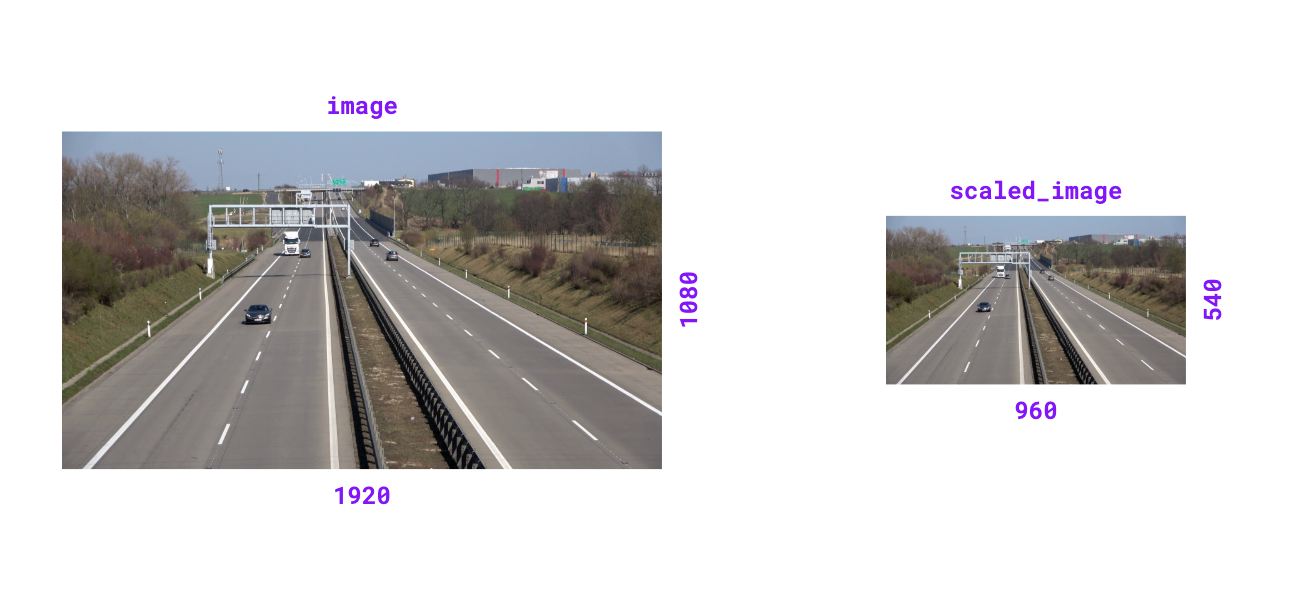
Scale image by given factor. Scale factor > 1.0 zooms in, < 1.0 zooms out.

Parameters:

Name Type Description Default

image

ImageType

The image to scale.

required

scale_factor

float

Factor by which to scale the image.

required

Returns:

Type Description
ImageType

Scaled image matching input type.

Raises:

Type Description
ValueError

If scale factor is non-positive.

Examples:

>>> import numpy as np
>>> import supervision as sv
>>> image = np.zeros((1080, 1920, 3), dtype=np.uint8)
>>> image.shape
(1080, 1920, 3)
>>> scaled_image = sv.scale_image(image=image, scale_factor=0.5)
>>> scaled_image.shape
(540, 960, 3)
>>> image = np.zeros((1920, 1080), dtype=np.uint8)
>>> image.shape
(1920, 1080)
>>> scaled_image = sv.scale_image(image=image, scale_factor=0.5)
>>> scaled_image.shape
(960, 540)
scale-image

Source code in src/supervision/utils/image.py
@ensure_cv2_image_for_standalone_function
def scale_image(image: ImageType, scale_factor: float) -> ImageType:
    """
    Scale image by given factor. Scale factor > 1.0 zooms in, < 1.0 zooms out.

    Args:
        image: The image to scale.
        scale_factor: Factor by which to scale the image.

    Returns:
        Scaled image matching input
            type.

    Raises:
        ValueError: If scale factor is non-positive.

    Examples:
        ```pycon
        >>> import numpy as np
        >>> import supervision as sv
        >>> image = np.zeros((1080, 1920, 3), dtype=np.uint8)
        >>> image.shape
        (1080, 1920, 3)
        >>> scaled_image = sv.scale_image(image=image, scale_factor=0.5)
        >>> scaled_image.shape
        (540, 960, 3)

        ```

        ```pycon
        >>> image = np.zeros((1920, 1080), dtype=np.uint8)
        >>> image.shape
        (1920, 1080)
        >>> scaled_image = sv.scale_image(image=image, scale_factor=0.5)
        >>> scaled_image.shape
        (960, 540)

        ```

    ![scale-image](https://media.roboflow.com/supervision-docs/supervision-docs-scale-image-2.png){ align=center width="1000" }
    """  # noqa E501 // docs
    assert isinstance(image, np.ndarray)
    if scale_factor <= 0:
        raise ValueError("Scale factor must be positive.")

    width_old, height_old = image.shape[1], image.shape[0]
    width_new = int(width_old * scale_factor)
    height_new = int(height_old * scale_factor)
    return cv2.resize(image, (width_new, height_new), interpolation=cv2.INTER_LINEAR)

supervision.utils.image.resize_image(image: ImageType, resolution_wh: tuple[int, int], keep_aspect_ratio: bool = False) -> ImageType

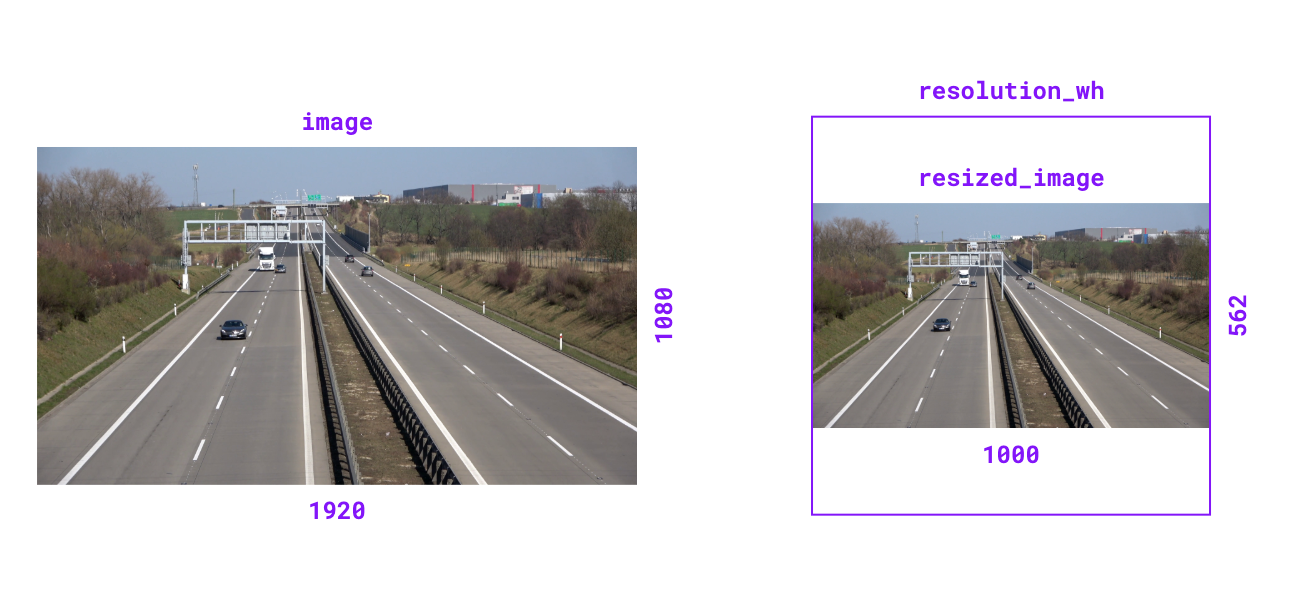
Resize image to specified resolution. Can optionally maintain aspect ratio.

Parameters:

Name Type Description Default

image

ImageType

The image to resize.

required

resolution_wh

tuple[int, int]

Target resolution as (width, height).

required

keep_aspect_ratio

bool

Flag to maintain original aspect ratio. Defaults to False.

False

Returns:

Type Description
ImageType

Resized image matching input type.

Examples:

>>> import numpy as np
>>> import supervision as sv
>>> image = np.zeros((1080, 1920, 3), dtype=np.uint8)
>>> image.shape
(1080, 1920, 3)
>>> resized_image = sv.resize_image(
...     image=image, resolution_wh=(1000, 1000), keep_aspect_ratio=True
... )
>>> resized_image.shape
(562, 1000, 3)
>>> image = np.zeros((1920, 1080), dtype=np.uint8)
>>> image.shape
(1920, 1080)
>>> resized_image = sv.resize_image(
...     image=image, resolution_wh=(1000, 1000), keep_aspect_ratio=True
... )
>>> resized_image.shape
(1000, 562)
resize-image

Source code in src/supervision/utils/image.py
@ensure_cv2_image_for_standalone_function
def resize_image(
    image: ImageType,
    resolution_wh: tuple[int, int],
    keep_aspect_ratio: bool = False,
) -> ImageType:
    """
    Resize image to specified resolution. Can optionally maintain aspect ratio.

    Args:
        image: The image to resize.
        resolution_wh: Target resolution as `(width, height)`.
        keep_aspect_ratio: Flag to maintain original aspect ratio.
            Defaults to `False`.

    Returns:
        Resized image matching input
            type.

    Examples:
        ```pycon
        >>> import numpy as np
        >>> import supervision as sv
        >>> image = np.zeros((1080, 1920, 3), dtype=np.uint8)
        >>> image.shape
        (1080, 1920, 3)
        >>> resized_image = sv.resize_image(
        ...     image=image, resolution_wh=(1000, 1000), keep_aspect_ratio=True
        ... )
        >>> resized_image.shape
        (562, 1000, 3)

        ```

        ```pycon
        >>> image = np.zeros((1920, 1080), dtype=np.uint8)
        >>> image.shape
        (1920, 1080)
        >>> resized_image = sv.resize_image(
        ...     image=image, resolution_wh=(1000, 1000), keep_aspect_ratio=True
        ... )
        >>> resized_image.shape
        (1000, 562)

        ```

    ![resize-image](https://media.roboflow.com/supervision-docs/supervision-docs-resize-image-2.png){ align=center width="1000" }
    """  # noqa E501 // docs
    assert isinstance(image, np.ndarray)
    if keep_aspect_ratio:
        image_ratio = image.shape[1] / image.shape[0]
        target_ratio = resolution_wh[0] / resolution_wh[1]
        if image_ratio >= target_ratio:
            width_new = resolution_wh[0]
            height_new = int(resolution_wh[0] / image_ratio)
        else:
            height_new = resolution_wh[1]
            width_new = int(resolution_wh[1] * image_ratio)
    else:
        width_new, height_new = resolution_wh

    return cv2.resize(image, (width_new, height_new), interpolation=cv2.INTER_LINEAR)

supervision.utils.image.letterbox_image(image: ImageType, resolution_wh: tuple[int, int], color: tuple[int, int, int] | Color = Color.BLACK) -> ImageType

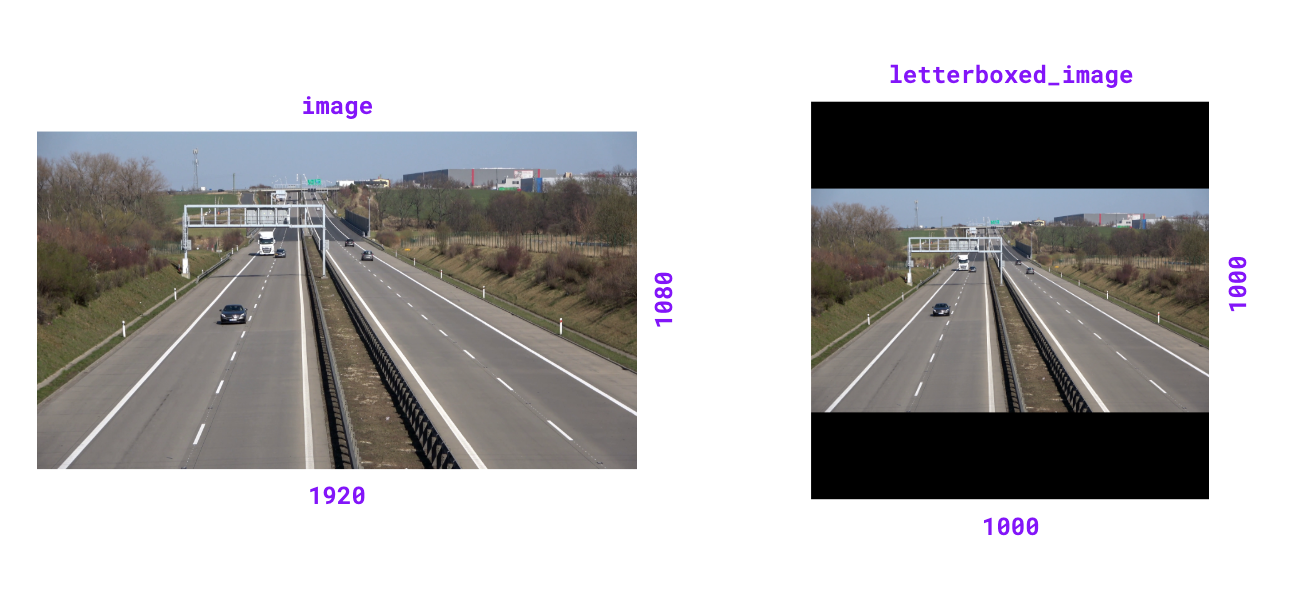
Resize image and pad with color to achieve desired resolution while maintaining aspect ratio.

Parameters:

Name Type Description Default

image

ImageType

The image to resize and pad. Accepts BGR arrays of shape (H, W, 3), BGRA arrays of shape (H, W, 4), grayscale arrays of shape (H, W), or a PIL Image.

required

resolution_wh

tuple[int, int]

Target resolution as (width, height).

required

color

tuple[int, int, int] | Color

Padding color. If tuple, should be in BGR format. Defaults to Color.BLACK.

BLACK

Returns:

Type Description
ImageType

Letterboxed image matching input type.

Note

For BGRA inputs, the alpha channel in the padding region is set to 0 (fully transparent). Grayscale inputs receive scalar padding from color[0].

Examples:

>>> import numpy as np
>>> import supervision as sv
>>> image = np.zeros((1080, 1920, 3), dtype=np.uint8)
>>> image.shape
(1080, 1920, 3)
>>> letterboxed_image = sv.letterbox_image(
...     image=image, resolution_wh=(1000, 1000)
... )
>>> letterboxed_image.shape
(1000, 1000, 3)
>>> gray = np.zeros((4, 6), dtype=np.uint8)
>>> sv.letterbox_image(image=gray, resolution_wh=(10, 10)).shape
(10, 10)
letterbox-image

Source code in src/supervision/utils/image.py
@ensure_cv2_image_for_standalone_function
def letterbox_image(
    image: ImageType,
    resolution_wh: tuple[int, int],
    color: tuple[int, int, int] | Color = Color.BLACK,
) -> ImageType:
    """
    Resize image and pad with color to achieve desired resolution while
    maintaining aspect ratio.

    Args:
        image: The image to resize and pad. Accepts BGR arrays of shape
            ``(H, W, 3)``, BGRA arrays of shape ``(H, W, 4)``, grayscale
            arrays of shape ``(H, W)``, or a PIL ``Image``.
        resolution_wh: Target resolution as `(width, height)`.
        color: Padding color. If tuple, should be in BGR format.
            Defaults to `Color.BLACK`.

    Returns:
        Letterboxed image matching input type.

    Note:
        For BGRA inputs, the alpha channel in the padding region is set to
        0 (fully transparent). Grayscale inputs receive scalar padding
        from ``color[0]``.

    Examples:
        ```pycon
        >>> import numpy as np
        >>> import supervision as sv
        >>> image = np.zeros((1080, 1920, 3), dtype=np.uint8)
        >>> image.shape
        (1080, 1920, 3)
        >>> letterboxed_image = sv.letterbox_image(
        ...     image=image, resolution_wh=(1000, 1000)
        ... )
        >>> letterboxed_image.shape
        (1000, 1000, 3)
        >>> gray = np.zeros((4, 6), dtype=np.uint8)
        >>> sv.letterbox_image(image=gray, resolution_wh=(10, 10)).shape
        (10, 10)

        ```

    ![letterbox-image](https://media.roboflow.com/supervision-docs/supervision-docs-letterbox-image-2.png){ align=center width="1000" }
    """  # noqa E501 // docs
    assert isinstance(image, np.ndarray)
    color = unify_to_bgr(color=color)
    resized_image = resize_image(
        image=image, resolution_wh=resolution_wh, keep_aspect_ratio=True
    )
    height_new, width_new = resized_image.shape[:2]
    padding_top = (resolution_wh[1] - height_new) // 2
    padding_bottom = resolution_wh[1] - height_new - padding_top
    padding_left = (resolution_wh[0] - width_new) // 2
    padding_right = resolution_wh[0] - width_new - padding_left
    image_with_borders = cv2.copyMakeBorder(
        resized_image,
        padding_top,
        padding_bottom,
        padding_left,
        padding_right,
        cv2.BORDER_CONSTANT,
        value=color,
    )

    return image_with_borders

supervision.utils.image.tint_image(image: ImageType, color: Color = Color.BLACK, opacity: float = 0.5) -> ImageType

Tint image with solid color overlay at specified opacity.

Parameters:

Name Type Description Default

image

ImageType

The image to tint.

required

color

Color

Overlay tint color. Defaults to Color.BLACK.

BLACK

opacity

float

Blend ratio between overlay and image (0.0-1.0). Defaults to 0.5.

0.5

Returns:

Type Description
ImageType

Tinted image matching input type.

Raises:

Type Description
ValueError

If opacity is outside range [0.0, 1.0].

Examples:

>>> import numpy as np
>>> import supervision as sv
>>> image = np.zeros((100, 100, 3), dtype=np.uint8)
>>> tinted_image = sv.tint_image(
...     image=image, color=sv.Color.ROBOFLOW, opacity=0.5
... )
>>> tinted_image.shape
(100, 100, 3)
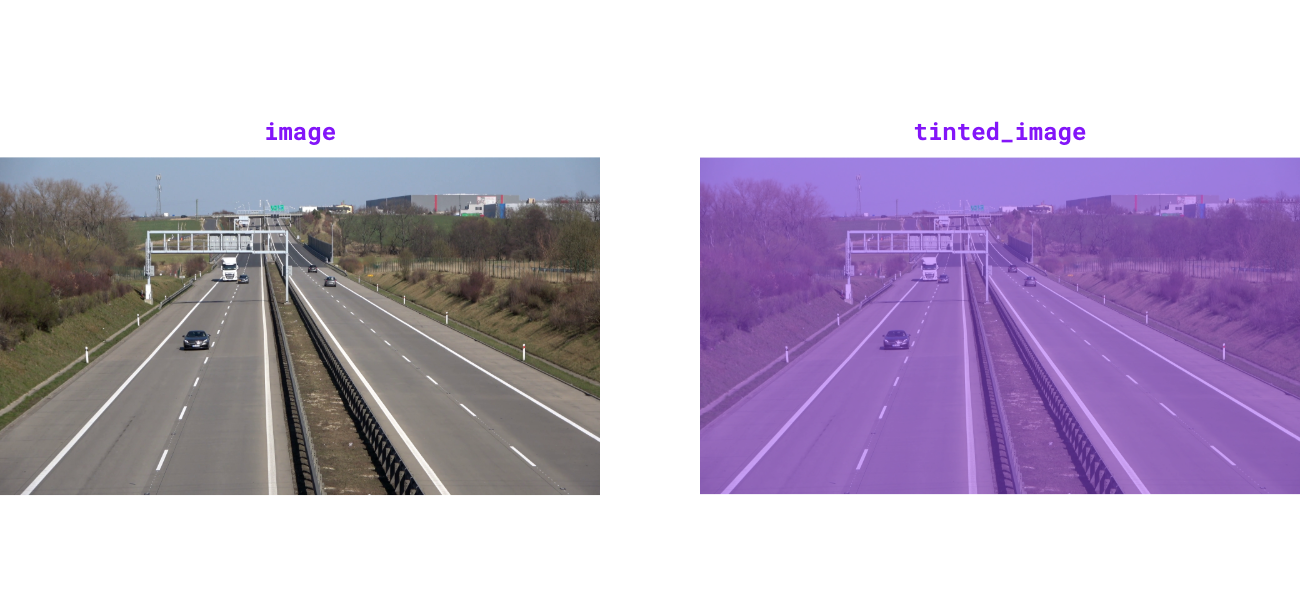
tint-image

Source code in src/supervision/utils/image.py
@ensure_cv2_image_for_standalone_function
def tint_image(
    image: ImageType,
    color: Color = Color.BLACK,
    opacity: float = 0.5,
) -> ImageType:
    """
    Tint image with solid color overlay at specified opacity.

    Args:
        image: The image to tint.
        color: Overlay tint color. Defaults to `Color.BLACK`.
        opacity: Blend ratio between overlay and image (0.0-1.0).
            Defaults to `0.5`.

    Returns:
        Tinted image matching input
            type.

    Raises:
        ValueError: If opacity is outside range [0.0, 1.0].

    Examples:
        ```pycon
        >>> import numpy as np
        >>> import supervision as sv
        >>> image = np.zeros((100, 100, 3), dtype=np.uint8)
        >>> tinted_image = sv.tint_image(
        ...     image=image, color=sv.Color.ROBOFLOW, opacity=0.5
        ... )
        >>> tinted_image.shape
        (100, 100, 3)

        ```

    ![tint-image](https://media.roboflow.com/supervision-docs/supervision-docs-tint-image-2.png){ align=center width="1000" }
    """  # noqa E501 // docs
    assert isinstance(image, np.ndarray)
    if not 0.0 <= opacity <= 1.0:
        raise ValueError("opacity must be between 0.0 and 1.0")

    overlay = np.full_like(image, fill_value=color.as_bgr(), dtype=image.dtype)
    cv2.addWeighted(
        src1=overlay, alpha=opacity, src2=image, beta=1 - opacity, gamma=0, dst=image
    )
    return image

supervision.utils.image.grayscale_image(image: ImageType) -> ImageType

Convert image to 3-channel grayscale. Luminance channel is broadcast to all three channels for compatibility with color-based drawing helpers.

Parameters:

Name Type Description Default

image

ImageType

The image to convert to grayscale.

required

Returns:

Type Description
ImageType

3-channel grayscale image matching input type.

Examples:

>>> import numpy as np
>>> import supervision as sv
>>> image = np.ones((100, 100, 3), dtype=np.uint8) * 128
>>> grayscale_image = sv.grayscale_image(image=image)
>>> grayscale_image.shape
(100, 100, 3)
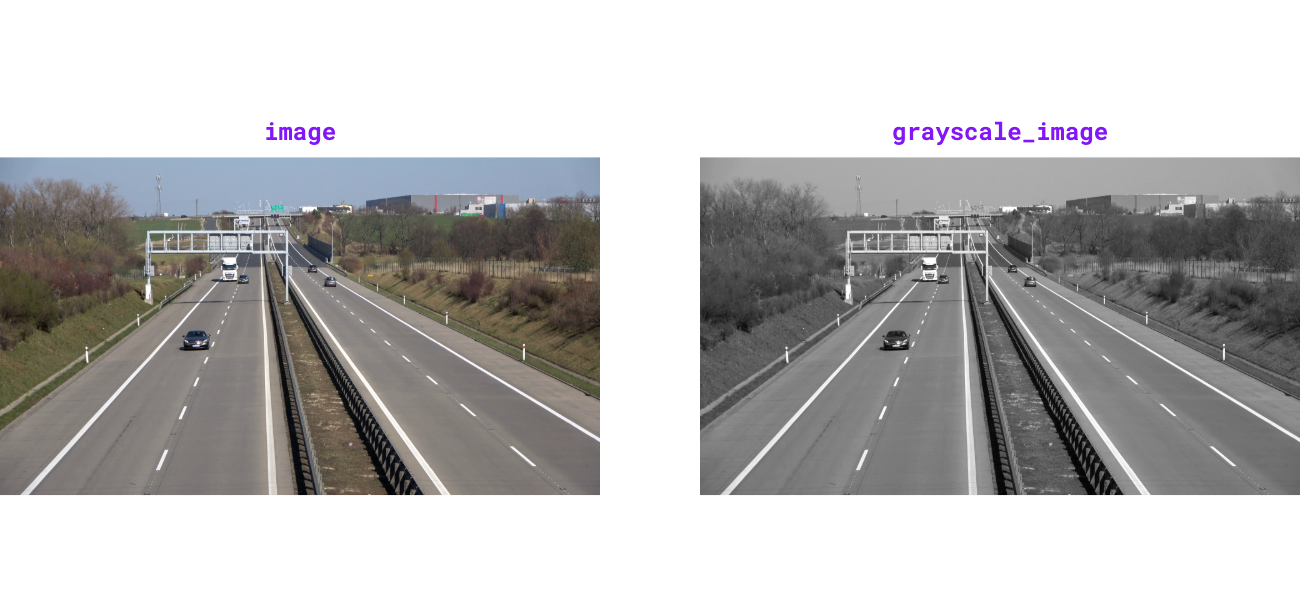
grayscale-image

Source code in src/supervision/utils/image.py
@ensure_cv2_image_for_standalone_function
def grayscale_image(image: ImageType) -> ImageType:
    """
    Convert image to 3-channel grayscale. Luminance channel is broadcast to
    all three channels for compatibility with color-based drawing helpers.

    Args:
        image: The image to convert to
            grayscale.

    Returns:
        3-channel grayscale image
            matching input type.

    Examples:
        ```pycon
        >>> import numpy as np
        >>> import supervision as sv
        >>> image = np.ones((100, 100, 3), dtype=np.uint8) * 128
        >>> grayscale_image = sv.grayscale_image(image=image)
        >>> grayscale_image.shape
        (100, 100, 3)

        ```

    ![grayscale-image](https://media.roboflow.com/supervision-docs/supervision-docs-grayscale-image-2.png){ align=center width="1000" }
    """  # noqa E501 // docs
    grayscaled = cv2.cvtColor(image, cv2.COLOR_BGR2GRAY)
    return cv2.cvtColor(grayscaled, cv2.COLOR_GRAY2BGR)

supervision.utils.image.get_image_resolution_wh(image: ImageType) -> tuple[int, int]

Get image width and height as a tuple (width, height) for various image formats.

Supports both numpy.ndarray images (with shape (H, W, ...)) and PIL.Image.Image inputs.

Parameters:

Name Type Description Default

image

ImageType

Input image.

required

Returns:

Type Description
tuple[int, int]

Image resolution as (width, height).

Raises:

Type Description
ValueError

If a numpy.ndarray image has fewer than 2 dimensions.

TypeError

If image is not a supported type (numpy.ndarray or PIL.Image.Image).

Examples:

>>> import numpy as np
>>> import supervision as sv
>>> image = np.zeros((1080, 1920, 3), dtype=np.uint8)
>>> sv.get_image_resolution_wh(image)
(1920, 1080)
Source code in src/supervision/utils/image.py
def get_image_resolution_wh(image: ImageType) -> tuple[int, int]:
    """
    Get image width and height as a tuple `(width, height)` for various image formats.

    Supports both `numpy.ndarray` images (with shape `(H, W, ...)`) and
    `PIL.Image.Image` inputs.

    Args:
        image: Input image.

    Returns:
        Image resolution as `(width, height)`.

    Raises:
        ValueError: If a `numpy.ndarray` image has fewer than 2 dimensions.
        TypeError: If `image` is not a supported type (`numpy.ndarray` or
            `PIL.Image.Image`).

    Examples:
        ```pycon
        >>> import numpy as np
        >>> import supervision as sv
        >>> image = np.zeros((1080, 1920, 3), dtype=np.uint8)
        >>> sv.get_image_resolution_wh(image)
        (1920, 1080)

        ```
    """
    if isinstance(image, np.ndarray):
        if image.ndim < 2:
            raise ValueError(
                "NumPy image must have at least 2 dimensions (H, W, ...). "
                f"Received shape: {image.shape}"
            )
        height, width = image.shape[:2]
        return int(width), int(height)

    if isinstance(image, Image.Image):
        width, height = image.size
        return int(width), int(height)

    raise TypeError(
        "`image` must be a numpy.ndarray or PIL.Image.Image. "
        f"Received type: {type(image)}"
    )

supervision.utils.image.ImageSink

Source code in src/supervision/utils/image.py
class ImageSink:
    def __init__(
        self,
        target_dir_path: str,
        overwrite: bool = False,
        image_name_pattern: str = "image_{:05d}.png",
    ):
        """
        Initialize context manager for saving images to directory.

        Args:
            target_dir_path: Target directory path where images will be
                saved.
            overwrite: Whether to overwrite existing directory.
                Defaults to `False`.
            image_name_pattern: File name pattern for saved images.
                Defaults to `"image_{:05d}.png"`.

        Examples:
            ```pycon
            >>> import numpy as np
            >>> import supervision as sv
            >>> import tempfile
            >>> import os
            >>> with tempfile.TemporaryDirectory() as tmpdir:
            ...     image = np.zeros((100, 100, 3), dtype=np.uint8)
            ...     with sv.ImageSink(target_dir_path=tmpdir, overwrite=True) as sink:
            ...         sink.save_image(image=image)
            ...         sink.save_image(image=image)
            ...     files = sorted(os.listdir(tmpdir))
            ...     len(files)
            2

            ```
        """
        self.target_dir_path = target_dir_path
        self.overwrite = overwrite
        self.image_name_pattern = image_name_pattern
        self.image_count = 0

    def __enter__(self) -> ImageSink:
        if os.path.exists(self.target_dir_path):
            if self.overwrite:
                shutil.rmtree(self.target_dir_path)
                os.makedirs(self.target_dir_path)
        else:
            os.makedirs(self.target_dir_path)

        return self

    def save_image(
        self, image: npt.NDArray[np.uint8], image_name: str | None = None
    ) -> None:
        """
        Save image to target directory with optional custom filename.

        Args:
            image: Image to save with shape `(height, width, 3)`
                in BGR format.
            image_name: Custom filename for saved image. If
                `None`, generates name using `image_name_pattern`. Defaults to
                `None`.
        """
        if image_name is None:
            image_name = self.image_name_pattern.format(self.image_count)

        image_path = os.path.join(self.target_dir_path, image_name)
        cv2.imwrite(image_path, image)
        self.image_count += 1

    def __exit__(
        self,
        exc_type: type[BaseException] | None,
        exc_value: BaseException | None,
        exc_traceback: Any,
    ) -> None:
        pass

Functions

__init__(target_dir_path: str, overwrite: bool = False, image_name_pattern: str = 'image_{:05d}.png')

Initialize context manager for saving images to directory.

Parameters:

Name Type Description Default
target_dir_path
str

Target directory path where images will be saved.

required
overwrite
bool

Whether to overwrite existing directory. Defaults to False.

False
image_name_pattern
str

File name pattern for saved images. Defaults to "image_{:05d}.png".

'image_{:05d}.png'

Examples:

>>> import numpy as np
>>> import supervision as sv
>>> import tempfile
>>> import os
>>> with tempfile.TemporaryDirectory() as tmpdir:
...     image = np.zeros((100, 100, 3), dtype=np.uint8)
...     with sv.ImageSink(target_dir_path=tmpdir, overwrite=True) as sink:
...         sink.save_image(image=image)
...     files = sorted(os.listdir(tmpdir))
...     len(files)
2
Source code in src/supervision/utils/image.py
def __init__(
    self,
    target_dir_path: str,
    overwrite: bool = False,
    image_name_pattern: str = "image_{:05d}.png",
):
    """
    Initialize context manager for saving images to directory.

    Args:
        target_dir_path: Target directory path where images will be
            saved.
        overwrite: Whether to overwrite existing directory.
            Defaults to `False`.
        image_name_pattern: File name pattern for saved images.
            Defaults to `"image_{:05d}.png"`.

    Examples:
        ```pycon
        >>> import numpy as np
        >>> import supervision as sv
        >>> import tempfile
        >>> import os
        >>> with tempfile.TemporaryDirectory() as tmpdir:
        ...     image = np.zeros((100, 100, 3), dtype=np.uint8)
        ...     with sv.ImageSink(target_dir_path=tmpdir, overwrite=True) as sink:
        ...         sink.save_image(image=image)
        ...         sink.save_image(image=image)
        ...     files = sorted(os.listdir(tmpdir))
        ...     len(files)
        2

        ```
    """
    self.target_dir_path = target_dir_path
    self.overwrite = overwrite
    self.image_name_pattern = image_name_pattern
    self.image_count = 0

save_image(image: npt.NDArray[np.uint8], image_name: str | None = None) -> None

Save image to target directory with optional custom filename.

Parameters:

Name Type Description Default
image
NDArray[uint8]

Image to save with shape (height, width, 3) in BGR format.

required
image_name
str | None

Custom filename for saved image. If None, generates name using image_name_pattern. Defaults to None.

None
Source code in src/supervision/utils/image.py
def save_image(
    self, image: npt.NDArray[np.uint8], image_name: str | None = None
) -> None:
    """
    Save image to target directory with optional custom filename.

    Args:
        image: Image to save with shape `(height, width, 3)`
            in BGR format.
        image_name: Custom filename for saved image. If
            `None`, generates name using `image_name_pattern`. Defaults to
            `None`.
    """
    if image_name is None:
        image_name = self.image_name_pattern.format(self.image_count)

    image_path = os.path.join(self.target_dir_path, image_name)
    cv2.imwrite(image_path, image)
    self.image_count += 1

Comments