Skip to content

Annotators

import supervision as sv

image = ...
key_points = sv.KeyPoints(...)

vertex_annotator = sv.VertexAnnotator(
    color=sv.Color.GREEN,
    radius=10,
)
annotated_frame = vertex_annotator.annotate(
    scene=image.copy(),
    key_points=key_points,
)
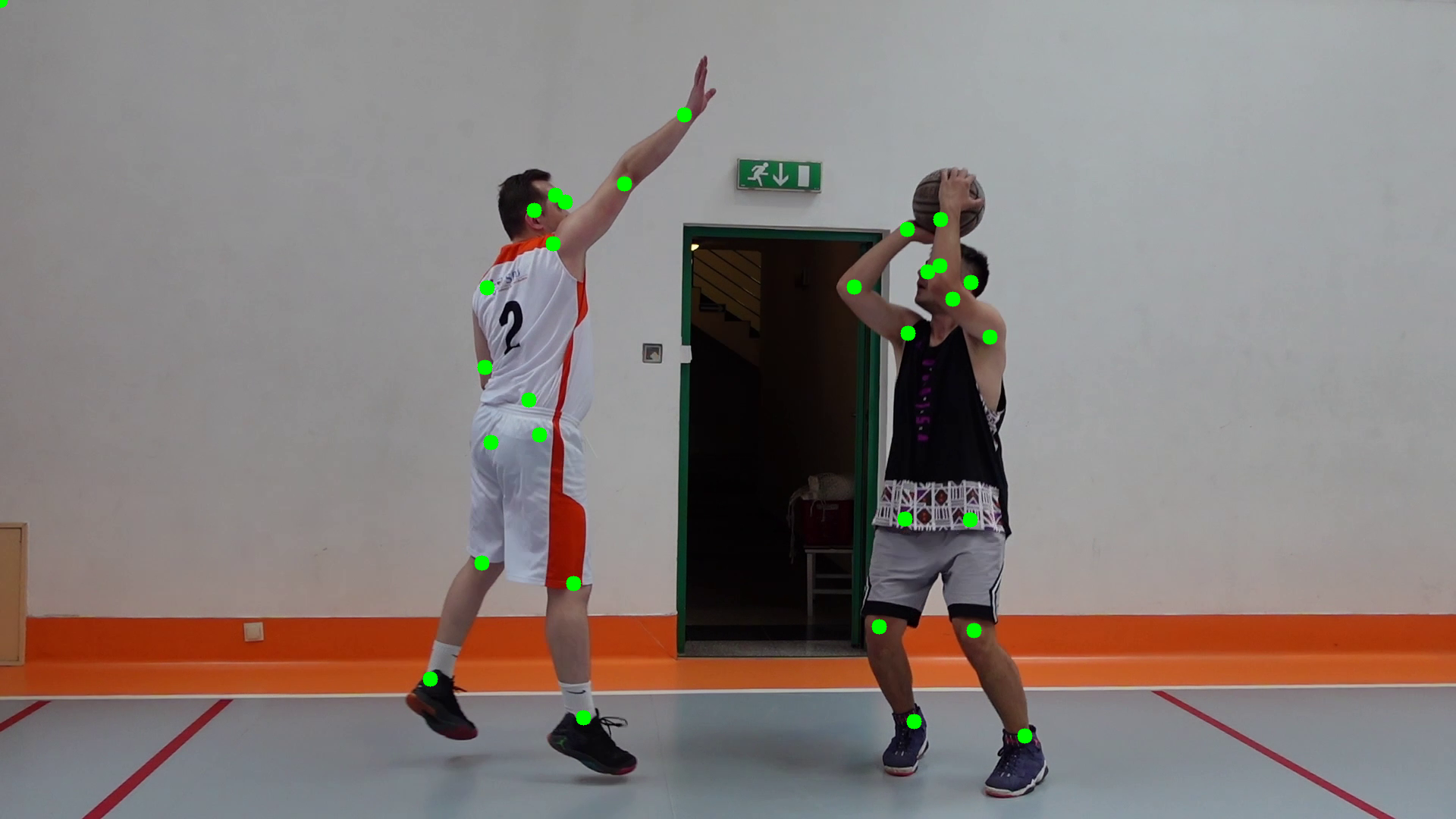
vertex-annotator-example

import supervision as sv

image = ...
key_points = sv.KeyPoints(...)

edge_annotator = sv.EdgeAnnotator(
    color=sv.Color.GREEN,
    thickness=5,
)
annotated_frame = edge_annotator.annotate(
    scene=image.copy(),
    key_points=key_points,
)
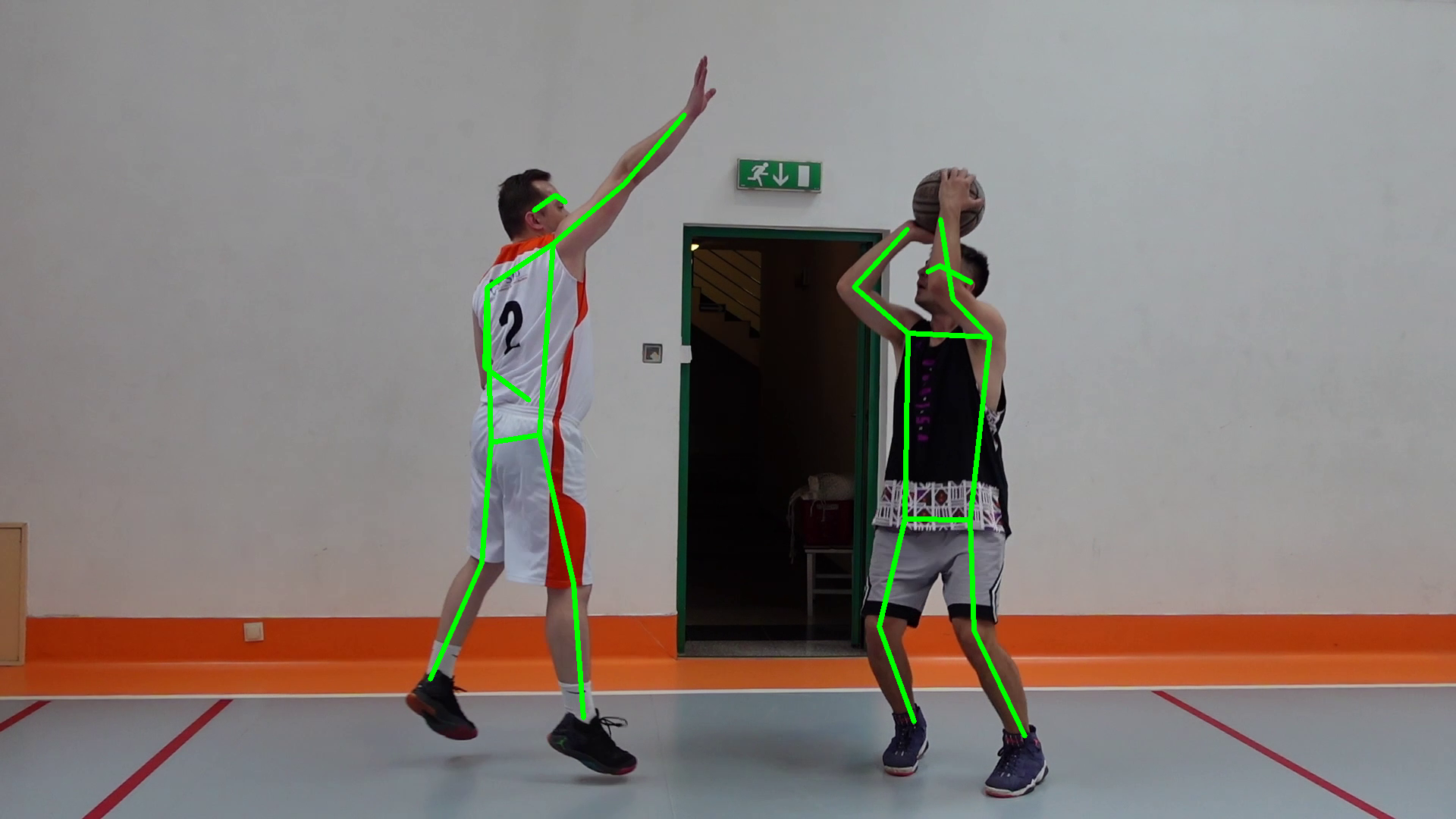
edge-annotator-example

import supervision as sv

image = ...
key_points = sv.KeyPoints(...)

vertex_label_annotator = sv.VertexLabelAnnotator(
    color=sv.Color.GREEN,
    text_color=sv.Color.BLACK,
    border_radius=5,
)
annotated_frame = vertex_label_annotator.annotate(
    scene=image.copy(),
    key_points=key_points,
)
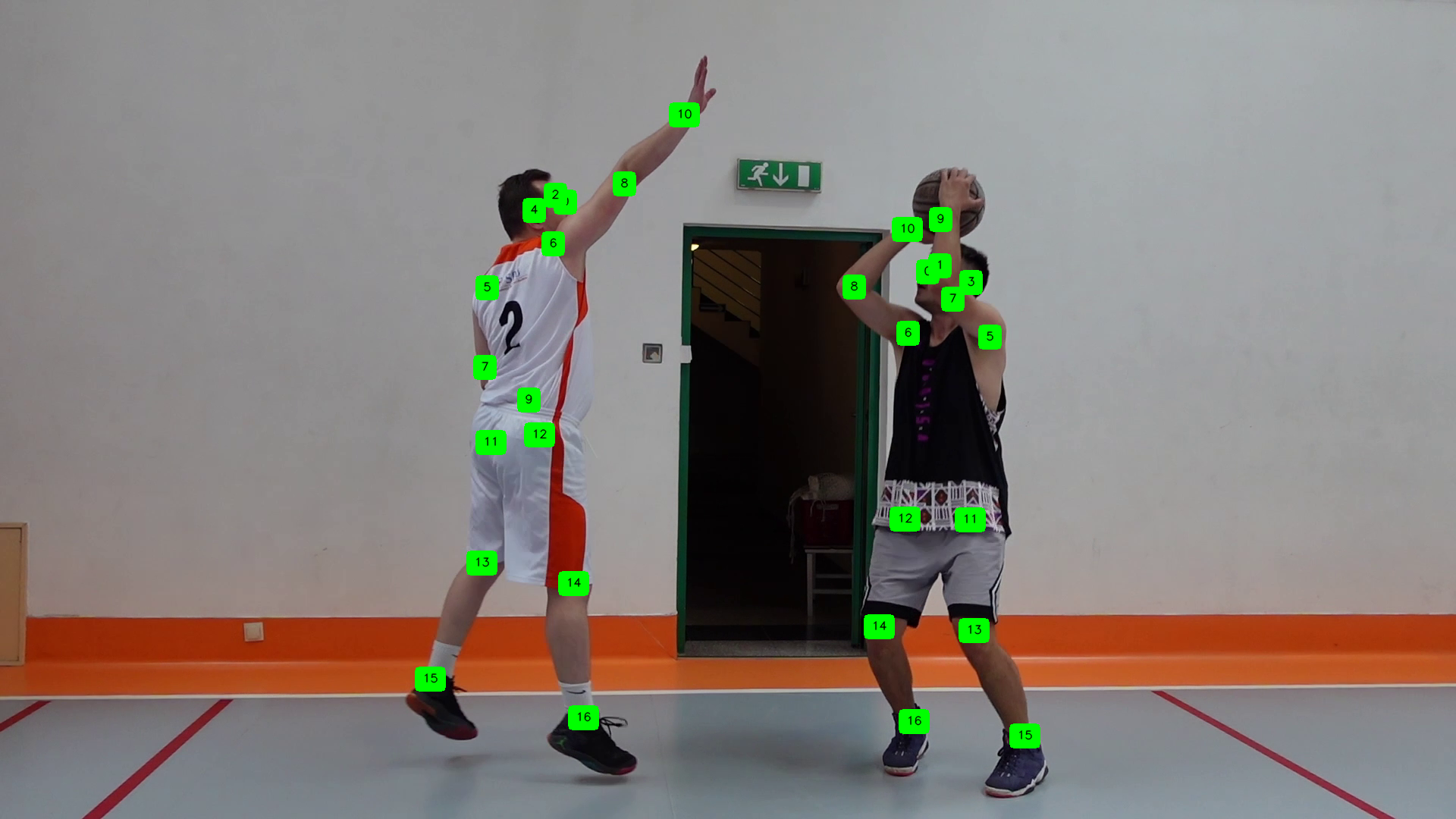
vertex-label-annotator-example

import supervision as sv

image = ...
key_points = sv.KeyPoints(...)

area_annotator = sv.VertexEllipseAreaAnnotator(
    color=sv.Color.GREEN,
    sigma=2.0,
)
annotated_frame = area_annotator.annotate(
    scene=image.copy(),
    key_points=key_points,
)
import supervision as sv

image = ...
key_points = sv.KeyPoints(...)

outline_annotator = sv.VertexEllipseOutlineAnnotator(
    color=sv.Color.GREEN,
    sigma=2.0,
    thickness=2,
)
annotated_frame = outline_annotator.annotate(
    scene=image.copy(),
    key_points=key_points,
)
import supervision as sv

image = ...
key_points = sv.KeyPoints(...)

halo_annotator = sv.VertexEllipseHaloAnnotator(
    color=sv.Color.GREEN,
    sigma=2.0,
)
annotated_frame = halo_annotator.annotate(
    scene=image.copy(),
    key_points=key_points,
)

supervision.key_points.annotators.VertexAnnotator

Bases: BaseKeyPointAnnotator

A class that specializes in drawing skeleton vertices on images. It uses specified key points to determine the locations where the vertices should be drawn.

Source code in src/supervision/key_points/annotators.py
class VertexAnnotator(BaseKeyPointAnnotator):
    """
    A class that specializes in drawing skeleton vertices on images. It uses
    specified key points to determine the locations where the vertices should be
    drawn.
    """

    def __init__(
        self,
        color: Color = Color.ROBOFLOW,
        radius: int = 4,
    ) -> None:
        """
        Args:
            color: The color to use for annotating key points.
            radius: The radius of the circles used to represent the key points.
        """
        self.color = color
        self.radius = radius

    @ensure_cv2_image_for_class_method
    def annotate(self, scene: ImageType, key_points: KeyPoints) -> ImageType:
        """
        Annotates the given scene with skeleton vertices based on the provided key
        points. It draws circles at each key point location. Anchors marked as
        not visible via ``key_points.visible`` are skipped.

        Args:
            scene: The image where skeleton vertices will be drawn. `ImageType` is a
                flexible type, accepting either `numpy.ndarray` or `PIL.Image.Image`.
            key_points: A collection of key points where each key point consists of x
                and y coordinates.

        Returns:
            The annotated image, matching the type of `scene` (`numpy.ndarray`
                or `PIL.Image.Image`)

        Example:
            ```pycon
            >>> import numpy as np
            >>> import supervision as sv
            >>> image = np.zeros((800, 800, 3), dtype=np.uint8)
            >>> key_points = sv.KeyPoints(
            ...     xy=np.array(
            ...         [[[400, 200], [300, 500], [500, 500]]],
            ...         dtype=np.float32,
            ...     ),
            ...     class_id=np.array([0]),
            ...     visible=np.array([[True, True, True]]),
            ... )
            >>> annotator = sv.VertexAnnotator(
            ...     color=sv.Color.ROBOFLOW, radius=10
            ... )
            >>> result = annotator.annotate(image.copy(), key_points)

            ```
        """
        assert isinstance(scene, np.ndarray)
        if len(key_points) == 0:
            return scene

        for detection_index, xy in enumerate(key_points.xy):
            for point_index, (x, y) in enumerate(xy):
                if np.allclose((x, y), 0):
                    continue
                if (
                    key_points.visible is not None
                    and not key_points.visible[detection_index, point_index]
                ):
                    continue
                cv2.circle(
                    img=scene,
                    center=(int(x), int(y)),
                    radius=self.radius,
                    color=self.color.as_bgr(),
                    thickness=-1,
                )

        return scene

Functions

__init__(color: Color = Color.ROBOFLOW, radius: int = 4) -> None

Parameters:

Name Type Description Default
color
Color

The color to use for annotating key points.

ROBOFLOW
radius
int

The radius of the circles used to represent the key points.

4
Source code in src/supervision/key_points/annotators.py
def __init__(
    self,
    color: Color = Color.ROBOFLOW,
    radius: int = 4,
) -> None:
    """
    Args:
        color: The color to use for annotating key points.
        radius: The radius of the circles used to represent the key points.
    """
    self.color = color
    self.radius = radius

annotate(scene: ImageType, key_points: KeyPoints) -> ImageType

Annotates the given scene with skeleton vertices based on the provided key points. It draws circles at each key point location. Anchors marked as not visible via key_points.visible are skipped.

Parameters:

Name Type Description Default
scene
ImageType

The image where skeleton vertices will be drawn. ImageType is a flexible type, accepting either numpy.ndarray or PIL.Image.Image.

required
key_points
KeyPoints

A collection of key points where each key point consists of x and y coordinates.

required

Returns:

Type Description
ImageType

The annotated image, matching the type of scene (numpy.ndarray or PIL.Image.Image)

Example
>>> import numpy as np
>>> import supervision as sv
>>> image = np.zeros((800, 800, 3), dtype=np.uint8)
>>> key_points = sv.KeyPoints(
...     xy=np.array(
...         [[[400, 200], [300, 500], [500, 500]]],
...         dtype=np.float32,
...     ),
...     class_id=np.array([0]),
...     visible=np.array([[True, True, True]]),
... )
>>> annotator = sv.VertexAnnotator(
...     color=sv.Color.ROBOFLOW, radius=10
... )
>>> result = annotator.annotate(image.copy(), key_points)
Source code in src/supervision/key_points/annotators.py
@ensure_cv2_image_for_class_method
def annotate(self, scene: ImageType, key_points: KeyPoints) -> ImageType:
    """
    Annotates the given scene with skeleton vertices based on the provided key
    points. It draws circles at each key point location. Anchors marked as
    not visible via ``key_points.visible`` are skipped.

    Args:
        scene: The image where skeleton vertices will be drawn. `ImageType` is a
            flexible type, accepting either `numpy.ndarray` or `PIL.Image.Image`.
        key_points: A collection of key points where each key point consists of x
            and y coordinates.

    Returns:
        The annotated image, matching the type of `scene` (`numpy.ndarray`
            or `PIL.Image.Image`)

    Example:
        ```pycon
        >>> import numpy as np
        >>> import supervision as sv
        >>> image = np.zeros((800, 800, 3), dtype=np.uint8)
        >>> key_points = sv.KeyPoints(
        ...     xy=np.array(
        ...         [[[400, 200], [300, 500], [500, 500]]],
        ...         dtype=np.float32,
        ...     ),
        ...     class_id=np.array([0]),
        ...     visible=np.array([[True, True, True]]),
        ... )
        >>> annotator = sv.VertexAnnotator(
        ...     color=sv.Color.ROBOFLOW, radius=10
        ... )
        >>> result = annotator.annotate(image.copy(), key_points)

        ```
    """
    assert isinstance(scene, np.ndarray)
    if len(key_points) == 0:
        return scene

    for detection_index, xy in enumerate(key_points.xy):
        for point_index, (x, y) in enumerate(xy):
            if np.allclose((x, y), 0):
                continue
            if (
                key_points.visible is not None
                and not key_points.visible[detection_index, point_index]
            ):
                continue
            cv2.circle(
                img=scene,
                center=(int(x), int(y)),
                radius=self.radius,
                color=self.color.as_bgr(),
                thickness=-1,
            )

    return scene

supervision.key_points.annotators.EdgeAnnotator

Bases: BaseKeyPointAnnotator

A class that specializes in drawing skeleton edges on images using specified key points. It connects key points with lines to form the skeleton structure.

Source code in src/supervision/key_points/annotators.py
class EdgeAnnotator(BaseKeyPointAnnotator):
    """
    A class that specializes in drawing skeleton edges on images using specified key
    points. It connects key points with lines to form the skeleton structure.
    """

    def __init__(
        self,
        color: Color = Color.ROBOFLOW,
        thickness: int = 2,
        edges: (
            Sequence[tuple[int, int]] | dict[int, Sequence[tuple[int, int]]] | None
        ) = None,
    ) -> None:
        """
        Args:
            color: The color to use for the edges.
            thickness: The thickness of the edges.
            edges: The edges to draw. If set to ``None``, will attempt to
                auto-detect the skeleton by vertex count. A
                ``Sequence[tuple[int, int]]`` applies a single skeleton to
                every instance. A ``dict[int, Sequence[tuple[int, int]]]``
                maps ``class_id`` to skeleton edges, enabling correct
                rendering for datasets with multiple skeleton types.
        """
        self.color = color
        self.thickness = thickness
        self.edges = edges

    @ensure_cv2_image_for_class_method
    def annotate(self, scene: ImageType, key_points: KeyPoints) -> ImageType:
        """
        Annotates the given scene by drawing lines between specified key points to form
        edges. Edges where either endpoint is marked as not visible via
        ``key_points.visible`` are skipped.

        Args:
            scene: The image where skeleton edges will be drawn. `ImageType` is a
                flexible type, accepting either `numpy.ndarray` or `PIL.Image.Image`.
            key_points: A collection of key points where each key point consists of x
                and y coordinates.

        Returns:
            The annotated image, matching the type of `scene` (`numpy.ndarray`
                or `PIL.Image.Image`)

        Example:
            Single-skeleton example:

            ```pycon
            >>> import numpy as np
            >>> import supervision as sv
            >>> image = np.zeros((800, 800, 3), dtype=np.uint8)
            >>> key_points = sv.KeyPoints(
            ...     xy=np.array(
            ...         [[[400, 200], [300, 500], [500, 500]]],
            ...         dtype=np.float32,
            ...     ),
            ...     class_id=np.array([0]),
            ...     visible=np.array([[True, True, True]]),
            ... )
            >>> annotator = sv.EdgeAnnotator(
            ...     color=sv.Color.ROBOFLOW,
            ...     thickness=3,
            ...     edges=[(1, 2), (1, 3)],
            ... )
            >>> result = annotator.annotate(image.copy(), key_points)

            ```

            Multi-skeleton example with per-class edges:

            ```pycon
            >>> import numpy as np
            >>> import supervision as sv
            >>> image = np.zeros((800, 800, 3), dtype=np.uint8)
            >>> key_points = sv.KeyPoints(
            ...     xy=np.array(
            ...         [[[400, 200], [300, 500], [500, 500]],
            ...          [[700, 300], [650, 500], [0, 0]]],
            ...         dtype=np.float32,
            ...     ),
            ...     class_id=np.array([0, 1]),
            ...     visible=np.array(
            ...         [[True, True, True],
            ...          [True, True, False]],
            ...     ),
            ... )
            >>> annotator = sv.EdgeAnnotator(
            ...     color=sv.Color.ROBOFLOW,
            ...     thickness=3,
            ...     edges={0: [(1, 2), (1, 3)], 1: [(1, 2)]},
            ... )
            >>> result = annotator.annotate(image.copy(), key_points)

            ```
        """
        assert isinstance(scene, np.ndarray)
        if len(key_points) == 0:
            return scene

        for detection_index, xy in enumerate(key_points.xy):
            if isinstance(self.edges, dict):
                class_id = (
                    int(key_points.class_id[detection_index])
                    if key_points.class_id is not None
                    else None
                )
                if class_id is None:
                    raise ValueError(
                        "edges is a dict but class_id is None; "
                        "KeyPoints must have class_id set."
                    )
                if class_id not in self.edges:
                    raise ValueError(f"No edges defined for class_id={class_id}.")
                edges = self.edges[class_id]
            elif self.edges:
                edges = self.edges
            else:
                _looked_up = SKELETONS_BY_VERTEX_COUNT.get(len(xy))
                if not _looked_up:
                    logger.warning("No skeleton found with %d vertices", len(xy))
                    continue
                edges = _looked_up

            for class_a, class_b in edges:
                idx_a = class_a - 1
                idx_b = class_b - 1
                xy_a = xy[idx_a]
                xy_b = xy[idx_b]
                if np.allclose(xy_a, 0) or np.allclose(xy_b, 0):
                    continue
                if key_points.visible is not None:
                    if (
                        not key_points.visible[detection_index, idx_a]
                        or not key_points.visible[detection_index, idx_b]
                    ):
                        continue

                cv2.line(
                    img=scene,
                    pt1=(int(xy_a[0]), int(xy_a[1])),
                    pt2=(int(xy_b[0]), int(xy_b[1])),
                    color=self.color.as_bgr(),
                    thickness=self.thickness,
                )

        return scene

Functions

__init__(color: Color = Color.ROBOFLOW, thickness: int = 2, edges: Sequence[tuple[int, int]] | dict[int, Sequence[tuple[int, int]]] | None = None) -> None

Parameters:

Name Type Description Default
color
Color

The color to use for the edges.

ROBOFLOW
thickness
int

The thickness of the edges.

2
edges
Sequence[tuple[int, int]] | dict[int, Sequence[tuple[int, int]]] | None

The edges to draw. If set to None, will attempt to auto-detect the skeleton by vertex count. A Sequence[tuple[int, int]] applies a single skeleton to every instance. A dict[int, Sequence[tuple[int, int]]] maps class_id to skeleton edges, enabling correct rendering for datasets with multiple skeleton types.

None
Source code in src/supervision/key_points/annotators.py
def __init__(
    self,
    color: Color = Color.ROBOFLOW,
    thickness: int = 2,
    edges: (
        Sequence[tuple[int, int]] | dict[int, Sequence[tuple[int, int]]] | None
    ) = None,
) -> None:
    """
    Args:
        color: The color to use for the edges.
        thickness: The thickness of the edges.
        edges: The edges to draw. If set to ``None``, will attempt to
            auto-detect the skeleton by vertex count. A
            ``Sequence[tuple[int, int]]`` applies a single skeleton to
            every instance. A ``dict[int, Sequence[tuple[int, int]]]``
            maps ``class_id`` to skeleton edges, enabling correct
            rendering for datasets with multiple skeleton types.
    """
    self.color = color
    self.thickness = thickness
    self.edges = edges

annotate(scene: ImageType, key_points: KeyPoints) -> ImageType

Annotates the given scene by drawing lines between specified key points to form edges. Edges where either endpoint is marked as not visible via key_points.visible are skipped.

Parameters:

Name Type Description Default
scene
ImageType

The image where skeleton edges will be drawn. ImageType is a flexible type, accepting either numpy.ndarray or PIL.Image.Image.

required
key_points
KeyPoints

A collection of key points where each key point consists of x and y coordinates.

required

Returns:

Type Description
ImageType

The annotated image, matching the type of scene (numpy.ndarray or PIL.Image.Image)

Example

Single-skeleton example:

>>> import numpy as np
>>> import supervision as sv
>>> image = np.zeros((800, 800, 3), dtype=np.uint8)
>>> key_points = sv.KeyPoints(
...     xy=np.array(
...         [[[400, 200], [300, 500], [500, 500]]],
...         dtype=np.float32,
...     ),
...     class_id=np.array([0]),
...     visible=np.array([[True, True, True]]),
... )
>>> annotator = sv.EdgeAnnotator(
...     color=sv.Color.ROBOFLOW,
...     thickness=3,
...     edges=[(1, 2), (1, 3)],
... )
>>> result = annotator.annotate(image.copy(), key_points)

Multi-skeleton example with per-class edges:

>>> import numpy as np
>>> import supervision as sv
>>> image = np.zeros((800, 800, 3), dtype=np.uint8)
>>> key_points = sv.KeyPoints(
...     xy=np.array(
...         [[[400, 200], [300, 500], [500, 500]],
...          [[700, 300], [650, 500], [0, 0]]],
...         dtype=np.float32,
...     ),
...     class_id=np.array([0, 1]),
...     visible=np.array(
...         [[True, True, True],
...          [True, True, False]],
...     ),
... )
>>> annotator = sv.EdgeAnnotator(
...     color=sv.Color.ROBOFLOW,
...     thickness=3,
...     edges={0: [(1, 2), (1, 3)], 1: [(1, 2)]},
... )
>>> result = annotator.annotate(image.copy(), key_points)
Source code in src/supervision/key_points/annotators.py
@ensure_cv2_image_for_class_method
def annotate(self, scene: ImageType, key_points: KeyPoints) -> ImageType:
    """
    Annotates the given scene by drawing lines between specified key points to form
    edges. Edges where either endpoint is marked as not visible via
    ``key_points.visible`` are skipped.

    Args:
        scene: The image where skeleton edges will be drawn. `ImageType` is a
            flexible type, accepting either `numpy.ndarray` or `PIL.Image.Image`.
        key_points: A collection of key points where each key point consists of x
            and y coordinates.

    Returns:
        The annotated image, matching the type of `scene` (`numpy.ndarray`
            or `PIL.Image.Image`)

    Example:
        Single-skeleton example:

        ```pycon
        >>> import numpy as np
        >>> import supervision as sv
        >>> image = np.zeros((800, 800, 3), dtype=np.uint8)
        >>> key_points = sv.KeyPoints(
        ...     xy=np.array(
        ...         [[[400, 200], [300, 500], [500, 500]]],
        ...         dtype=np.float32,
        ...     ),
        ...     class_id=np.array([0]),
        ...     visible=np.array([[True, True, True]]),
        ... )
        >>> annotator = sv.EdgeAnnotator(
        ...     color=sv.Color.ROBOFLOW,
        ...     thickness=3,
        ...     edges=[(1, 2), (1, 3)],
        ... )
        >>> result = annotator.annotate(image.copy(), key_points)

        ```

        Multi-skeleton example with per-class edges:

        ```pycon
        >>> import numpy as np
        >>> import supervision as sv
        >>> image = np.zeros((800, 800, 3), dtype=np.uint8)
        >>> key_points = sv.KeyPoints(
        ...     xy=np.array(
        ...         [[[400, 200], [300, 500], [500, 500]],
        ...          [[700, 300], [650, 500], [0, 0]]],
        ...         dtype=np.float32,
        ...     ),
        ...     class_id=np.array([0, 1]),
        ...     visible=np.array(
        ...         [[True, True, True],
        ...          [True, True, False]],
        ...     ),
        ... )
        >>> annotator = sv.EdgeAnnotator(
        ...     color=sv.Color.ROBOFLOW,
        ...     thickness=3,
        ...     edges={0: [(1, 2), (1, 3)], 1: [(1, 2)]},
        ... )
        >>> result = annotator.annotate(image.copy(), key_points)

        ```
    """
    assert isinstance(scene, np.ndarray)
    if len(key_points) == 0:
        return scene

    for detection_index, xy in enumerate(key_points.xy):
        if isinstance(self.edges, dict):
            class_id = (
                int(key_points.class_id[detection_index])
                if key_points.class_id is not None
                else None
            )
            if class_id is None:
                raise ValueError(
                    "edges is a dict but class_id is None; "
                    "KeyPoints must have class_id set."
                )
            if class_id not in self.edges:
                raise ValueError(f"No edges defined for class_id={class_id}.")
            edges = self.edges[class_id]
        elif self.edges:
            edges = self.edges
        else:
            _looked_up = SKELETONS_BY_VERTEX_COUNT.get(len(xy))
            if not _looked_up:
                logger.warning("No skeleton found with %d vertices", len(xy))
                continue
            edges = _looked_up

        for class_a, class_b in edges:
            idx_a = class_a - 1
            idx_b = class_b - 1
            xy_a = xy[idx_a]
            xy_b = xy[idx_b]
            if np.allclose(xy_a, 0) or np.allclose(xy_b, 0):
                continue
            if key_points.visible is not None:
                if (
                    not key_points.visible[detection_index, idx_a]
                    or not key_points.visible[detection_index, idx_b]
                ):
                    continue

            cv2.line(
                img=scene,
                pt1=(int(xy_a[0]), int(xy_a[1])),
                pt2=(int(xy_b[0]), int(xy_b[1])),
                color=self.color.as_bgr(),
                thickness=self.thickness,
            )

    return scene

supervision.key_points.annotators.VertexLabelAnnotator

A class that draws labels of skeleton vertices on images. It uses specified key points to determine the locations where the vertices should be drawn.

Source code in src/supervision/key_points/annotators.py
class VertexLabelAnnotator:
    """
    A class that draws labels of skeleton vertices on images. It uses specified key
    points to determine the locations where the vertices should be drawn.
    """

    def __init__(
        self,
        color: Color | list[Color] = Color.ROBOFLOW,
        text_color: Color | list[Color] = Color.WHITE,
        text_scale: float = 0.5,
        text_thickness: int = 1,
        text_padding: int = 10,
        border_radius: int = 0,
        smart_position: bool = False,
    ):
        """
        Args:
            color: The color to use for each keypoint label. If a list is
                provided, the colors will be used in order for each keypoint.
            text_color: The color to use for the labels. If a list is
                provided, the colors will be used in order for each keypoint.
            text_scale: The scale of the text.
            text_thickness: The thickness of the text.
            text_padding: The padding around the text.
            border_radius: The radius of the rounded corners of the boxes.
                Set to a high value to produce circles.
            smart_position: Spread out the labels to avoid overlap.
        """
        self.border_radius: int = border_radius
        self.color: Color | list[Color] = color
        self.text_color: Color | list[Color] = text_color
        self.text_scale: float = text_scale
        self.text_thickness: int = text_thickness
        self.text_padding: int = text_padding
        self.smart_position = smart_position

    def annotate(
        self,
        scene: ImageType,
        key_points: KeyPoints,
        labels: list[str] | dict[int, list[str]] | None = None,
    ) -> ImageType:
        """
        Draws labels at skeleton vertex positions on the image. Vertices
        marked not visible via ``key_points.visible`` are skipped.

        Args:
            scene: The image where vertex labels will be drawn. `ImageType` is a
                flexible type, accepting either `numpy.ndarray` or `PIL.Image.Image`.
            key_points: A collection of key points where each key point consists of x
                and y coordinates.
            labels: Labels to display at each keypoint. If ``None``, keypoint
                indices are used. A ``list[str]`` applies the same labels to
                every instance. A ``dict[int, list[str]]`` maps ``class_id``
                to per-class label lists, enabling correct labeling for
                datasets with multiple skeleton types.

        Returns:
            The annotated image, matching the type of `scene` (`numpy.ndarray`
                or `PIL.Image.Image`)

        Example:
            Single-skeleton example:

            ```pycon
            >>> import numpy as np
            >>> import supervision as sv
            >>> image = np.zeros((800, 800, 3), dtype=np.uint8)
            >>> key_points = sv.KeyPoints(
            ...     xy=np.array(
            ...         [[[400, 200], [300, 500], [500, 500]]],
            ...         dtype=np.float32,
            ...     ),
            ...     class_id=np.array([0]),
            ...     visible=np.array([[True, True, True]]),
            ... )
            >>> annotator = sv.VertexLabelAnnotator(
            ...     color=sv.Color.ROBOFLOW,
            ...     text_color=sv.Color.WHITE,
            ...     border_radius=5,
            ... )
            >>> result = annotator.annotate(
            ...     scene=image.copy(),
            ...     key_points=key_points,
            ...     labels=["head", "L-foot", "R-foot"],
            ... )

            ```

            Multi-skeleton example with per-class labels:

            ```pycon
            >>> import numpy as np
            >>> import supervision as sv
            >>> image = np.zeros((800, 800, 3), dtype=np.uint8)
            >>> key_points = sv.KeyPoints(
            ...     xy=np.array(
            ...         [[[400, 200], [300, 500], [500, 500]],
            ...          [[700, 300], [650, 500], [0, 0]]],
            ...         dtype=np.float32,
            ...     ),
            ...     class_id=np.array([0, 1]),
            ...     visible=np.array(
            ...         [[True, True, True],
            ...          [True, True, False]],
            ...     ),
            ... )
            >>> annotator = sv.VertexLabelAnnotator(
            ...     color=sv.Color.ROBOFLOW,
            ...     text_color=sv.Color.WHITE,
            ...     border_radius=5,
            ... )
            >>> result = annotator.annotate(
            ...     scene=image.copy(),
            ...     key_points=key_points,
            ...     labels={
            ...         0: ["head", "L-foot", "R-foot"],
            ...         1: ["top", "bottom", "pad"],
            ...     },
            ... )

            ```
        """
        assert isinstance(scene, np.ndarray)
        font = cv2.FONT_HERSHEY_SIMPLEX

        skeletons_count, points_count, _ = key_points.xy.shape
        if skeletons_count == 0:
            return scene

        all_anchors: list[tuple[int, int]] = []
        all_labels: list[str] = []
        all_colors: list[Color] = []
        all_text_colors: list[Color] = []

        for i in range(skeletons_count):
            xy = key_points.xy[i]

            class_id = (
                int(key_points.class_id[i]) if key_points.class_id is not None else None
            )
            instance_labels = self._resolve_labels(labels, points_count, class_id)
            instance_colors = self._resolve_color_list(self.color, points_count)
            instance_text_colors = self._resolve_color_list(
                self.text_color, points_count
            )

            for j in range(points_count):
                if key_points.visible is not None:
                    if not key_points.visible[i, j]:
                        continue
                elif np.allclose(xy[j], 0):
                    continue

                anchor = (int(xy[j][0]), int(xy[j][1]))
                all_anchors.append(anchor)
                all_labels.append(instance_labels[j])
                all_colors.append(instance_colors[j])
                all_text_colors.append(instance_text_colors[j])

        if not all_anchors:
            return scene

        xyxy = np.array(
            [
                self.get_text_bounding_box(
                    text=label,
                    font=font,
                    text_scale=self.text_scale,
                    text_thickness=self.text_thickness,
                    center_coordinates=anchor,
                )
                for anchor, label in zip(all_anchors, all_labels)
            ]
        )
        xyxy_padded = pad_boxes(xyxy=xyxy, px=self.text_padding)

        if self.smart_position:
            xyxy_padded = spread_out_boxes(xyxy_padded)
            xyxy = pad_boxes(xyxy=xyxy_padded, px=-self.text_padding)

        for text, color, text_color, box, box_padded in zip(
            all_labels, all_colors, all_text_colors, xyxy, xyxy_padded
        ):
            draw_rounded_rectangle(
                scene=scene,
                rect=Rect.from_xyxy(box_padded),
                color=color,
                border_radius=self.border_radius,
            )
            cv2.putText(
                img=scene,
                text=text,
                org=(box[0], box[3]),
                fontFace=font,
                fontScale=self.text_scale,
                color=text_color.as_bgr(),
                thickness=self.text_thickness,
                lineType=cv2.LINE_AA,
            )

        return scene

    @staticmethod
    def get_text_bounding_box(
        text: str,
        font: int,
        text_scale: float,
        text_thickness: int,
        center_coordinates: tuple[int, int],
    ) -> tuple[int, int, int, int]:
        text_w, text_h = cv2.getTextSize(
            text=text,
            fontFace=font,
            fontScale=text_scale,
            thickness=text_thickness,
        )[0]
        center_x, center_y = center_coordinates
        return (
            center_x - text_w // 2,
            center_y - text_h // 2,
            center_x + text_w // 2,
            center_y + text_h // 2,
        )

    @staticmethod
    def _resolve_labels(
        labels: list[str] | dict[int, list[str]] | None,
        points_count: int,
        class_id: int | None = None,
    ) -> list[str]:
        """Return the label list for a single instance."""
        if labels is None:
            return [str(j) for j in range(points_count)]

        resolved: list[str]
        if isinstance(labels, dict):
            if class_id is None:
                raise ValueError(
                    "labels is a dict but class_id is None; "
                    "KeyPoints must have class_id set."
                )
            if class_id not in labels:
                raise ValueError(f"No labels defined for class_id={class_id}.")
            resolved = labels[class_id]
        else:
            resolved = labels

        if len(resolved) != points_count:
            raise ValueError(
                f"Number of labels ({len(resolved)}) must match "
                f"number of key points ({points_count})."
            )
        return resolved

    @staticmethod
    def _resolve_color_list(
        colors: Color | list[Color],
        points_count: int,
    ) -> list[Color]:
        """Return a per-keypoint color list for a single instance."""
        if isinstance(colors, list):
            if len(colors) != points_count:
                raise ValueError(
                    f"Number of colors ({len(colors)}) must match "
                    f"number of key points ({points_count})."
                )
            return colors
        return [colors] * points_count

Functions

__init__(color: Color | list[Color] = Color.ROBOFLOW, text_color: Color | list[Color] = Color.WHITE, text_scale: float = 0.5, text_thickness: int = 1, text_padding: int = 10, border_radius: int = 0, smart_position: bool = False)

Parameters:

Name Type Description Default
color
Color | list[Color]

The color to use for each keypoint label. If a list is provided, the colors will be used in order for each keypoint.

ROBOFLOW
text_color
Color | list[Color]

The color to use for the labels. If a list is provided, the colors will be used in order for each keypoint.

WHITE
text_scale
float

The scale of the text.

0.5
text_thickness
int

The thickness of the text.

1
text_padding
int

The padding around the text.

10
border_radius
int

The radius of the rounded corners of the boxes. Set to a high value to produce circles.

0
smart_position
bool

Spread out the labels to avoid overlap.

False
Source code in src/supervision/key_points/annotators.py
def __init__(
    self,
    color: Color | list[Color] = Color.ROBOFLOW,
    text_color: Color | list[Color] = Color.WHITE,
    text_scale: float = 0.5,
    text_thickness: int = 1,
    text_padding: int = 10,
    border_radius: int = 0,
    smart_position: bool = False,
):
    """
    Args:
        color: The color to use for each keypoint label. If a list is
            provided, the colors will be used in order for each keypoint.
        text_color: The color to use for the labels. If a list is
            provided, the colors will be used in order for each keypoint.
        text_scale: The scale of the text.
        text_thickness: The thickness of the text.
        text_padding: The padding around the text.
        border_radius: The radius of the rounded corners of the boxes.
            Set to a high value to produce circles.
        smart_position: Spread out the labels to avoid overlap.
    """
    self.border_radius: int = border_radius
    self.color: Color | list[Color] = color
    self.text_color: Color | list[Color] = text_color
    self.text_scale: float = text_scale
    self.text_thickness: int = text_thickness
    self.text_padding: int = text_padding
    self.smart_position = smart_position

annotate(scene: ImageType, key_points: KeyPoints, labels: list[str] | dict[int, list[str]] | None = None) -> ImageType

Draws labels at skeleton vertex positions on the image. Vertices marked not visible via key_points.visible are skipped.

Parameters:

Name Type Description Default
scene
ImageType

The image where vertex labels will be drawn. ImageType is a flexible type, accepting either numpy.ndarray or PIL.Image.Image.

required
key_points
KeyPoints

A collection of key points where each key point consists of x and y coordinates.

required
labels
list[str] | dict[int, list[str]] | None

Labels to display at each keypoint. If None, keypoint indices are used. A list[str] applies the same labels to every instance. A dict[int, list[str]] maps class_id to per-class label lists, enabling correct labeling for datasets with multiple skeleton types.

None

Returns:

Type Description
ImageType

The annotated image, matching the type of scene (numpy.ndarray or PIL.Image.Image)

Example

Single-skeleton example:

>>> import numpy as np
>>> import supervision as sv
>>> image = np.zeros((800, 800, 3), dtype=np.uint8)
>>> key_points = sv.KeyPoints(
...     xy=np.array(
...         [[[400, 200], [300, 500], [500, 500]]],
...         dtype=np.float32,
...     ),
...     class_id=np.array([0]),
...     visible=np.array([[True, True, True]]),
... )
>>> annotator = sv.VertexLabelAnnotator(
...     color=sv.Color.ROBOFLOW,
...     text_color=sv.Color.WHITE,
...     border_radius=5,
... )
>>> result = annotator.annotate(
...     scene=image.copy(),
...     key_points=key_points,
...     labels=["head", "L-foot", "R-foot"],
... )

Multi-skeleton example with per-class labels:

>>> import numpy as np
>>> import supervision as sv
>>> image = np.zeros((800, 800, 3), dtype=np.uint8)
>>> key_points = sv.KeyPoints(
...     xy=np.array(
...         [[[400, 200], [300, 500], [500, 500]],
...          [[700, 300], [650, 500], [0, 0]]],
...         dtype=np.float32,
...     ),
...     class_id=np.array([0, 1]),
...     visible=np.array(
...         [[True, True, True],
...          [True, True, False]],
...     ),
... )
>>> annotator = sv.VertexLabelAnnotator(
...     color=sv.Color.ROBOFLOW,
...     text_color=sv.Color.WHITE,
...     border_radius=5,
... )
>>> result = annotator.annotate(
...     scene=image.copy(),
...     key_points=key_points,
...     labels={
...         0: ["head", "L-foot", "R-foot"],
...         1: ["top", "bottom", "pad"],
...     },
... )
Source code in src/supervision/key_points/annotators.py
def annotate(
    self,
    scene: ImageType,
    key_points: KeyPoints,
    labels: list[str] | dict[int, list[str]] | None = None,
) -> ImageType:
    """
    Draws labels at skeleton vertex positions on the image. Vertices
    marked not visible via ``key_points.visible`` are skipped.

    Args:
        scene: The image where vertex labels will be drawn. `ImageType` is a
            flexible type, accepting either `numpy.ndarray` or `PIL.Image.Image`.
        key_points: A collection of key points where each key point consists of x
            and y coordinates.
        labels: Labels to display at each keypoint. If ``None``, keypoint
            indices are used. A ``list[str]`` applies the same labels to
            every instance. A ``dict[int, list[str]]`` maps ``class_id``
            to per-class label lists, enabling correct labeling for
            datasets with multiple skeleton types.

    Returns:
        The annotated image, matching the type of `scene` (`numpy.ndarray`
            or `PIL.Image.Image`)

    Example:
        Single-skeleton example:

        ```pycon
        >>> import numpy as np
        >>> import supervision as sv
        >>> image = np.zeros((800, 800, 3), dtype=np.uint8)
        >>> key_points = sv.KeyPoints(
        ...     xy=np.array(
        ...         [[[400, 200], [300, 500], [500, 500]]],
        ...         dtype=np.float32,
        ...     ),
        ...     class_id=np.array([0]),
        ...     visible=np.array([[True, True, True]]),
        ... )
        >>> annotator = sv.VertexLabelAnnotator(
        ...     color=sv.Color.ROBOFLOW,
        ...     text_color=sv.Color.WHITE,
        ...     border_radius=5,
        ... )
        >>> result = annotator.annotate(
        ...     scene=image.copy(),
        ...     key_points=key_points,
        ...     labels=["head", "L-foot", "R-foot"],
        ... )

        ```

        Multi-skeleton example with per-class labels:

        ```pycon
        >>> import numpy as np
        >>> import supervision as sv
        >>> image = np.zeros((800, 800, 3), dtype=np.uint8)
        >>> key_points = sv.KeyPoints(
        ...     xy=np.array(
        ...         [[[400, 200], [300, 500], [500, 500]],
        ...          [[700, 300], [650, 500], [0, 0]]],
        ...         dtype=np.float32,
        ...     ),
        ...     class_id=np.array([0, 1]),
        ...     visible=np.array(
        ...         [[True, True, True],
        ...          [True, True, False]],
        ...     ),
        ... )
        >>> annotator = sv.VertexLabelAnnotator(
        ...     color=sv.Color.ROBOFLOW,
        ...     text_color=sv.Color.WHITE,
        ...     border_radius=5,
        ... )
        >>> result = annotator.annotate(
        ...     scene=image.copy(),
        ...     key_points=key_points,
        ...     labels={
        ...         0: ["head", "L-foot", "R-foot"],
        ...         1: ["top", "bottom", "pad"],
        ...     },
        ... )

        ```
    """
    assert isinstance(scene, np.ndarray)
    font = cv2.FONT_HERSHEY_SIMPLEX

    skeletons_count, points_count, _ = key_points.xy.shape
    if skeletons_count == 0:
        return scene

    all_anchors: list[tuple[int, int]] = []
    all_labels: list[str] = []
    all_colors: list[Color] = []
    all_text_colors: list[Color] = []

    for i in range(skeletons_count):
        xy = key_points.xy[i]

        class_id = (
            int(key_points.class_id[i]) if key_points.class_id is not None else None
        )
        instance_labels = self._resolve_labels(labels, points_count, class_id)
        instance_colors = self._resolve_color_list(self.color, points_count)
        instance_text_colors = self._resolve_color_list(
            self.text_color, points_count
        )

        for j in range(points_count):
            if key_points.visible is not None:
                if not key_points.visible[i, j]:
                    continue
            elif np.allclose(xy[j], 0):
                continue

            anchor = (int(xy[j][0]), int(xy[j][1]))
            all_anchors.append(anchor)
            all_labels.append(instance_labels[j])
            all_colors.append(instance_colors[j])
            all_text_colors.append(instance_text_colors[j])

    if not all_anchors:
        return scene

    xyxy = np.array(
        [
            self.get_text_bounding_box(
                text=label,
                font=font,
                text_scale=self.text_scale,
                text_thickness=self.text_thickness,
                center_coordinates=anchor,
            )
            for anchor, label in zip(all_anchors, all_labels)
        ]
    )
    xyxy_padded = pad_boxes(xyxy=xyxy, px=self.text_padding)

    if self.smart_position:
        xyxy_padded = spread_out_boxes(xyxy_padded)
        xyxy = pad_boxes(xyxy=xyxy_padded, px=-self.text_padding)

    for text, color, text_color, box, box_padded in zip(
        all_labels, all_colors, all_text_colors, xyxy, xyxy_padded
    ):
        draw_rounded_rectangle(
            scene=scene,
            rect=Rect.from_xyxy(box_padded),
            color=color,
            border_radius=self.border_radius,
        )
        cv2.putText(
            img=scene,
            text=text,
            org=(box[0], box[3]),
            fontFace=font,
            fontScale=self.text_scale,
            color=text_color.as_bgr(),
            thickness=self.text_thickness,
            lineType=cv2.LINE_AA,
        )

    return scene

supervision.key_points.annotators.VertexEllipseAreaAnnotator

Bases: _BaseVertexEllipseAnnotator

Draws filled semi-transparent covariance ellipses at multiple sigma levels around each keypoint, each ring in a different color. This produces a bullseye-like uncertainty visualization where inner rings represent higher probability density.

Warning

This annotator uses key_points.data["covariance"] with shape (N, K, 2, 2) in pixel coordinates.

Source code in src/supervision/key_points/annotators.py
class VertexEllipseAreaAnnotator(_BaseVertexEllipseAnnotator):
    """
    Draws filled semi-transparent covariance ellipses at multiple sigma levels
    around each keypoint, each ring in a different color.  This produces a
    bullseye-like uncertainty visualization where inner rings represent higher
    probability density.

    !!! warning

        This annotator uses `key_points.data["covariance"]` with shape
        `(N, K, 2, 2)` in pixel coordinates.
    """

    def __init__(
        self,
        sigma: float | Sequence[float] = (1.0, 2.0, 3.0),
        color: Color | Sequence[Color] = (Color.GREEN, Color.YELLOW, Color.RED),
        opacity: float = 0.4,
        max_axis: float | None = None,
    ) -> None:
        """
        Args:
            sigma: Sigma multipliers for each ring, drawn from outermost to
                innermost.  Accepts a single float or a sequence of floats.
                Defaults to ``(1.0, 2.0, 3.0)``.
            color: The color for each sigma level.  Accepts a single
                ``Color`` or a sequence of colors (one per sigma level).
                Defaults to ``(Color.GREEN, Color.YELLOW, Color.RED)``.
            opacity: Opacity of the overlay mask. Must be between ``0`` and
                ``1``.
            max_axis: Optional cap for ellipse semi-axis lengths in pixels.
        """
        super().__init__(sigma=sigma, color=color, max_axis=max_axis)
        self.opacity = opacity

    @ensure_cv2_image_for_class_method
    def annotate(self, scene: ImageType, key_points: KeyPoints) -> ImageType:
        """
        Draws filled semi-transparent covariance ellipses around each keypoint.

        Args:
            scene: The image to annotate. ``ImageType`` accepts either
                ``numpy.ndarray`` or ``PIL.Image.Image``.
            key_points: Key points with covariance data in
                ``key_points.data["covariance"]``.

        Returns:
            The annotated image, matching the type of ``scene``.

        Example:
            ```pycon
            >>> import numpy as np
            >>> import supervision as sv
            >>> image = np.zeros((800, 800, 3), dtype=np.uint8)
            >>> key_points = sv.KeyPoints(
            ...     xy=np.array(
            ...         [[[400, 200], [300, 500], [500, 500]]],
            ...         dtype=np.float32,
            ...     ),
            ...     class_id=np.array([0]),
            ...     visible=np.array([[True, True, True]]),
            ...     data={
            ...         "covariance": np.array(
            ...             [[[[800, 0], [0, 400]],
            ...               [[400, 0], [0, 800]],
            ...               [[600, 0], [0, 600]]]],
            ...             dtype=np.float32,
            ...         )
            ...     },
            ... )
            >>> annotator = sv.VertexEllipseAreaAnnotator(
            ...     sigma=[1.0, 2.0],
            ...     color=[sv.Color.GREEN, sv.Color.RED],
            ... )
            >>> result = annotator.annotate(image.copy(), key_points)

            ```
        """
        assert isinstance(scene, np.ndarray)
        if len(key_points) == 0:
            return scene

        overlay = scene.copy()
        for level in self._iter_ellipse_params(key_points):
            for center, axis_lengths, angle, _sigma, color in level:
                cv2.ellipse(
                    img=overlay,
                    center=center,
                    axes=axis_lengths,
                    angle=angle,
                    startAngle=0,
                    endAngle=360,
                    color=color.as_bgr(),
                    thickness=-1,
                    lineType=cv2.LINE_AA,
                )

        cv2.addWeighted(overlay, self.opacity, scene, 1 - self.opacity, 0, dst=scene)
        return scene

Functions

__init__(sigma: float | Sequence[float] = (1.0, 2.0, 3.0), color: Color | Sequence[Color] = (Color.GREEN, Color.YELLOW, Color.RED), opacity: float = 0.4, max_axis: float | None = None) -> None

Parameters:

Name Type Description Default
sigma
float | Sequence[float]

Sigma multipliers for each ring, drawn from outermost to innermost. Accepts a single float or a sequence of floats. Defaults to (1.0, 2.0, 3.0).

(1.0, 2.0, 3.0)
color
Color | Sequence[Color]

The color for each sigma level. Accepts a single Color or a sequence of colors (one per sigma level). Defaults to (Color.GREEN, Color.YELLOW, Color.RED).

(GREEN, YELLOW, RED)
opacity
float

Opacity of the overlay mask. Must be between 0 and 1.

0.4
max_axis
float | None

Optional cap for ellipse semi-axis lengths in pixels.

None
Source code in src/supervision/key_points/annotators.py
def __init__(
    self,
    sigma: float | Sequence[float] = (1.0, 2.0, 3.0),
    color: Color | Sequence[Color] = (Color.GREEN, Color.YELLOW, Color.RED),
    opacity: float = 0.4,
    max_axis: float | None = None,
) -> None:
    """
    Args:
        sigma: Sigma multipliers for each ring, drawn from outermost to
            innermost.  Accepts a single float or a sequence of floats.
            Defaults to ``(1.0, 2.0, 3.0)``.
        color: The color for each sigma level.  Accepts a single
            ``Color`` or a sequence of colors (one per sigma level).
            Defaults to ``(Color.GREEN, Color.YELLOW, Color.RED)``.
        opacity: Opacity of the overlay mask. Must be between ``0`` and
            ``1``.
        max_axis: Optional cap for ellipse semi-axis lengths in pixels.
    """
    super().__init__(sigma=sigma, color=color, max_axis=max_axis)
    self.opacity = opacity

annotate(scene: ImageType, key_points: KeyPoints) -> ImageType

Draws filled semi-transparent covariance ellipses around each keypoint.

Parameters:

Name Type Description Default
scene
ImageType

The image to annotate. ImageType accepts either numpy.ndarray or PIL.Image.Image.

required
key_points
KeyPoints

Key points with covariance data in key_points.data["covariance"].

required

Returns:

Type Description
ImageType

The annotated image, matching the type of scene.

Example
>>> import numpy as np
>>> import supervision as sv
>>> image = np.zeros((800, 800, 3), dtype=np.uint8)
>>> key_points = sv.KeyPoints(
...     xy=np.array(
...         [[[400, 200], [300, 500], [500, 500]]],
...         dtype=np.float32,
...     ),
...     class_id=np.array([0]),
...     visible=np.array([[True, True, True]]),
...     data={
...         "covariance": np.array(
...             [[[[800, 0], [0, 400]],
...               [[400, 0], [0, 800]],
...               [[600, 0], [0, 600]]]],
...             dtype=np.float32,
...         )
...     },
... )
>>> annotator = sv.VertexEllipseAreaAnnotator(
...     sigma=[1.0, 2.0],
...     color=[sv.Color.GREEN, sv.Color.RED],
... )
>>> result = annotator.annotate(image.copy(), key_points)
Source code in src/supervision/key_points/annotators.py
@ensure_cv2_image_for_class_method
def annotate(self, scene: ImageType, key_points: KeyPoints) -> ImageType:
    """
    Draws filled semi-transparent covariance ellipses around each keypoint.

    Args:
        scene: The image to annotate. ``ImageType`` accepts either
            ``numpy.ndarray`` or ``PIL.Image.Image``.
        key_points: Key points with covariance data in
            ``key_points.data["covariance"]``.

    Returns:
        The annotated image, matching the type of ``scene``.

    Example:
        ```pycon
        >>> import numpy as np
        >>> import supervision as sv
        >>> image = np.zeros((800, 800, 3), dtype=np.uint8)
        >>> key_points = sv.KeyPoints(
        ...     xy=np.array(
        ...         [[[400, 200], [300, 500], [500, 500]]],
        ...         dtype=np.float32,
        ...     ),
        ...     class_id=np.array([0]),
        ...     visible=np.array([[True, True, True]]),
        ...     data={
        ...         "covariance": np.array(
        ...             [[[[800, 0], [0, 400]],
        ...               [[400, 0], [0, 800]],
        ...               [[600, 0], [0, 600]]]],
        ...             dtype=np.float32,
        ...         )
        ...     },
        ... )
        >>> annotator = sv.VertexEllipseAreaAnnotator(
        ...     sigma=[1.0, 2.0],
        ...     color=[sv.Color.GREEN, sv.Color.RED],
        ... )
        >>> result = annotator.annotate(image.copy(), key_points)

        ```
    """
    assert isinstance(scene, np.ndarray)
    if len(key_points) == 0:
        return scene

    overlay = scene.copy()
    for level in self._iter_ellipse_params(key_points):
        for center, axis_lengths, angle, _sigma, color in level:
            cv2.ellipse(
                img=overlay,
                center=center,
                axes=axis_lengths,
                angle=angle,
                startAngle=0,
                endAngle=360,
                color=color.as_bgr(),
                thickness=-1,
                lineType=cv2.LINE_AA,
            )

    cv2.addWeighted(overlay, self.opacity, scene, 1 - self.opacity, 0, dst=scene)
    return scene

supervision.key_points.annotators.VertexEllipseOutlineAnnotator

Bases: _BaseVertexEllipseAnnotator

Draws stroke-only concentric covariance ellipse rings at multiple sigma levels around each keypoint.

Warning

This annotator uses key_points.data["covariance"] with shape (N, K, 2, 2) in pixel coordinates.

Source code in src/supervision/key_points/annotators.py
class VertexEllipseOutlineAnnotator(_BaseVertexEllipseAnnotator):
    """
    Draws stroke-only concentric covariance ellipse rings at multiple sigma
    levels around each keypoint.

    !!! warning

        This annotator uses `key_points.data["covariance"]` with shape
        `(N, K, 2, 2)` in pixel coordinates.
    """

    def __init__(
        self,
        sigma: float | Sequence[float] = (1.0, 2.0, 3.0),
        color: Color | Sequence[Color] = (Color.GREEN, Color.YELLOW, Color.RED),
        thickness: int = 2,
        max_axis: float | None = None,
    ) -> None:
        """
        Args:
            sigma: Sigma multipliers for each ring, drawn from outermost to
                innermost.  Accepts a single float or a sequence of floats.
                Defaults to ``(1.0, 2.0, 3.0)``.
            color: The color for each sigma level.  Accepts a single
                ``Color`` or a sequence of colors (one per sigma level).
                Defaults to ``(Color.GREEN, Color.YELLOW, Color.RED)``.
            thickness: Line thickness of the ellipse outlines.
            max_axis: Optional cap for ellipse semi-axis lengths in pixels.
        """
        super().__init__(sigma=sigma, color=color, max_axis=max_axis)
        self.thickness = thickness

    @ensure_cv2_image_for_class_method
    def annotate(self, scene: ImageType, key_points: KeyPoints) -> ImageType:
        """
        Draws stroke-only covariance ellipse outlines around each keypoint.

        Args:
            scene: The image to annotate. ``ImageType`` accepts either
                ``numpy.ndarray`` or ``PIL.Image.Image``.
            key_points: Key points with covariance data in
                ``key_points.data["covariance"]``.

        Returns:
            The annotated image, matching the type of ``scene``.

        Example:
            ```pycon
            >>> import numpy as np
            >>> import supervision as sv
            >>> image = np.zeros((800, 800, 3), dtype=np.uint8)
            >>> key_points = sv.KeyPoints(
            ...     xy=np.array(
            ...         [[[400, 200], [300, 500], [500, 500]]],
            ...         dtype=np.float32,
            ...     ),
            ...     class_id=np.array([0]),
            ...     visible=np.array([[True, True, True]]),
            ...     data={
            ...         "covariance": np.array(
            ...             [[[[800, 0], [0, 400]],
            ...               [[400, 0], [0, 800]],
            ...               [[600, 0], [0, 600]]]],
            ...             dtype=np.float32,
            ...         )
            ...     },
            ... )
            >>> annotator = sv.VertexEllipseOutlineAnnotator(
            ...     sigma=[1.0, 2.0],
            ...     color=[sv.Color.GREEN, sv.Color.RED],
            ...     thickness=2,
            ... )
            >>> result = annotator.annotate(image.copy(), key_points)

            ```
        """
        assert isinstance(scene, np.ndarray)
        if len(key_points) == 0:
            return scene

        for level in self._iter_ellipse_params(key_points):
            for center, axis_lengths, angle, _sigma, color in level:
                cv2.ellipse(
                    img=scene,
                    center=center,
                    axes=axis_lengths,
                    angle=angle,
                    startAngle=0,
                    endAngle=360,
                    color=color.as_bgr(),
                    thickness=self.thickness,
                    lineType=cv2.LINE_AA,
                )

        return scene

Functions

__init__(sigma: float | Sequence[float] = (1.0, 2.0, 3.0), color: Color | Sequence[Color] = (Color.GREEN, Color.YELLOW, Color.RED), thickness: int = 2, max_axis: float | None = None) -> None

Parameters:

Name Type Description Default
sigma
float | Sequence[float]

Sigma multipliers for each ring, drawn from outermost to innermost. Accepts a single float or a sequence of floats. Defaults to (1.0, 2.0, 3.0).

(1.0, 2.0, 3.0)
color
Color | Sequence[Color]

The color for each sigma level. Accepts a single Color or a sequence of colors (one per sigma level). Defaults to (Color.GREEN, Color.YELLOW, Color.RED).

(GREEN, YELLOW, RED)
thickness
int

Line thickness of the ellipse outlines.

2
max_axis
float | None

Optional cap for ellipse semi-axis lengths in pixels.

None
Source code in src/supervision/key_points/annotators.py
def __init__(
    self,
    sigma: float | Sequence[float] = (1.0, 2.0, 3.0),
    color: Color | Sequence[Color] = (Color.GREEN, Color.YELLOW, Color.RED),
    thickness: int = 2,
    max_axis: float | None = None,
) -> None:
    """
    Args:
        sigma: Sigma multipliers for each ring, drawn from outermost to
            innermost.  Accepts a single float or a sequence of floats.
            Defaults to ``(1.0, 2.0, 3.0)``.
        color: The color for each sigma level.  Accepts a single
            ``Color`` or a sequence of colors (one per sigma level).
            Defaults to ``(Color.GREEN, Color.YELLOW, Color.RED)``.
        thickness: Line thickness of the ellipse outlines.
        max_axis: Optional cap for ellipse semi-axis lengths in pixels.
    """
    super().__init__(sigma=sigma, color=color, max_axis=max_axis)
    self.thickness = thickness

annotate(scene: ImageType, key_points: KeyPoints) -> ImageType

Draws stroke-only covariance ellipse outlines around each keypoint.

Parameters:

Name Type Description Default
scene
ImageType

The image to annotate. ImageType accepts either numpy.ndarray or PIL.Image.Image.

required
key_points
KeyPoints

Key points with covariance data in key_points.data["covariance"].

required

Returns:

Type Description
ImageType

The annotated image, matching the type of scene.

Example
>>> import numpy as np
>>> import supervision as sv
>>> image = np.zeros((800, 800, 3), dtype=np.uint8)
>>> key_points = sv.KeyPoints(
...     xy=np.array(
...         [[[400, 200], [300, 500], [500, 500]]],
...         dtype=np.float32,
...     ),
...     class_id=np.array([0]),
...     visible=np.array([[True, True, True]]),
...     data={
...         "covariance": np.array(
...             [[[[800, 0], [0, 400]],
...               [[400, 0], [0, 800]],
...               [[600, 0], [0, 600]]]],
...             dtype=np.float32,
...         )
...     },
... )
>>> annotator = sv.VertexEllipseOutlineAnnotator(
...     sigma=[1.0, 2.0],
...     color=[sv.Color.GREEN, sv.Color.RED],
...     thickness=2,
... )
>>> result = annotator.annotate(image.copy(), key_points)
Source code in src/supervision/key_points/annotators.py
@ensure_cv2_image_for_class_method
def annotate(self, scene: ImageType, key_points: KeyPoints) -> ImageType:
    """
    Draws stroke-only covariance ellipse outlines around each keypoint.

    Args:
        scene: The image to annotate. ``ImageType`` accepts either
            ``numpy.ndarray`` or ``PIL.Image.Image``.
        key_points: Key points with covariance data in
            ``key_points.data["covariance"]``.

    Returns:
        The annotated image, matching the type of ``scene``.

    Example:
        ```pycon
        >>> import numpy as np
        >>> import supervision as sv
        >>> image = np.zeros((800, 800, 3), dtype=np.uint8)
        >>> key_points = sv.KeyPoints(
        ...     xy=np.array(
        ...         [[[400, 200], [300, 500], [500, 500]]],
        ...         dtype=np.float32,
        ...     ),
        ...     class_id=np.array([0]),
        ...     visible=np.array([[True, True, True]]),
        ...     data={
        ...         "covariance": np.array(
        ...             [[[[800, 0], [0, 400]],
        ...               [[400, 0], [0, 800]],
        ...               [[600, 0], [0, 600]]]],
        ...             dtype=np.float32,
        ...         )
        ...     },
        ... )
        >>> annotator = sv.VertexEllipseOutlineAnnotator(
        ...     sigma=[1.0, 2.0],
        ...     color=[sv.Color.GREEN, sv.Color.RED],
        ...     thickness=2,
        ... )
        >>> result = annotator.annotate(image.copy(), key_points)

        ```
    """
    assert isinstance(scene, np.ndarray)
    if len(key_points) == 0:
        return scene

    for level in self._iter_ellipse_params(key_points):
        for center, axis_lengths, angle, _sigma, color in level:
            cv2.ellipse(
                img=scene,
                center=center,
                axes=axis_lengths,
                angle=angle,
                startAngle=0,
                endAngle=360,
                color=color.as_bgr(),
                thickness=self.thickness,
                lineType=cv2.LINE_AA,
            )

    return scene

supervision.key_points.annotators.VertexEllipseHaloAnnotator

Bases: _BaseVertexEllipseAnnotator

Draws filled covariance ellipses with a radial fade: full opacity at the center, smoothly falling off to zero at the ellipse boundary. The falloff follows a power curve controlled by decay, producing a soft glow that is strongest near the keypoint.

Warning

This annotator uses key_points.data["covariance"] with shape (N, K, 2, 2) in pixel coordinates.

Source code in src/supervision/key_points/annotators.py
class VertexEllipseHaloAnnotator(_BaseVertexEllipseAnnotator):
    """
    Draws filled covariance ellipses with a radial fade: full opacity at the
    center, smoothly falling off to zero at the ellipse boundary.  The falloff
    follows a power curve controlled by ``decay``, producing a soft glow that
    is strongest near the keypoint.

    !!! warning

        This annotator uses `key_points.data["covariance"]` with shape
        `(N, K, 2, 2)` in pixel coordinates.
    """

    _DECAY: float = 2.0

    def __init__(
        self,
        sigma: float | Sequence[float] = (1.0, 2.0, 3.0),
        color: Color | Sequence[Color] = (Color.GREEN, Color.YELLOW, Color.RED),
        opacity: float = 0.6,
        max_axis: float | None = None,
    ) -> None:
        """
        Args:
            sigma: Sigma multipliers for each ring, drawn from outermost to
                innermost.  Accepts a single float or a sequence of floats.
                Defaults to ``(1.0, 2.0, 3.0)``.
            color: The color for each sigma level.  Accepts a single
                ``Color`` or a sequence of colors (one per sigma level).
                Defaults to ``(Color.GREEN, Color.YELLOW, Color.RED)``.
            opacity: Peak opacity at the ellipse center. Must be between ``0``
                and ``1``.
            max_axis: Optional cap for ellipse semi-axis lengths in pixels.
        """
        super().__init__(sigma=sigma, color=color, max_axis=max_axis)
        self.opacity = opacity

    @ensure_cv2_image_for_class_method
    def annotate(self, scene: ImageType, key_points: KeyPoints) -> ImageType:
        """
        Draws radially-fading covariance ellipses around each keypoint.

        Args:
            scene: The image to annotate. ``ImageType`` accepts either
                ``numpy.ndarray`` or ``PIL.Image.Image``.
            key_points: Key points with covariance data in
                ``key_points.data["covariance"]``.

        Returns:
            The annotated image, matching the type of ``scene``.

        Example:
            ```pycon
            >>> import numpy as np
            >>> import supervision as sv
            >>> image = np.zeros((800, 800, 3), dtype=np.uint8)
            >>> key_points = sv.KeyPoints(
            ...     xy=np.array(
            ...         [[[400, 200], [300, 500], [500, 500]]],
            ...         dtype=np.float32,
            ...     ),
            ...     class_id=np.array([0]),
            ...     visible=np.array([[True, True, True]]),
            ...     data={
            ...         "covariance": np.array(
            ...             [[[[800, 0], [0, 400]],
            ...               [[400, 0], [0, 800]],
            ...               [[600, 0], [0, 600]]]],
            ...             dtype=np.float32,
            ...         )
            ...     },
            ... )
            >>> annotator = sv.VertexEllipseHaloAnnotator(
            ...     sigma=[1.0, 2.0],
            ...     color=[sv.Color.GREEN, sv.Color.RED],
            ... )
            >>> result = annotator.annotate(image.copy(), key_points)

            ```
        """
        assert isinstance(scene, np.ndarray)
        if len(key_points) == 0:
            return scene

        h, w = scene.shape[:2]
        composite: npt.NDArray[np.float32] = scene.astype(np.float32)

        for level in self._iter_ellipse_params(key_points):
            for center, axis_lengths, angle, _sigma, color in level:
                ax, ay = axis_lengths
                if ax == 0 or ay == 0:
                    continue

                pad = 2
                roi_half_w = ax + pad
                roi_half_h = ay + pad
                cx, cy = center

                x_min = max(cx - roi_half_w, 0)
                x_max = min(cx + roi_half_w, w)
                y_min = max(cy - roi_half_h, 0)
                y_max = min(cy + roi_half_h, h)
                if x_min >= x_max or y_min >= y_max:
                    continue

                ys = np.arange(y_min, y_max, dtype=np.float32) - cy
                xs = np.arange(x_min, x_max, dtype=np.float32) - cx
                grid_x, grid_y = np.meshgrid(xs, ys)

                angle_rad = np.radians(-angle)
                cos_a = np.cos(angle_rad)
                sin_a = np.sin(angle_rad)
                rx = grid_x * cos_a - grid_y * sin_a
                ry = grid_x * sin_a + grid_y * cos_a

                dist_sq = (rx / ax) ** 2 + (ry / ay) ** 2
                inside = dist_sq <= 1.0

                falloff = np.zeros_like(dist_sq)
                falloff[inside] = (1.0 - dist_sq[inside]) ** self._DECAY

                scaled_alpha = falloff * self.opacity

                bgr = np.array(color.as_bgr(), dtype=np.float32)
                roi = composite[y_min:y_max, x_min:x_max]
                alpha_3 = scaled_alpha[:, :, np.newaxis]
                roi[:] = roi * (1 - alpha_3) + bgr * alpha_3

        np.copyto(scene, composite.astype(np.uint8))
        return scene

Functions

__init__(sigma: float | Sequence[float] = (1.0, 2.0, 3.0), color: Color | Sequence[Color] = (Color.GREEN, Color.YELLOW, Color.RED), opacity: float = 0.6, max_axis: float | None = None) -> None

Parameters:

Name Type Description Default
sigma
float | Sequence[float]

Sigma multipliers for each ring, drawn from outermost to innermost. Accepts a single float or a sequence of floats. Defaults to (1.0, 2.0, 3.0).

(1.0, 2.0, 3.0)
color
Color | Sequence[Color]

The color for each sigma level. Accepts a single Color or a sequence of colors (one per sigma level). Defaults to (Color.GREEN, Color.YELLOW, Color.RED).

(GREEN, YELLOW, RED)
opacity
float

Peak opacity at the ellipse center. Must be between 0 and 1.

0.6
max_axis
float | None

Optional cap for ellipse semi-axis lengths in pixels.

None
Source code in src/supervision/key_points/annotators.py
def __init__(
    self,
    sigma: float | Sequence[float] = (1.0, 2.0, 3.0),
    color: Color | Sequence[Color] = (Color.GREEN, Color.YELLOW, Color.RED),
    opacity: float = 0.6,
    max_axis: float | None = None,
) -> None:
    """
    Args:
        sigma: Sigma multipliers for each ring, drawn from outermost to
            innermost.  Accepts a single float or a sequence of floats.
            Defaults to ``(1.0, 2.0, 3.0)``.
        color: The color for each sigma level.  Accepts a single
            ``Color`` or a sequence of colors (one per sigma level).
            Defaults to ``(Color.GREEN, Color.YELLOW, Color.RED)``.
        opacity: Peak opacity at the ellipse center. Must be between ``0``
            and ``1``.
        max_axis: Optional cap for ellipse semi-axis lengths in pixels.
    """
    super().__init__(sigma=sigma, color=color, max_axis=max_axis)
    self.opacity = opacity

annotate(scene: ImageType, key_points: KeyPoints) -> ImageType

Draws radially-fading covariance ellipses around each keypoint.

Parameters:

Name Type Description Default
scene
ImageType

The image to annotate. ImageType accepts either numpy.ndarray or PIL.Image.Image.

required
key_points
KeyPoints

Key points with covariance data in key_points.data["covariance"].

required

Returns:

Type Description
ImageType

The annotated image, matching the type of scene.

Example
>>> import numpy as np
>>> import supervision as sv
>>> image = np.zeros((800, 800, 3), dtype=np.uint8)
>>> key_points = sv.KeyPoints(
...     xy=np.array(
...         [[[400, 200], [300, 500], [500, 500]]],
...         dtype=np.float32,
...     ),
...     class_id=np.array([0]),
...     visible=np.array([[True, True, True]]),
...     data={
...         "covariance": np.array(
...             [[[[800, 0], [0, 400]],
...               [[400, 0], [0, 800]],
...               [[600, 0], [0, 600]]]],
...             dtype=np.float32,
...         )
...     },
... )
>>> annotator = sv.VertexEllipseHaloAnnotator(
...     sigma=[1.0, 2.0],
...     color=[sv.Color.GREEN, sv.Color.RED],
... )
>>> result = annotator.annotate(image.copy(), key_points)
Source code in src/supervision/key_points/annotators.py
@ensure_cv2_image_for_class_method
def annotate(self, scene: ImageType, key_points: KeyPoints) -> ImageType:
    """
    Draws radially-fading covariance ellipses around each keypoint.

    Args:
        scene: The image to annotate. ``ImageType`` accepts either
            ``numpy.ndarray`` or ``PIL.Image.Image``.
        key_points: Key points with covariance data in
            ``key_points.data["covariance"]``.

    Returns:
        The annotated image, matching the type of ``scene``.

    Example:
        ```pycon
        >>> import numpy as np
        >>> import supervision as sv
        >>> image = np.zeros((800, 800, 3), dtype=np.uint8)
        >>> key_points = sv.KeyPoints(
        ...     xy=np.array(
        ...         [[[400, 200], [300, 500], [500, 500]]],
        ...         dtype=np.float32,
        ...     ),
        ...     class_id=np.array([0]),
        ...     visible=np.array([[True, True, True]]),
        ...     data={
        ...         "covariance": np.array(
        ...             [[[[800, 0], [0, 400]],
        ...               [[400, 0], [0, 800]],
        ...               [[600, 0], [0, 600]]]],
        ...             dtype=np.float32,
        ...         )
        ...     },
        ... )
        >>> annotator = sv.VertexEllipseHaloAnnotator(
        ...     sigma=[1.0, 2.0],
        ...     color=[sv.Color.GREEN, sv.Color.RED],
        ... )
        >>> result = annotator.annotate(image.copy(), key_points)

        ```
    """
    assert isinstance(scene, np.ndarray)
    if len(key_points) == 0:
        return scene

    h, w = scene.shape[:2]
    composite: npt.NDArray[np.float32] = scene.astype(np.float32)

    for level in self._iter_ellipse_params(key_points):
        for center, axis_lengths, angle, _sigma, color in level:
            ax, ay = axis_lengths
            if ax == 0 or ay == 0:
                continue

            pad = 2
            roi_half_w = ax + pad
            roi_half_h = ay + pad
            cx, cy = center

            x_min = max(cx - roi_half_w, 0)
            x_max = min(cx + roi_half_w, w)
            y_min = max(cy - roi_half_h, 0)
            y_max = min(cy + roi_half_h, h)
            if x_min >= x_max or y_min >= y_max:
                continue

            ys = np.arange(y_min, y_max, dtype=np.float32) - cy
            xs = np.arange(x_min, x_max, dtype=np.float32) - cx
            grid_x, grid_y = np.meshgrid(xs, ys)

            angle_rad = np.radians(-angle)
            cos_a = np.cos(angle_rad)
            sin_a = np.sin(angle_rad)
            rx = grid_x * cos_a - grid_y * sin_a
            ry = grid_x * sin_a + grid_y * cos_a

            dist_sq = (rx / ax) ** 2 + (ry / ay) ** 2
            inside = dist_sq <= 1.0

            falloff = np.zeros_like(dist_sq)
            falloff[inside] = (1.0 - dist_sq[inside]) ** self._DECAY

            scaled_alpha = falloff * self.opacity

            bgr = np.array(color.as_bgr(), dtype=np.float32)
            roi = composite[y_min:y_max, x_min:x_max]
            alpha_3 = scaled_alpha[:, :, np.newaxis]
            roi[:] = roi * (1 - alpha_3) + bgr * alpha_3

    np.copyto(scene, composite.astype(np.uint8))
    return scene

Comments