Image Utils
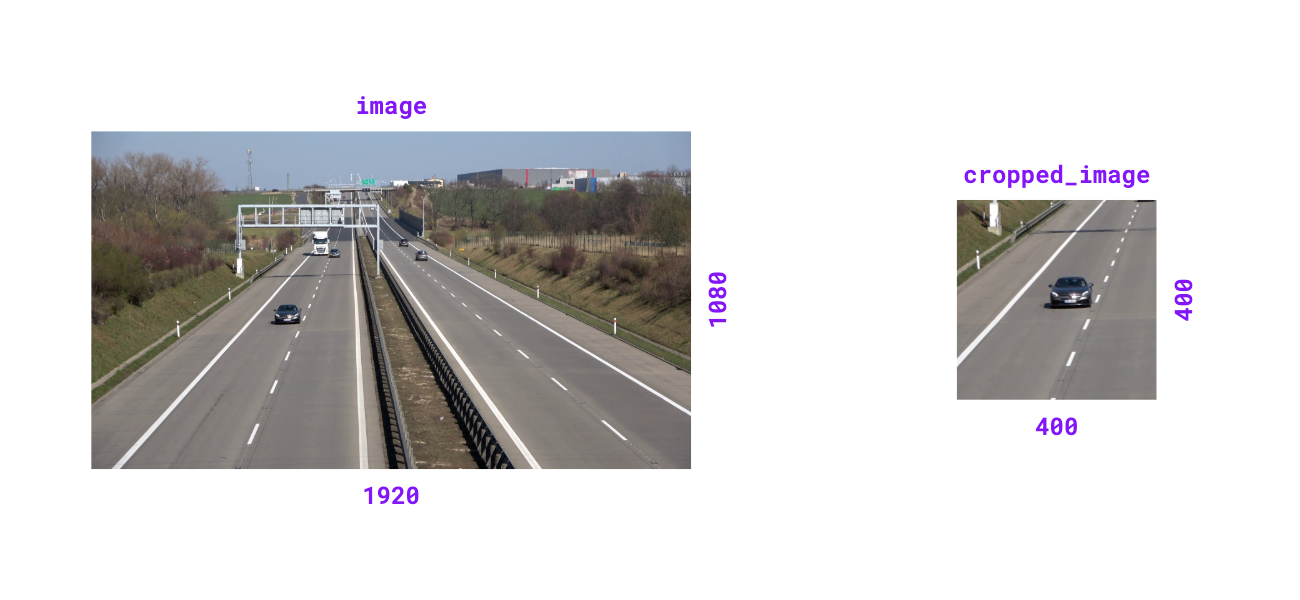
supervision.utils.image.crop_image(image, xyxy)

Crop image based on bounding box coordinates.
Parameters:
| Name | Type | Description | Default |
|---|---|---|---|
|
`numpy.ndarray` or `PIL.Image.Image`
|
The image to crop. |
required |
|
`numpy.array`, `list[int]`, or `tuple[int, int, int, int]`
|
Bounding box coordinates in |
required |
Returns:
| Type | Description |
|---|---|
`numpy.ndarray` or `PIL.Image.Image`
|
Cropped image matching input type. |
Examples:
import cv2
import supervision as sv

image = cv2.imread("source.png")
image.shape
# (1080, 1920, 3)

xyxy = (400, 400, 800, 800)
cropped_image = sv.crop_image(image=image, xyxy=xyxy)
cropped_image.shape
# (400, 400, 3)
from PIL import Image
import supervision as sv

image = Image.open("source.png")
image.size
# (1920, 1080)

xyxy = (400, 400, 800, 800)
cropped_image = sv.crop_image(image=image, xyxy=xyxy)
cropped_image.size
# (400, 400)
Source code in supervision/utils/image.py
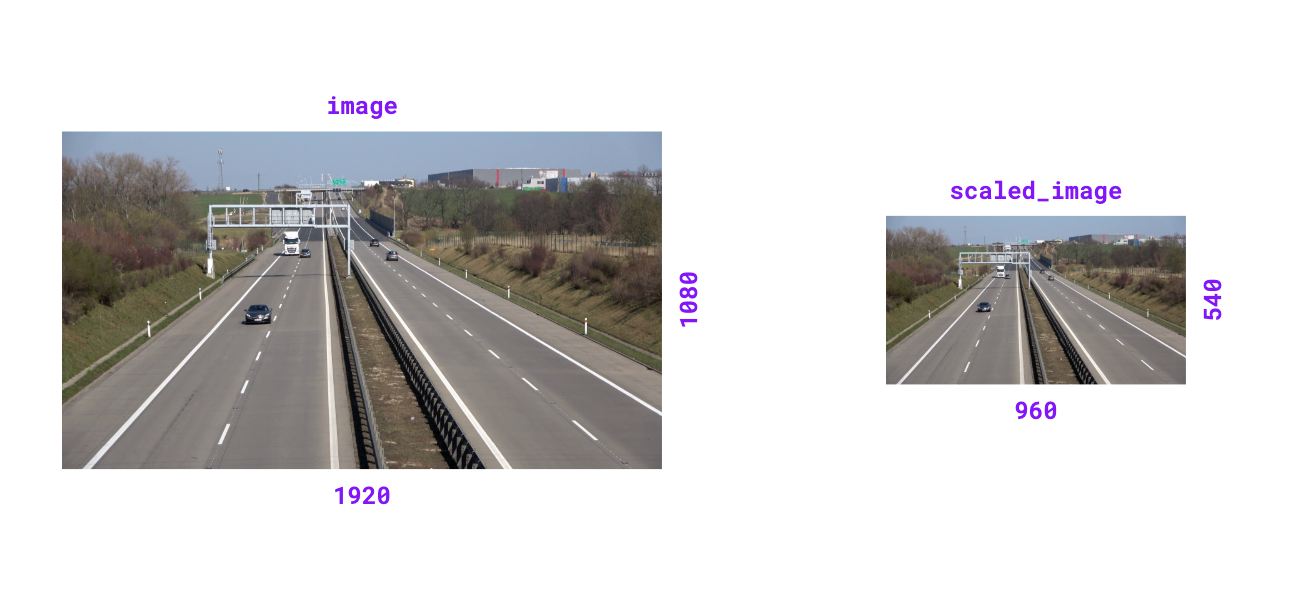
supervision.utils.image.scale_image(image, scale_factor)

Scale image by given factor. Scale factor > 1.0 zooms in, < 1.0 zooms out.
Parameters:
| Name | Type | Description | Default |
|---|---|---|---|
|
`numpy.ndarray` or `PIL.Image.Image`
|
The image to scale. |
required |
|
`float`
|
Factor by which to scale the image. |
required |
Returns:
| Type | Description |
|---|---|
`numpy.ndarray` or `PIL.Image.Image`
|
Scaled image matching input type. |
Raises:
| Type | Description |
|---|---|
ValueError
|
If scale factor is non-positive. |
Examples:
import cv2
import supervision as sv

image = cv2.imread("source.png")
image.shape
# (1080, 1920, 3)

scaled_image = sv.scale_image(image=image, scale_factor=0.5)
scaled_image.shape
# (540, 960, 3)
from PIL import Image
import supervision as sv

image = Image.open("source.png")
image.size
# (1920, 1080)

scaled_image = sv.scale_image(image=image, scale_factor=0.5)
scaled_image.size
# (960, 540)
Source code in supervision/utils/image.py
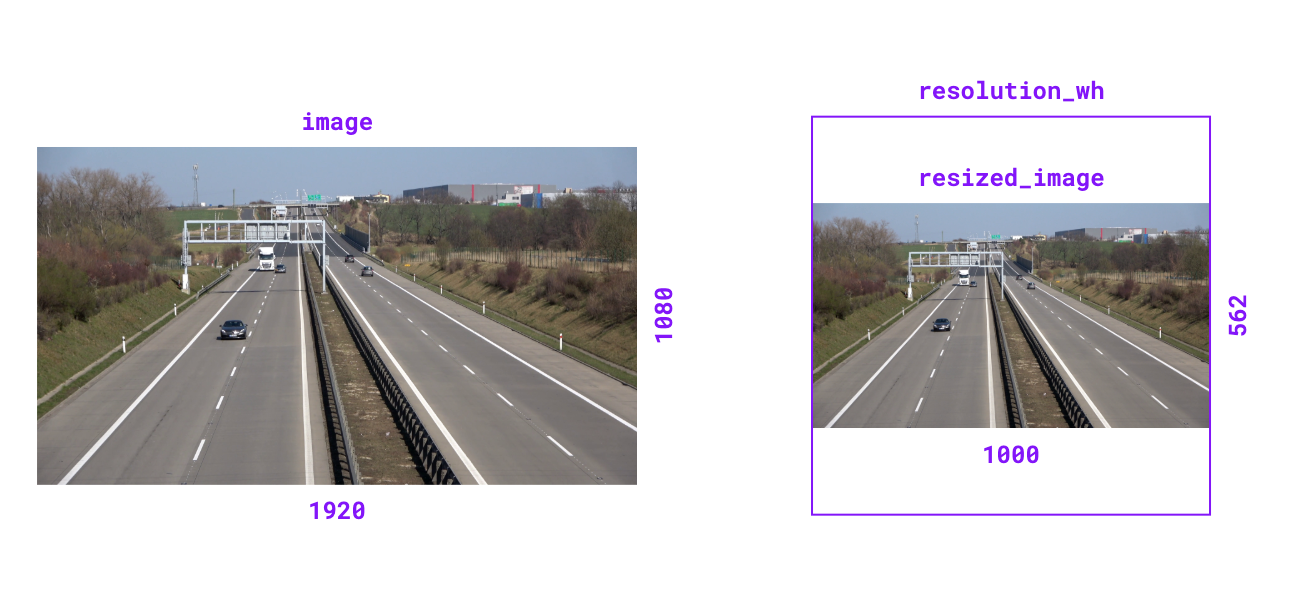
supervision.utils.image.resize_image(image, resolution_wh, keep_aspect_ratio=False)

Resize image to specified resolution. Can optionally maintain aspect ratio.
Parameters:
| Name | Type | Description | Default |
|---|---|---|---|
|
`numpy.ndarray` or `PIL.Image.Image`
|
The image to resize. |
required |
|
`tuple[int, int]`
|
Target resolution as |
required |
|
`bool`
|
Flag to maintain original aspect ratio.
Defaults to |
False
|
Returns:
| Type | Description |
|---|---|
`numpy.ndarray` or `PIL.Image.Image`
|
Resized image matching input type. |
Examples:
import cv2
import supervision as sv

image = cv2.imread("source.png")
image.shape
# (1080, 1920, 3)

resized_image = sv.resize_image(
    image=image, resolution_wh=(1000, 1000), keep_aspect_ratio=True
)
resized_image.shape
# (562, 1000, 3)
from PIL import Image
import supervision as sv

image = Image.open("source.png")
image.size
# (1920, 1080)

resized_image = sv.resize_image(
    image=image, resolution_wh=(1000, 1000), keep_aspect_ratio=True
)
resized_image.size
# (1000, 562)
Source code in supervision/utils/image.py
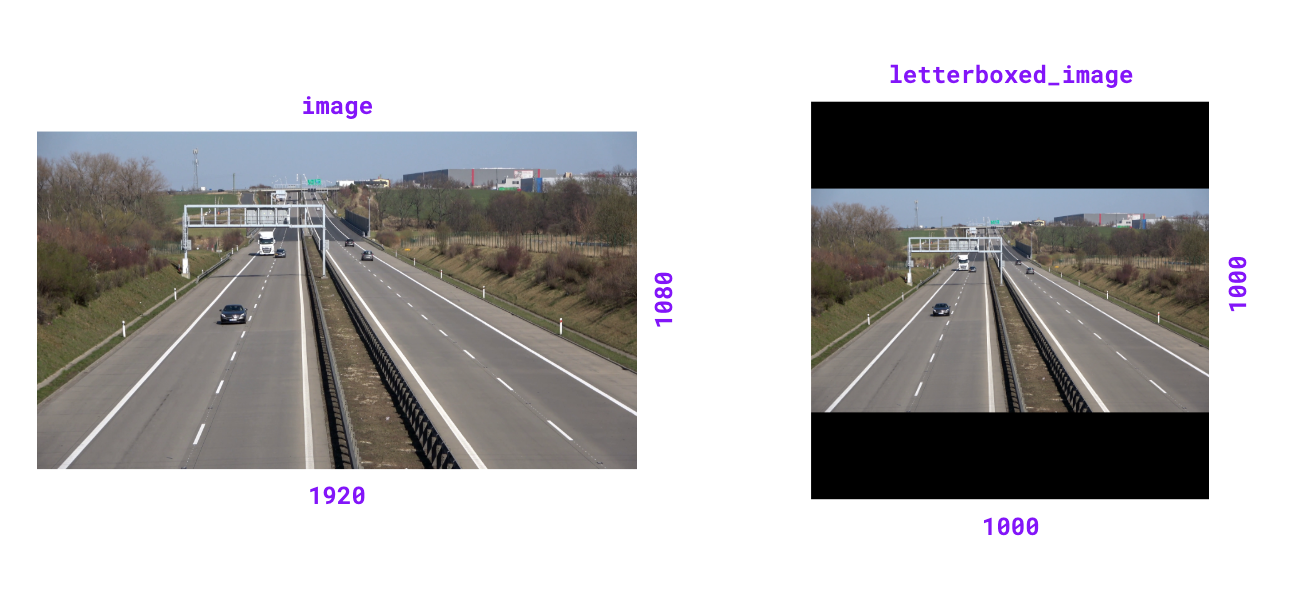
supervision.utils.image.letterbox_image(image, resolution_wh, color=Color.BLACK)

Resize image and pad with color to achieve desired resolution while maintaining aspect ratio.
Parameters:
| Name | Type | Description | Default |
|---|---|---|---|
|
`numpy.ndarray` or `PIL.Image.Image`
|
The image to resize and pad. |
required |
|
`tuple[int, int]`
|
Target resolution as |
required |
|
`tuple[int, int, int]` or `Color`
|
Padding color. If tuple, should
be in BGR format. Defaults to |
BLACK
|
Returns:
| Type | Description |
|---|---|
`numpy.ndarray` or `PIL.Image.Image`
|
Letterboxed image matching input type. |
Examples:
import cv2
import supervision as sv

image = cv2.imread("source.png")
image.shape
# (1080, 1920, 3)

letterboxed_image = sv.letterbox_image(
    image=image, resolution_wh=(1000, 1000)
)
letterboxed_image.shape
# (1000, 1000, 3)
from PIL import Image
import supervision as sv

image = Image.open("source.png")
image.size
# (1920, 1080)

letterboxed_image = sv.letterbox_image(
    image=image, resolution_wh=(1000, 1000)
)
letterboxed_image.size
# (1000, 1000)
Source code in supervision/utils/image.py
218 219 220 221 222 223 224 225 226 227 228 229 230 231 232 233 234 235 236 237 238 239 240 241 242 243 244 245 246 247 248 249 250 251 252 253 254 255 256 257 258 259 260 261 262 263 264 265 266 267 268 269 270 271 272 273 274 275 276 277 278 279 280 281 282 283 284 285 286 287 288 289 290 291 292 293 294 295 296 297 | |
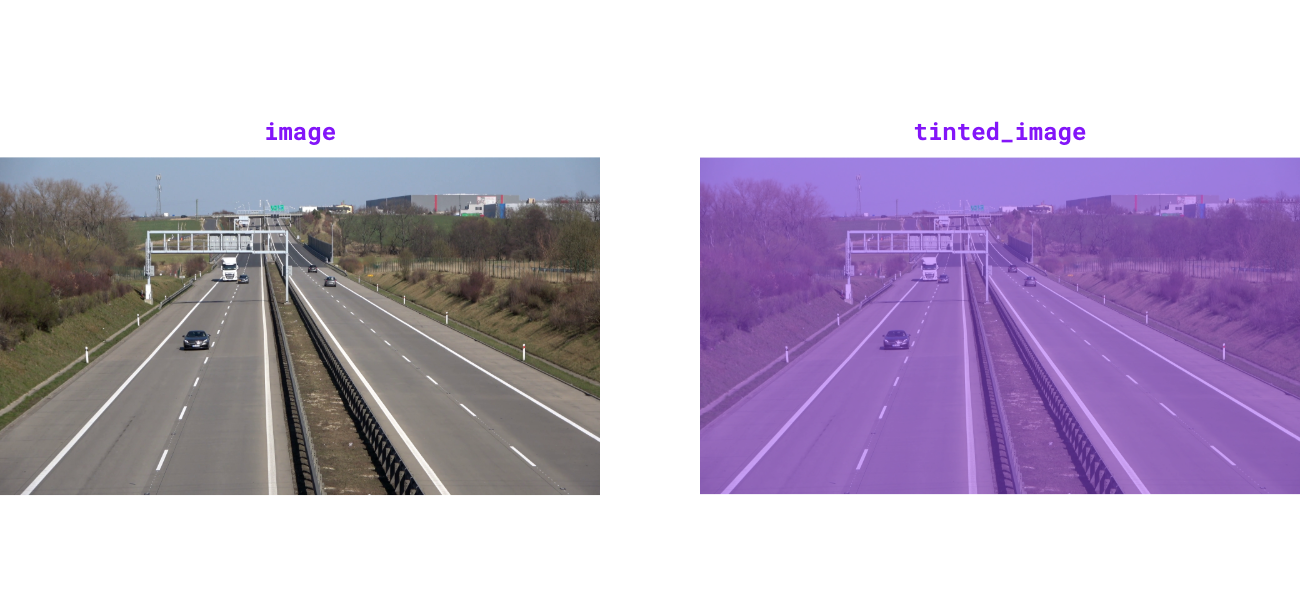
supervision.utils.image.tint_image(image, color=Color.BLACK, opacity=0.5)

Tint image with solid color overlay at specified opacity.
Parameters:
| Name | Type | Description | Default |
|---|---|---|---|
|
`numpy.ndarray` or `PIL.Image.Image`
|
The image to tint. |
required |
|
`Color`
|
Overlay tint color. Defaults to |
BLACK
|
|
`float`
|
Blend ratio between overlay and image (0.0-1.0).
Defaults to |
0.5
|
Returns:
| Type | Description |
|---|---|
`numpy.ndarray` or `PIL.Image.Image`
|
Tinted image matching input type. |
Raises:
| Type | Description |
|---|---|
ValueError
|
If opacity is outside range [0.0, 1.0]. |
Examples:
import cv2
import supervision as sv

image = cv2.imread("source.png")
tinted_image = sv.tint_image(
    image=image, color=sv.Color.ROBOFLOW, opacity=0.5
)
cv2.imwrite("target.png", tinted_image)
from PIL import Image
import supervision as sv

image = Image.open("source.png")
tinted_image = sv.tint_image(
    image=image, color=sv.Color.ROBOFLOW, opacity=0.5
)
tinted_image.save("target.png")
Source code in supervision/utils/image.py
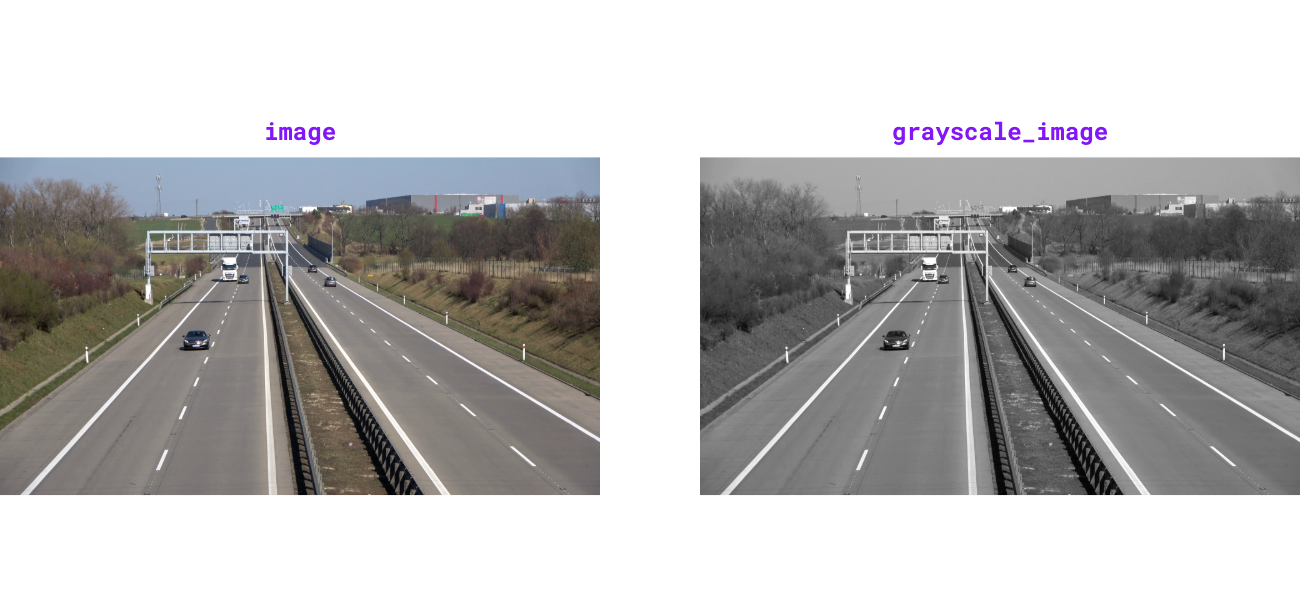
supervision.utils.image.grayscale_image(image)

Convert image to 3-channel grayscale. Luminance channel is broadcast to all three channels for compatibility with color-based drawing helpers.
Parameters:
| Name | Type | Description | Default |
|---|---|---|---|
|
`numpy.ndarray` or `PIL.Image.Image`
|
The image to convert to grayscale. |
required |
Returns:
| Type | Description |
|---|---|
`numpy.ndarray` or `PIL.Image.Image`
|
3-channel grayscale image matching input type. |
Examples:
import cv2
import supervision as sv

image = cv2.imread("source.png")
grayscale_image = sv.grayscale_image(image=image)
cv2.imwrite("target.png", grayscale_image)
from PIL import Image
import supervision as sv

image = Image.open("source.png")
grayscale_image = sv.grayscale_image(image=image)
grayscale_image.save("target.png")
Source code in supervision/utils/image.py
supervision.utils.image.get_image_resolution_wh(image)

Get image width and height as a tuple (width, height) for various image formats.
Supports both numpy.ndarray images (with shape (H, W, ...)) and
PIL.Image.Image inputs.
Parameters:
| Name | Type | Description | Default |
|---|---|---|---|
|
`numpy.ndarray` or `PIL.Image.Image`
|
Input image. |
required |
Returns:
| Type | Description |
|---|---|
`tuple[int, int]`
|
Image resolution as |
Raises:
| Type | Description |
|---|---|
ValueError
|
If a |
TypeError
|
If |
Examples:
import cv2
import supervision as sv

image = cv2.imread("example.png")
sv.get_image_resolution_wh(image)
# (1920, 1080)
from PIL import Image
import supervision as sv

image = Image.open("example.png")
sv.get_image_resolution_wh(image)
# (1920, 1080)
Source code in supervision/utils/image.py
supervision.utils.image.ImageSink

Source code in supervision/utils/image.py
544 545 546 547 548 549 550 551 552 553 554 555 556 557 558 559 560 561 562 563 564 565 566 567 568 569 570 571 572 573 574 575 576 577 578 579 580 581 582 583 584 585 586 587 588 589 590 591 592 593 594 595 596 597 598 599 600 601 602 603 604 605 606 607 608 609 610 611 612 613 614 615 616 617 618 619 620 621 622 623 624 625 626 627 628 629 630 631 632 633 634 635 636 637 638 639 640 641 642 643 644 | |
Functions
__init__(target_dir_path, overwrite=False, image_name_pattern='image_{:05d}.png')

Initialize context manager for saving images to directory.
Parameters:
| Name | Type | Description | Default |
|---|---|---|---|
|
`str`
|
Target directory path where images will be saved. |
required |
|
`bool`
|
Whether to overwrite existing directory.
Defaults to |
False
|
|
`str`
|
File name pattern for saved images.
Defaults to |
'image_{:05d}.png'
|
Examples:
import supervision as sv

frames_generator = sv.get_video_frames_generator(
    "source.mp4", stride=2
)

with sv.ImageSink(target_dir_path="output_frames") as sink:
    for image in frames_generator:
        sink.save_image(image=image)

# Directory structure:
# output_frames/
# ├── image_00000.png
# ├── image_00001.png
# ├── image_00002.png
# └── image_00003.png
import cv2
import supervision as sv

image = cv2.imread("source.png")
crop_boxes = [
    (  0,   0, 400, 400),
    (400,   0, 800, 400),
    (  0, 400, 400, 800),
    (400, 400, 800, 800)
]

with sv.ImageSink(
    target_dir_path="image_crops",
    overwrite=True
) as sink:
    for i, xyxy in enumerate(crop_boxes):
        crop = sv.crop_image(image=image, xyxy=xyxy)
        sink.save_image(image=crop, image_name=f"crop_{i}.png")

# Directory structure:
# image_crops/
# ├── crop_0.png
# ├── crop_1.png
# ├── crop_2.png
# └── crop_3.png
Source code in supervision/utils/image.py
save_image(image, image_name=None)

Save image to target directory with optional custom filename.
Parameters:
| Name | Type | Description | Default |
|---|---|---|---|
|
`numpy.array`
|
Image to save with shape |
required |
|
`str` or `None`
|
Custom filename for saved image. If
|
None
|