Understand Visitors with YOLO-World




Click the Open in Colab button to run the cookbook on Google Colab.
Understanding visitor behavior in malls, stores, and events is key to improving services and customer experience. With YOLO-World, we can now instantly identify specific visitor traits, like clothing colors or behaviors, without needing pre-trained data. This flexibility allows for tailored insights, enhancing how we manage and engage with visitors in any physical space.
Before you start
Let's make sure that we have access to GPU. We can use nvidia-smi command to do that. In case of any problems navigate to Edit -> Notebook settings -> Hardware accelerator, set it to GPU, and then click Save.
!nvidia-smi
Fri Feb 16 22:18:58 2024
+---------------------------------------------------------------------------------------+
| NVIDIA-SMI 535.154.05             Driver Version: 535.154.05   CUDA Version: 12.2     |
|-----------------------------------------+----------------------+----------------------+
| GPU  Name                 Persistence-M | Bus-Id        Disp.A | Volatile Uncorr. ECC |
| Fan  Temp   Perf          Pwr:Usage/Cap |         Memory-Usage | GPU-Util  Compute M. |
|                                         |                      |               MIG M. |
|=========================================+======================+======================|
|   0  NVIDIA GeForce RTX 4070 Ti     Off | 00000000:01:00.0  On |                  N/A |
|  0%   35C    P8              10W / 285W |    789MiB / 12282MiB |     37%      Default |
|                                         |                      |                  N/A |
+-----------------------------------------+----------------------+----------------------+

+---------------------------------------------------------------------------------------+
| Processes:                                                                            |
|  GPU   GI   CI        PID   Type   Process name                            GPU Memory |
|        ID   ID                                                             Usage      |
|=======================================================================================|
|    0   N/A  N/A      1385      G   /usr/lib/xorg/Xorg                          235MiB |
|    0   N/A  N/A      1665      G   /usr/bin/gnome-shell                        127MiB |
|    0   N/A  N/A      3005      G   ...seed-version=20240209-130055.018000       56MiB |
|    0   N/A  N/A      5673      G   ...yOnDemand --variations-seed-version       55MiB |
|    0   N/A  N/A     92076      G   ...sion,SpareRendererForSitePerProcess      188MiB |
|    0   N/A  N/A     92574      G   ...erProcess --variations-seed-version      108MiB |
+---------------------------------------------------------------------------------------+
NOTE: To make it easier for us to manage datasets, images and models we create a HOME constant.
import os
HOME = os.getcwd()
print(HOME)
/home/adonai/Documents/supervision/docs/notebooks
Install required packages
In this guide, we utilize two Python packages: inference, for executing zero-shot object detection using YOLO-World, and supervision, for post-processing and visualizing the detected objects.
!pip install -q inference-gpu[yolo-world]==0.9.12rc1
[notice] A new release of pip is available: 23.3.2 -> 24.0
[notice] To update, run: pip install --upgrade pip
!pip install -q supervision==0.19.0rc3
[notice] A new release of pip is available: 23.3.2 -> 24.0
[notice] To update, run: pip install --upgrade pip
Imports
import cv2
import supervision as sv

from tqdm import tqdm
from inference.models.yolo_world.yolo_world import YOLOWorld
[02/16/24 22:24:10] WARNING  Your inference package version 0.9.12rc1 is out of date! Please upgrade __init__.py:35
                             to version 0.9.13 of inference for the latest features and bug fixes by
                             running `pip install --upgrade inference`.
Download example data
!wget -P {HOME} -q https://storage.googleapis.com/adonaivera_certified/test.jpeg
!wget -P {HOME} -q https://storage.googleapis.com/adonaivera_certified/test_demo1.mp4
SOURCE_IMAGE_PATH = f"{HOME}/test.jpeg"
SOURCE_VIDEO_PATH = f"{HOME}/test_demo1.mp4"
NOTE: If you want to run the cookbook using your own file as input, simply upload video to Google Colab and replace SOURCE_IMAGE_PATH and SOURCE_VIDEO_PATH with the path to your file.
Run Object Detection
The Inference package provides the YOLO-World model in three versions: S, M, and L. You can load them by defining model_id as yolo_world/s, yolo_world/m, and yolo_world/l, respectively. The ROBOFLOW_API_KEY is not required to utilize this model.
model = YOLOWorld(model_id="yolo_world/l")
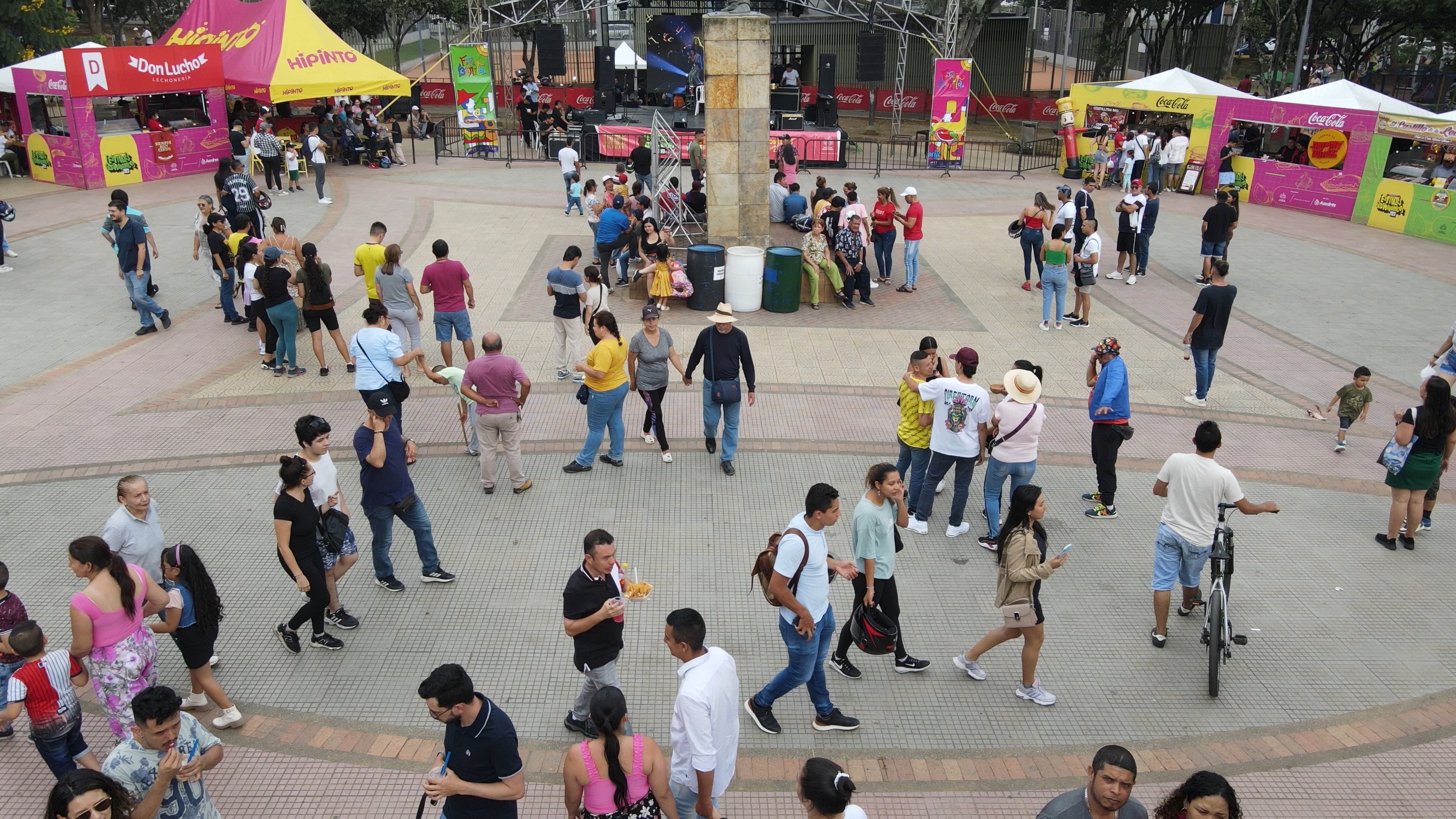
YOLO-World is a zero-shot model, enabling object detection without any training. You only need to define a prompt as a list of classes (things) you are searching for.
classes = ["person"]
model.set_classes(classes)
We perform detection on our sample image. Then, we convert the result into a sv.Detections object, which will be useful in the later parts of the cookbook.
image = cv2.imread(SOURCE_IMAGE_PATH)
results = model.infer(image, confidence=0.003)
detections = sv.Detections.from_inference(results).with_nms(threshold=0.1)
The results we've obtained can be easily visualized with sv.BoundingBoxAnnotator and sv.LabelAnnotator. We can adjust parameters such as line thickness, text scale, line and text color allowing for a highly tailored visualization experience.
BOUNDING_BOX_ANNOTATOR = sv.BoundingBoxAnnotator(thickness=2)
LABEL_ANNOTATOR = sv.LabelAnnotator(text_thickness=2, text_scale=1, text_color=sv.Color.BLACK)
By default, sv.LabelAnnotator displays only the names of objects. To also view the confidence levels associated with each detection, we must define custom labels and pass them to sv.LabelAnnotator.
labels = [
    f"{classes[class_id]} {confidence:0.3f}"
    for class_id, confidence
    in zip(detections.class_id, detections.confidence)
]

annotated_image = image.copy()
annotated_image = BOUNDING_BOX_ANNOTATOR.annotate(annotated_image, detections)
annotated_image = LABEL_ANNOTATOR.annotate(annotated_image, detections, labels=labels)
sv.plot_image(annotated_image, (10, 10))

Make Special Search
Imagine you're the marketing director of a leading retail chain, tasked with decoding the behavior of your visitors. Picture one of your flagship stores in the mall, renowned for its exquisite collection of hats and backpacks. You're curious about the number of event attendees sporting hats and backpacks. Enter YOLO-World, a tool that simplifies this task, requiring no prior training. With YOLO-World, you can effortlessly gauge customer preferences and trends, enabling you to tailor your marketing strategies and inventory to better meet your customers' needs.
classes = ["person", "backpack", "persons with backpack", "persons with hats", "hats"]
model.set_classes(classes)
image = cv2.imread(SOURCE_IMAGE_PATH)
results = model.infer(image, confidence=0.003)
detections = sv.Detections.from_inference(results).with_nms(threshold=0.1)

BOUNDING_BOX_ANNOTATOR = sv.BoundingBoxAnnotator(thickness=2)
LABEL_ANNOTATOR = sv.LabelAnnotator(text_thickness=2, text_scale=1, text_color=sv.Color.BLACK)

labels = [
    f"{classes[class_id]} {confidence:0.3f}"
    for class_id, confidence
    in zip(detections.class_id, detections.confidence)
]

annotated_image = image.copy()
annotated_image = BOUNDING_BOX_ANNOTATOR.annotate(annotated_image, detections)
annotated_image = LABEL_ANNOTATOR.annotate(annotated_image, detections)
sv.plot_image(annotated_image, (10, 10))

Saving Detections
Now, at the end of the day would you like to see the final results and show to your supervisor all the metrics, but for that you need to save each of the prediction and after that you can create reports with the data.
We can use sv.CSVSink to save predictions. CSVSink allow to pass custom data alongside the detection fields, providing flexibility for logging various types of information.
csv_sink = sv.CSVSink('detections.csv')
csv_sink.open()

image = cv2.imread(SOURCE_IMAGE_PATH)
results = model.infer(image, confidence=0.003)
detections = sv.Detections.from_inference(results).with_nms(threshold=0.1)

BOUNDING_BOX_ANNOTATOR = sv.BoundingBoxAnnotator(thickness=2)
LABEL_ANNOTATOR = sv.LabelAnnotator(text_thickness=2, text_scale=1, text_color=sv.Color.BLACK)

labels = [
    f"{classes[class_id]} {confidence:0.3f}"
    for class_id, confidence
    in zip(detections.class_id, detections.confidence)
]
annotated_image = image.copy()
annotated_image = BOUNDING_BOX_ANNOTATOR.annotate(annotated_image, detections)
annotated_image = LABEL_ANNOTATOR.annotate(annotated_image, detections)
csv_sink.append(detections, custom_data={'name_campaign': "hat and backpack"})

csv_sink.close()
Display the results
import pandas as pd
df = pd.read_csv('detections.csv')
df
| x_min | y_min | x_max | y_max | class_id | confidence | tracker_id | class_name | name_campaign | |
|---|---|---|---|---|---|---|---|---|---|
| 0 | 1259.824402 | 556.843323 | 1397.988586 | 880.115173 | 0 | 0.922177 | NaN | person | hat and backpack |
| 1 | 1907.605164 | 1374.541077 | 2123.481262 | 1511.999939 | 0 | 0.920088 | NaN | person | hat and backpack |
| 2 | 185.341125 | 1263.053284 | 414.481201 | 1511.509705 | 0 | 0.917237 | NaN | person | hat and backpack |
| 3 | 1758.057983 | 890.935486 | 1977.167114 | 1305.461975 | 0 | 0.914720 | NaN | person | hat and backpack |
| 4 | 2120.903442 | 775.296661 | 2363.229370 | 1198.338348 | 0 | 0.913808 | NaN | person | hat and backpack |
| ... | ... | ... | ... | ... | ... | ... | ... | ... | ... |
| 145 | 415.074677 | 164.863037 | 436.987091 | 237.999908 | 0 | 0.011514 | NaN | person | hat and backpack |
| 146 | 543.731293 | 764.712311 | 611.070221 | 820.007904 | 4 | 0.010440 | NaN | hats | hat and backpack |
| 147 | 945.790405 | 124.706638 | 977.625732 | 162.100552 | 3 | 0.010306 | NaN | persons with hats | hat and backpack |
| 148 | 1532.029236 | 999.259613 | 1661.712952 | 1252.837067 | 2 | 0.010227 | NaN | persons with backpack | hat and backpack |
| 149 | 859.790588 | 245.192230 | 890.864807 | 295.042755 | 0 | 0.010188 | NaN | person | hat and backpack |
150 rows × 9 columns
Final Result
Imagine taking it a step further as the marketing director of a premier retail conglomerate, aiming to expand your insights across the entire mall. You're not just analyzing static images anymore; you're delving into the dynamic world of video analysis. With YOLO-World, you can now process continuous video streams, capturing the ebb and flow of visitor behaviors and preferences in real-time. This leap from image to video processing opens up a new dimension of understanding, allowing you to observe trends, track movements, and gather nuanced insights into how visitors interact with different spaces within the mall. This powerful capability empowers you to refine the shopping experience, optimize store layouts, and develop targeted marketing campaigns that resonate with your audience on a whole new level.
TARGET_VIDEO_PATH = f"{HOME}/test_demo_result.mp4"
frame_generator = sv.get_video_frames_generator(SOURCE_VIDEO_PATH)
video_info = sv.VideoInfo.from_video_path(SOURCE_VIDEO_PATH)
csv_sink = sv.CSVSink('detections.csv')


with sv.VideoSink(target_path=TARGET_VIDEO_PATH, video_info=video_info) as sink, csv_sink:
    for frame in tqdm(frame_generator, total=video_info.total_frames):
        results = model.infer(frame, confidence=0.002)
        detections = sv.Detections.from_inference(results).with_nms(threshold=0.1)

        annotated_frame = frame.copy()
        annotated_frame = BOUNDING_BOX_ANNOTATOR.annotate(annotated_frame, detections)
        annotated_frame = LABEL_ANNOTATOR.annotate(annotated_frame, detections)
        sink.write_frame(annotated_frame)
        csv_sink.append(detections, custom_data={'name_campaign': "hat and backpack"})
87%|████████▋ | 173/199 [00:16<00:02, 10.77it/s]
Keep in mind that the video preview below works only in the web version of the cookbooks and not in Google Colab.